Cloud Storage for Universities and Schools — Manage Research Data, Course Materials, and Campus Files with RcloneView
A typical university runs Google Workspace for students, OneDrive for staff, AWS for research computing, and a local NAS for department files. Managing data across all of these is a daily challenge for IT teams.
Higher education institutions generate and consume vast amounts of data: research datasets, course materials, student work, administrative documents, and media archives. Most campuses run multiple cloud platforms simultaneously — often with no unified way to manage them. RcloneView bridges all of these into a single interface.

Manage & Sync All Clouds in One Place
RcloneView is a cross-platform GUI for rclone. Compare folders, transfer or sync files, and automate multi-cloud workflows with a clean, visual interface.
- One-click jobs: Copy · Sync · Compare
- Schedulers & history for reliable automation
- Works with Google Drive, OneDrive, Dropbox, S3, WebDAV, SFTP and more
Free core features. Plus automations available.
The University Cloud Storage Challenge
Multiple platforms are the norm
| User Group | Primary Storage | Typical Size |
|---|---|---|
| Students | Google Drive (Workspace for Education) | 15 GB–unlimited per student |
| Faculty/Staff | OneDrive for Business (Microsoft 365) | 1 TB per user |
| Researchers | AWS S3, Google Cloud, HPC storage | TBs–PBs per lab |
| IT/Admin | On-premise NAS, SharePoint | Varies |
| Media/Library | Specialized archives, S3 | TBs of digitized content |
Common pain points
- No single view — IT admins manage 3–5 different cloud consoles.
- Data silos — Research data on S3 isn't accessible to collaborators on Google Drive.
- Graduation data — When students leave, their Google Drive data needs to be archived or transferred.
- Research compliance — Grant-funded research often requires specific data storage and backup procedures.
- Budget pressure — Storage costs across multiple platforms add up quickly.
How RcloneView Helps
1) Unified management console
Connect all campus cloud accounts in RcloneView — Google Workspace, OneDrive, S3, NAS — and manage them from one interface:

2) Research data workflows
Research labs generate massive datasets that need to be:
- Backed up to durable storage (S3, Backblaze B2).
- Shared with collaborators on other platforms.
- Archived when projects complete.
Schedule automated backups from research storage to archive:

3) Student data lifecycle
When students graduate or leave:
- Export their Google Drive data to long-term storage (S3 Glacier).
- Verify the archive is complete with Folder Comparison.
- Free up the Google Workspace license.
This saves license costs while preserving important academic work.
4) Course material distribution
Professors can maintain course materials on their preferred platform and sync to student-accessible storage:
Professor's OneDrive → Google Drive shared folder (students)
5) Department NAS to cloud migration
Many departments run aging NAS hardware. Migrate department data to cloud storage:
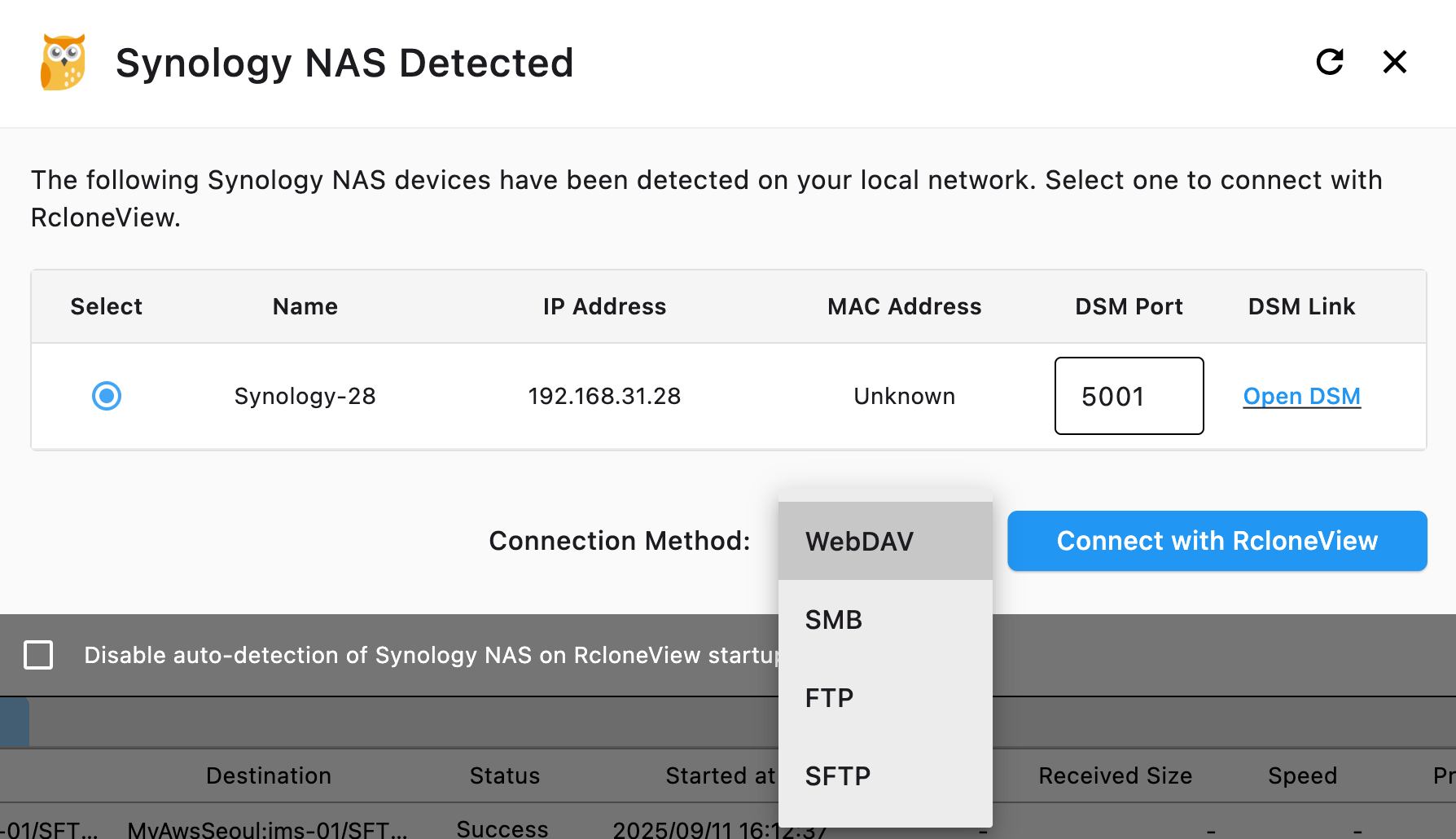
RcloneView auto-detects Synology NAS devices on your network.
Data Compliance and Security
Research data requirements
Many research grants require:
- Data management plans — Documented storage and backup procedures.
- Retention policies — Data kept for 5–10 years after project completion.
- Access controls — Only authorized researchers access sensitive data.
- Encryption — Sensitive data encrypted at rest and in transit.
RcloneView supports client-side encryption via crypt remotes, ensuring data is encrypted before it leaves campus infrastructure.
FERPA considerations
For student education records, FERPA (Family Educational Rights and Privacy Act) requires:
- Controlled access to student data.
- Secure transfer between systems.
- Audit capability for data access.
RcloneView's local-first architecture means student data transfers don't route through third-party servers.
Cost Optimization
Tiered storage strategy
| Data Type | Storage Tier | Monthly Cost |
|---|---|---|
| Active research | S3 Standard | $23/TB |
| Course materials | Google Drive (included) | $0 (Workspace license) |
| Archived research | S3 Glacier | $4/TB |
| Graduated student data | Backblaze B2 | $6/TB |
| Historical archives | S3 Glacier Deep Archive | $1/TB |
Use RcloneView to move data between tiers as its usage pattern changes.
Identify waste
Use Folder Comparison to find duplicate data across platforms:

Batch Jobs for Campus IT
v1.3 Batch Jobs automate multi-step campus operations:
- Sync faculty OneDrive to archive.
- Backup research S3 buckets to B2.
- Compare and verify.
- Send notification to IT team.
Getting Started
- Download RcloneView from rcloneview.com.
- Add all campus cloud accounts — Google Workspace, OneDrive, S3, NAS.
- Set up automated backup jobs for research data.
- Create student data lifecycle workflows.
- Schedule and verify with Folder Comparison.
Universities don't need more cloud consoles. They need one tool that connects them all.
Related Guides:
Supported Cloud Providers





























