Best CloudMounter Alternatives — Cross-Platform Cloud Mount and Sync with RcloneView

CloudMounter is a clean, security-focused way to mount cloud storage as a drive on macOS and Windows — but if you also need Linux support, folder sync, or free write access to object storage, the alternatives are worth a look.
CloudMounter earns loyal users with its Mac-first design and strong client-side encryption for mounted drives. Its scope, though, is deliberately narrow: mounting cloud and FTP/WebDAV locations as drives, without a dedicated sync or scheduling engine, and without a Linux build. This guide compares the strongest CloudMounter alternatives so you can match a tool to how you actually move and manage files.

Manage & Sync All Clouds in One Place
RcloneView is a cross-platform GUI for rclone. Compare folders, transfer or sync files, and automate multi-cloud workflows with a clean, visual interface.
- One-click jobs: Copy · Sync · Compare
- Schedulers & history for reliable automation
- Works with Google Drive, OneDrive, Dropbox, S3, WebDAV, SFTP and more
Free core features. Plus automations available.
Why People Look Beyond CloudMounter
CloudMounter does one job well: it mounts cloud, FTP, and WebDAV locations as local drives, and its Mac free version and client-side AES-256 encryption are genuine strengths worth acknowledging. As of June 2026, it runs on macOS and Windows only — there's no Linux build — and it has no dedicated sync or scheduler for keeping two locations in step over time. Pricing is a per-Mac annual license (roughly $29.99/yr for Personal, $99.99 for a 5-device Team plan, as of June 2026), with a lifetime option also available. For anyone who mounts on Linux, needs recurring sync jobs, or wants to write to S3-compatible storage without extra tooling, those constraints start to matter.

What to Look For in an Alternative
Three questions narrow the field quickly: Does the tool run on every OS you actually use, including Linux? Does it sync and verify files, or only mount them as a drive? And can it write to S3-compatible object storage — Amazon S3, Azure, Backblaze B2 — without paying more or adding a second app?
RcloneView — Mount and Sync, Free, on Every OS
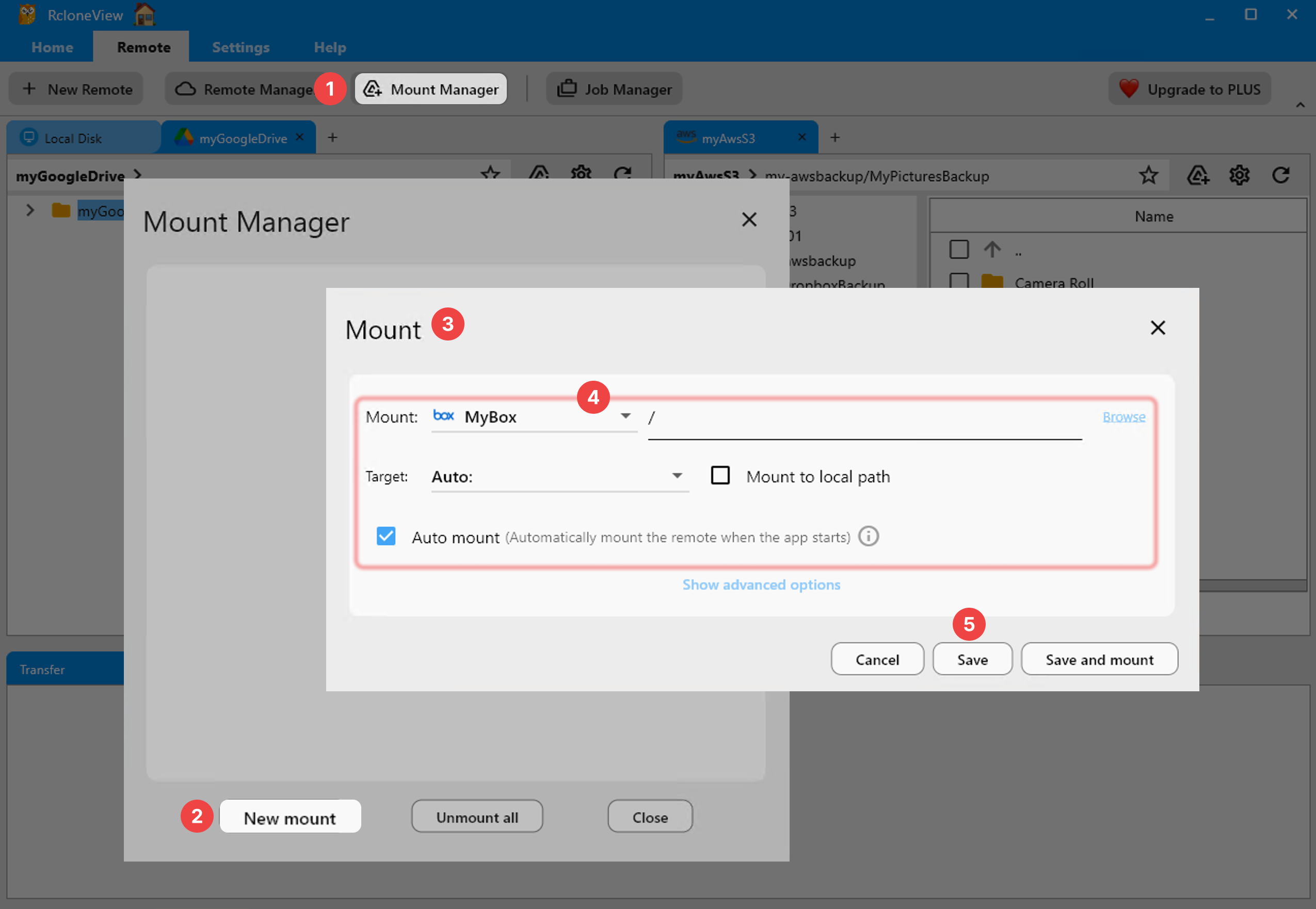
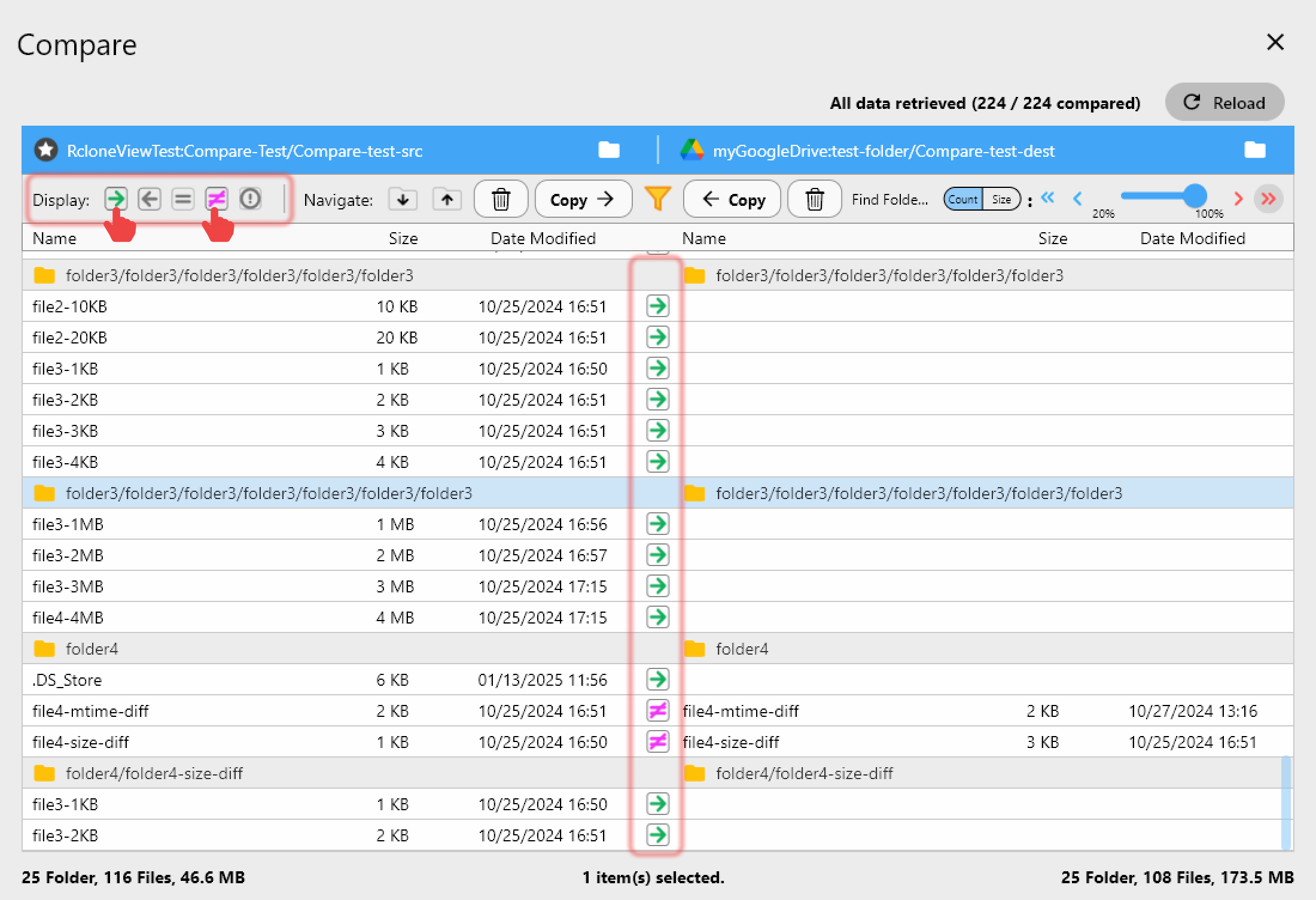
RcloneView is a GUI built on rclone that runs on Windows, macOS, and Linux. It mounts cloud storage as a local or virtual drive and adds one-way sync plus folder compare — on the FREE license. It connects 90+ providers, and read/write access to Amazon S3, Azure, and Backblaze B2 is available for free, with no ads shown. Its multi-panel Explorer can open several accounts of the same provider side by side for comparing or migrating between them. Advanced extras — scheduled sync, multi-window, and batch operations (Beta) — are reserved for the PLUS license, while mounting, syncing, and comparing stay free.
Other Alternatives Worth Knowing
Mountain Duck, from the Cyberduck lineage, is a mature, lightweight mounting app for macOS and Windows with deep protocol support, sold as a paid one-time license per major version. ExpanDrive runs on Windows, macOS, and Linux, is now free for personal use, and pairs mounting with a fast multi-threaded engine — a close match on platform breadth, though it stops short of RcloneView's folder compare and 90+ rclone-backed providers. RaiDrive is a strong Windows-only mounter with a broad provider catalog but no macOS app and no sync. Each is a capable mounting tool; the practical difference is that RcloneView combines mounting, sync, and folder compare with 90+ providers across all three operating systems.
Getting Started
- Download RcloneView from rcloneview.com.
- Add your cloud or object storage with New Remote — Google Drive, OneDrive, S3, Azure, Backblaze B2, and more.
- Mount it as a drive, or set up a sync job and preview changes with Dry Run before anything moves.
- Use Folder Compare to confirm both sides match after the transfer.
Pick the tool that fits your platforms and workflow — if you need mount and sync on more than just Mac and Windows, RcloneView covers ground CloudMounter doesn't.
Related Guides:
- RcloneView vs CloudMounter: Multi-Cloud Mounting and File Management Compared
- RcloneView vs Mountain Duck — Cloud Storage Mount and Transfer Comparison
- Best RaiDrive Alternatives — Cross-Platform Cloud Mount and Sync with RcloneView
Supported Cloud Providers





























