Cloud Storage for Healthcare — Secure Medical File Management with RcloneView

Healthcare organizations managing imaging archives, patient records, and clinical backups can use RcloneView to enforce client-side encryption, automate compliant backups, and replicate data across multiple cloud providers from a single desktop application.
Medical data demands a higher standard than the average file sync workflow. A radiology clinic archiving DICOM imaging files, a telehealth platform backing up consultation recordings, or a research hospital distributing datasets to collaborating institutions all face the same challenge: moving large volumes of sensitive data reliably while maintaining strict security controls. RcloneView provides healthcare teams with a GUI built on rclone's battle-tested transfer engine, making it practical to implement encrypted, multi-destination backup pipelines without requiring dedicated cloud infrastructure expertise.

Manage & Sync All Clouds in One Place
RcloneView is a cross-platform GUI for rclone. Compare folders, transfer or sync files, and automate multi-cloud workflows with a clean, visual interface.
- One-click jobs: Copy · Sync · Compare
- Schedulers & history for reliable automation
- Works with Google Drive, OneDrive, Dropbox, S3, WebDAV, SFTP and more
Free core features. Plus automations available.
Encrypting Medical Files Before They Leave Your Network
The most critical step in any healthcare cloud workflow is ensuring data is encrypted before upload — not just encrypted in transit, but encrypted at rest with keys your organization controls. RcloneView supports rclone's Crypt virtual remote, which applies client-side encryption to any existing cloud remote. File names, folder names, and file contents are all encrypted locally before anything reaches the cloud provider.
Setting up a Crypt remote takes only a few minutes: add your storage provider (Amazon S3, Azure Blob, Backblaze B2, OneDrive, or any of the 90+ supported services), then layer a Crypt remote on top of it. Supply a password and optional salt, and RcloneView will encrypt every file before upload. Even if the cloud provider's infrastructure were compromised, the stored blobs are unreadable without your key. This architecture suits organizations that require client-controlled encryption keys as part of their data governance and regulatory obligations.

Automating Backup Pipelines for Patient Records
Consistent, scheduled backups are non-negotiable in healthcare settings. RcloneView's Job Manager supports cron-style scheduling (available with the PLUS license), so backup jobs run automatically without manual intervention — nightly EMR database exports to an encrypted S3 bucket, daily imaging archive syncs, or hourly replication of active clinical data to a secondary provider for redundancy.
Configure each backup job with checksum verification enabled. This compares files by hash rather than modification time alone, catching silent data corruption events that would otherwise go undetected. For large imaging libraries where a radiology department might accumulate terabytes of DICOM files over months, the Dry Run feature lets administrators preview exactly which files will be copied or removed before committing to the operation — reducing the risk of accidental deletion during migrations or storage rebalancing.

Multi-Cloud Redundancy Across Compliant Providers
Healthcare data retention requirements frequently mandate geographic redundancy and provider diversification. RcloneView's 1:N sync capability lets you configure a single source — a local NAS, a shared network folder, or an existing cloud bucket — and mirror it to multiple destinations simultaneously. A clinical operations team might maintain their primary archive on Microsoft OneDrive for Microsoft 365 integration, a secondary encrypted copy on Backblaze B2 for cost-effective cold storage, and a third copy on a self-hosted Nextcloud or MinIO instance for on-premises control.
Managing all three destinations from a single RcloneView interface eliminates the complexity of running and monitoring separate sync processes per provider. The Job History view provides an auditable record of every transfer: timestamp, file count, total size, transfer speed, and success or error status — structured documentation that supports internal compliance reviews and reporting workflows.

Accessing Clinical Files Through Mounted Cloud Drives
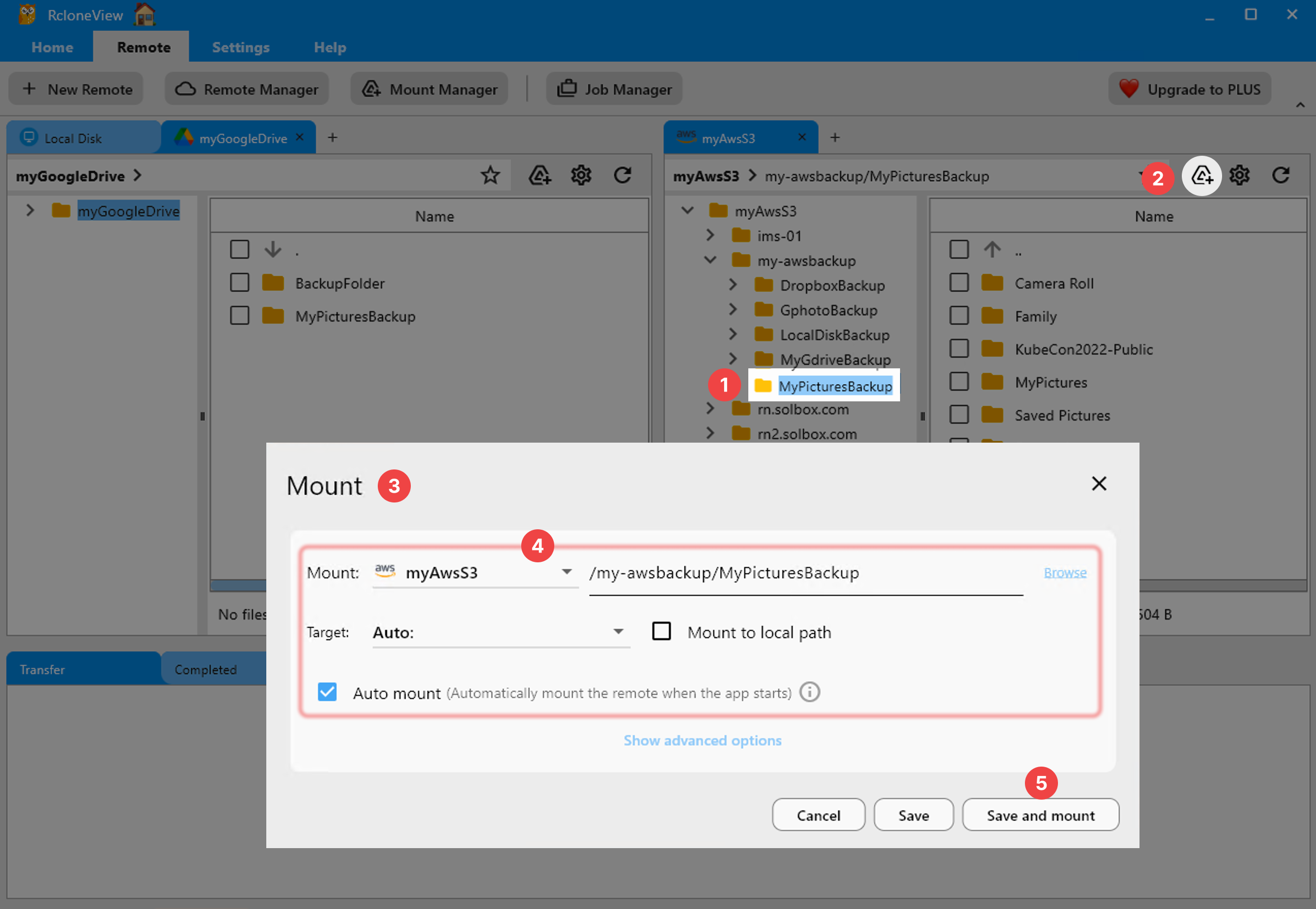
For clinical staff who need to access archived imaging files or shared reference datasets without downloading them locally, RcloneView's Mount Manager creates a virtual drive mapped directly to a cloud bucket. Radiologists can open DICOM viewers that point to a mounted S3 bucket; clinical teams can access shared reference libraries through a familiar drive letter or path without needing to understand the underlying cloud architecture.
Mount configurations support read-only mode for compliance scenarios where archived records must remain tamper-proof, and VFS cache tuning ensures large imaging files buffer efficiently for viewing workflows without saturating local disk space.
Getting Started
- Download RcloneView from rcloneview.com.
- Add your preferred cloud storage provider via Remote > New Remote.
- Create a Crypt virtual remote layered on top of it to enforce client-side encryption.
- Set up scheduled backup jobs in the Job Manager targeting your encrypted remote, with checksum verification enabled.
With RcloneView, healthcare organizations gain a practical, GUI-based path to encrypted, auditable, multi-cloud data management — without building custom scripts or depending on proprietary cloud backup tools with limited provider support.
Related Guides:
- How to Encrypt Cloud Backups — Secure Google Drive, OneDrive, and S3 with RcloneView
- Cloud Storage for Law Firms — Secure Legal File Management with RcloneView
- Multi-Cloud Backup Strategy with RcloneView
Supported Cloud Providers





























