RcloneView vs Air Explorer — Multi-Cloud File Manager Comparison
Both tools let you manage multiple cloud accounts from one interface. But they differ in provider support, transfer methods, pricing, and advanced features. Here's how they stack up.
Air Explorer is a popular multi-cloud file manager for Windows and macOS. It provides a dual-pane interface for browsing and transferring files between cloud accounts. RcloneView offers a similar experience but with a different underlying architecture (powered by rclone) and broader provider support. Choosing between them depends on your specific workflow needs.

Manage & Sync All Clouds in One Place
RcloneView is a cross-platform GUI for rclone. Compare folders, transfer or sync files, and automate multi-cloud workflows with a clean, visual interface.
- One-click jobs: Copy · Sync · Compare
- Schedulers & history for reliable automation
- Works with Google Drive, OneDrive, Dropbox, S3, WebDAV, SFTP and more
Free core features. Plus automations available.
Quick Comparison
| Feature | RcloneView | Air Explorer |
|---|---|---|
| Cloud providers | 70+ | ~30 |
| Cloud-to-cloud transfer | Direct (server-side when possible) | Via local machine |
| Dual-pane explorer | Yes | Yes |
| Job scheduling | Built-in | Built-in |
| Mount as drive | Yes (FUSE) | No |
| Encryption | Crypt remotes (zero-knowledge) | AES encryption |
| Folder comparison | Yes | Basic |
| S3-compatible support | Full (any S3 endpoint) | Limited |
| Self-hosted clouds | SFTP, WebDAV, SMB, Nextcloud | WebDAV |
| Platforms | Windows, macOS, Linux | Windows, macOS |
| Pricing | Free | Free (Pro: ~$42/year) |
Where Air Explorer Excels
Simple, familiar interface
Air Explorer provides a clean, Windows Explorer-like experience. If you work primarily with major consumer clouds (Google Drive, OneDrive, Dropbox), it covers the basics well.
Built-in encryption
Air Explorer Pro includes file encryption for cloud uploads, which is convenient for basic security needs.
Where RcloneView Excels
Provider breadth
RcloneView supports over 70 cloud providers, including S3-compatible storage (Wasabi, Backblaze B2, MinIO, DigitalOcean Spaces), self-hosted options (Nextcloud, Seafile, SFTP), and niche providers. If you work with enterprise or S3-compatible storage, the difference is significant.
Cloud-to-cloud transfers
RcloneView can transfer directly between cloud providers without downloading to your local machine first, saving bandwidth and time:

Mount as local drive
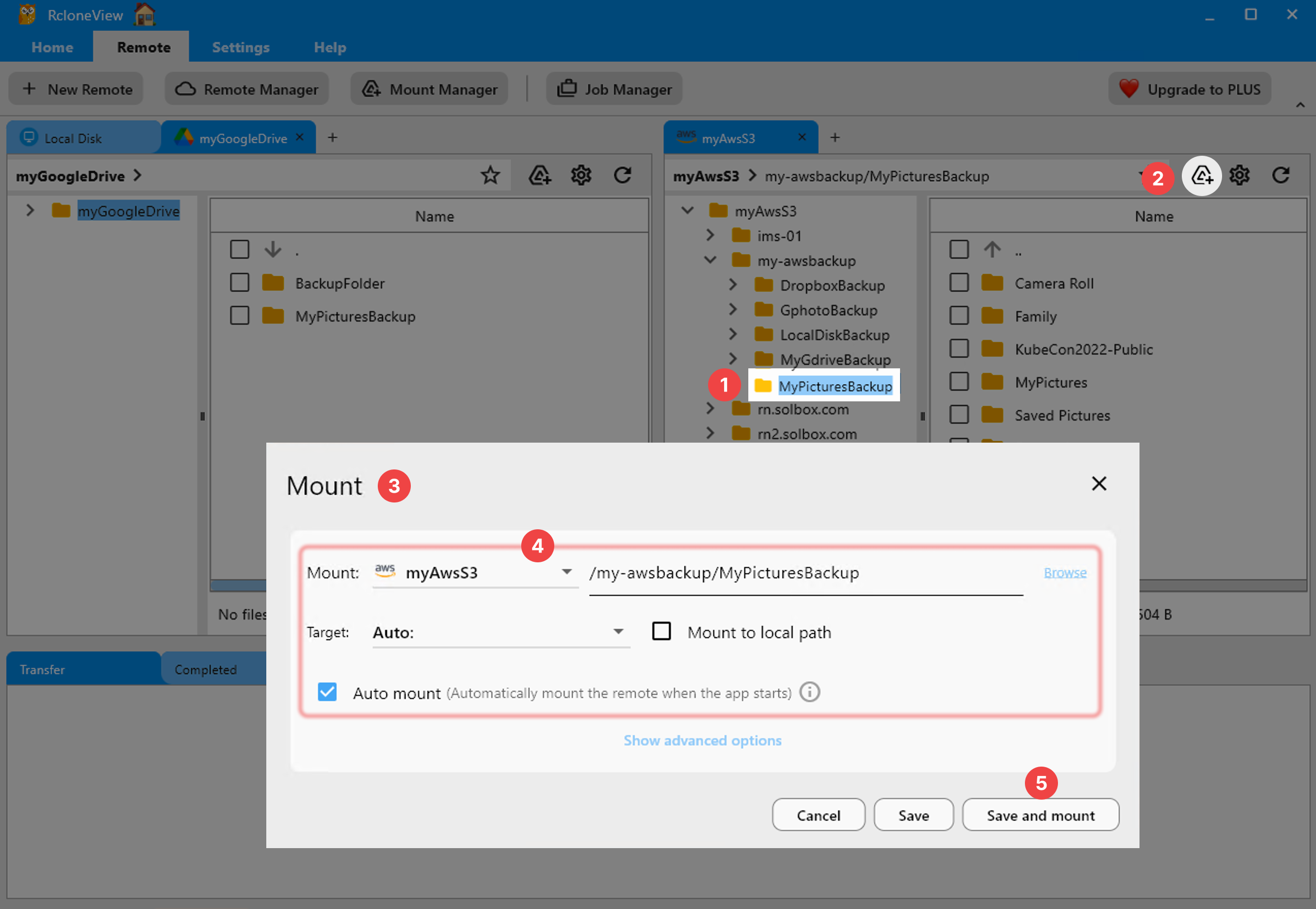
Mount any cloud storage as a local drive on your system. Access cloud files from any application as if they were local:
Advanced verification
Folder Comparison provides detailed difference detection between any two locations — critical for verifying migrations and backups:

Linux support
RcloneView runs on Linux in addition to Windows and macOS. Air Explorer is limited to Windows and macOS.
Zero-knowledge encryption
Crypt remotes provide true zero-knowledge encryption where even the cloud provider cannot read your data.
Use Case Matrix
| Scenario | Best Tool |
|---|---|
| Basic Google Drive + OneDrive management | Either |
| S3-compatible storage management | RcloneView |
| Cloud-to-cloud migration (large scale) | RcloneView |
| Mount cloud as local drive | RcloneView |
| Self-hosted cloud management | RcloneView |
| Simple consumer cloud browsing | Air Explorer |
| Linux workstation | RcloneView |
| Zero-knowledge encrypted backups | RcloneView |
Getting Started with RcloneView
- Download RcloneView from rcloneview.com.
- Add your cloud accounts — all 70+ providers supported.
- Transfer directly between any two providers.
- Mount, sync, and schedule with advanced features.
More providers, more features, same dual-pane simplicity.
Related Guides:
Supported Cloud Providers





























