Best Mountain Duck Alternatives — Cross-Platform Cloud Mount and Sync with RcloneView

Mountain Duck is a mature, lightweight way to mount cloud storage as a drive on macOS and Windows — but if you need Linux support, recurring sync, or a free path to write to S3-compatible storage, it's worth comparing the alternatives first.
Mountain Duck, built by the team behind Cyberduck, mounts cloud and server storage as a local drive with deep protocol support carried over from its Cyberduck lineage — a genuine strength for anyone already comfortable in that ecosystem. As of June 2026, it's sold as a paid one-time license per major version and runs on macOS and Windows only, with no dedicated sync engine for keeping two locations in step over time. This guide compares the strongest Mountain Duck alternatives so you can match a tool to your actual platforms and workflow.

Manage & Sync All Clouds in One Place
RcloneView is a cross-platform GUI for rclone. Compare folders, transfer or sync files, and automate multi-cloud workflows with a clean, visual interface.
- One-click jobs: Copy · Sync · Compare
- Schedulers & history for reliable automation
- Works with Google Drive, OneDrive, Dropbox, S3, WebDAV, SFTP and more
Free core features. Plus automations available.
Why People Look Beyond Mountain Duck
Mountain Duck does one job well: mounting cloud and remote-server locations as local drives, with the same lightweight footprint and broad protocol support Cyberduck users already trust. What it doesn't include is a scheduler or sync engine — moving files means dragging them through the mounted drive rather than running a repeatable job — and there's no Linux build, so a mixed-OS team has to standardize on macOS or Windows to use it consistently. For anyone who also needs Linux support, unattended recurring transfers, or free write access to object storage like Amazon S3 or Backblaze B2, those gaps start to matter.

What to Look For in an Alternative
Three questions narrow the field quickly: Does the tool run on every OS your team actually uses, Linux included? Does it sync and verify files on a schedule, or only present them through a mounted drive? And can it write to S3-compatible object storage without a separate paid tier?
RcloneView — Mount and Sync, Free, on Every OS
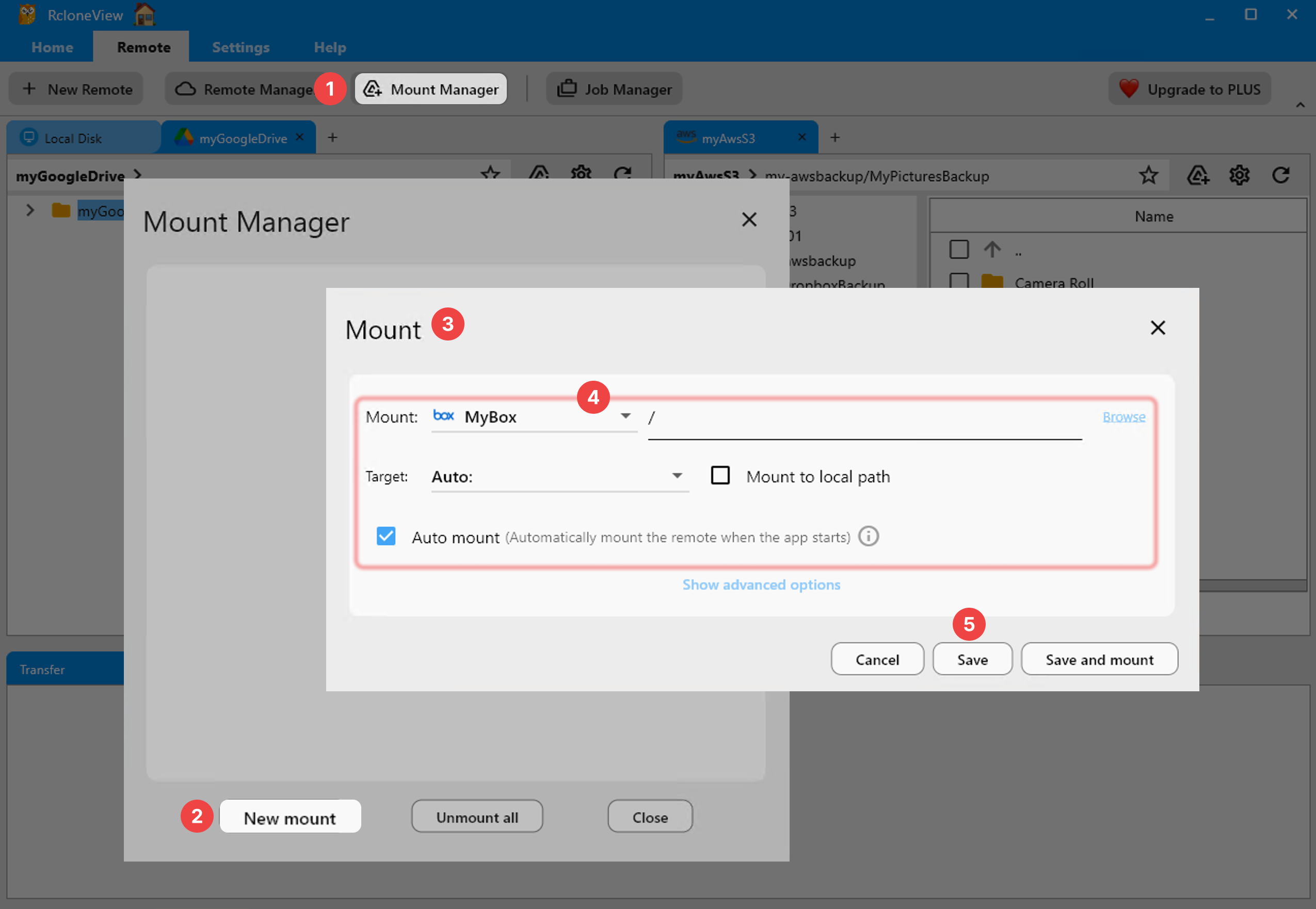
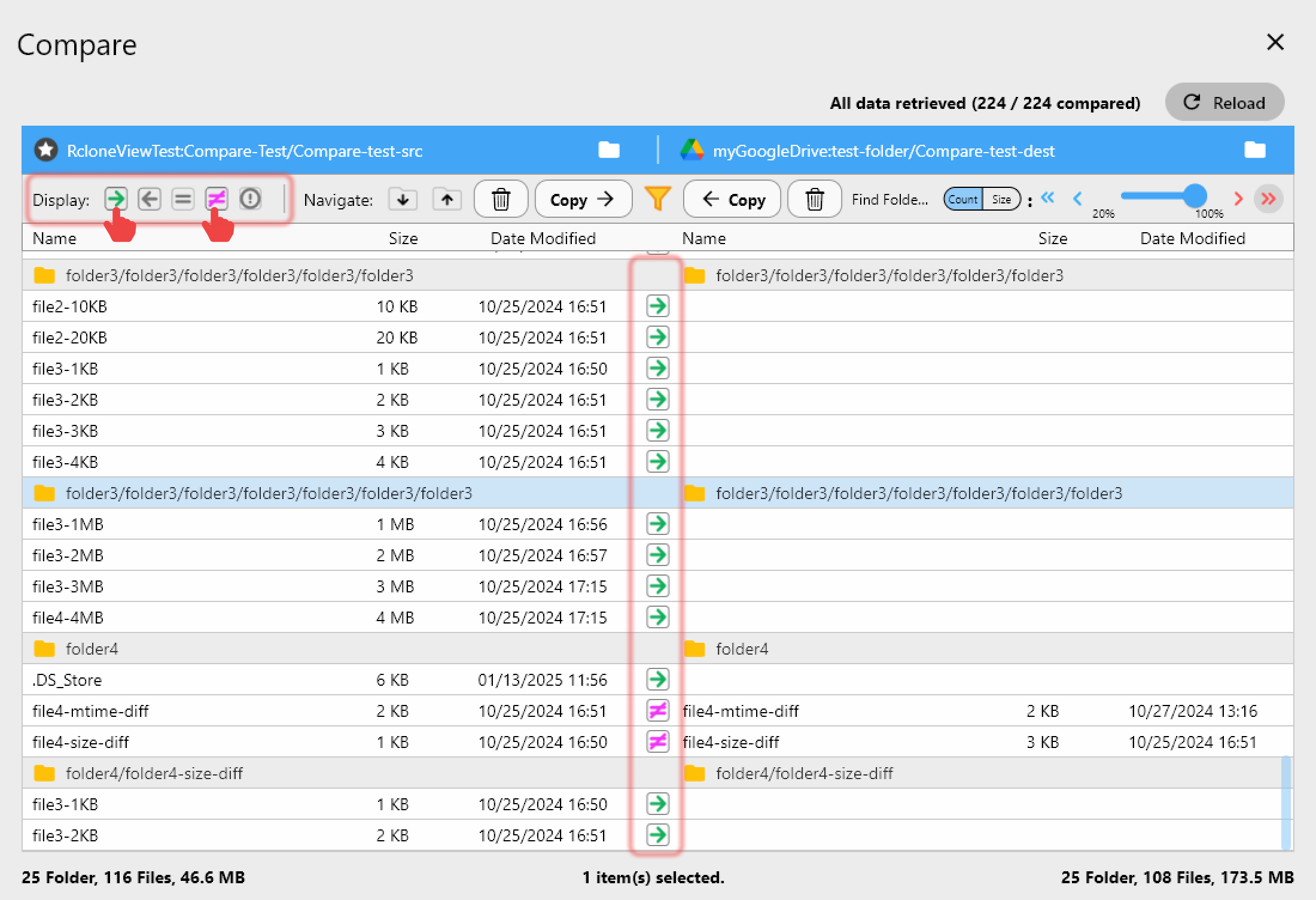
RcloneView is a GUI built on rclone that runs on Windows, macOS, and Linux. Unlike mount-only tools, RcloneView also syncs and compares folders — on the FREE license — so a mounted drive isn't the only way to move files. It connects 90+ providers, and read/write access to Amazon S3, Azure, and Backblaze B2 is available for free, with no ads shown. Its multi-panel Explorer can open several remotes at once for comparing or migrating between them, and a Dry Run previews exactly what a sync will change before anything is written. Scheduled sync, multi-window, and batch operations (Beta) are reserved for the PLUS license, while mounting, syncing, and comparing stay free.
Other Alternatives Worth Knowing
ExpanDrive runs on Windows, macOS, and Linux, and as of June 2026 its personal tier is free, pairing mounting with a fast multi-threaded transfer engine — a close match on platform breadth, though it doesn't include RcloneView's folder compare or its 90+ rclone-backed provider list. CloudMounter focuses on macOS and Windows with strong client-side AES-256 encryption and a clean interface, but has no dedicated sync feature and no Linux build. Each is a solid mounting tool in its own right; the practical difference is that RcloneView pairs mounting with sync, folder compare, and scheduling across all three operating systems from one app.
Getting Started
- Download RcloneView from rcloneview.com.
- Add your cloud or object storage with New Remote — Google Drive, OneDrive, S3, Azure, Backblaze B2, and more.
- Mount it as a drive, or set up a sync job and preview changes with Dry Run before anything moves.
- Use Folder Compare to confirm both sides match after the transfer.
If your workflow needs mounting and recurring sync on more than macOS and Windows, RcloneView covers ground Mountain Duck leaves to a separate tool.
Related Guides:
- RcloneView vs Mountain Duck — Cloud Storage Mount and Transfer Comparison
- Best CloudMounter Alternatives — Cross-Platform Cloud Mount and Sync with RcloneView
- Best RaiDrive Alternatives — Cross-Platform Cloud Mount and Sync with RcloneView
Supported Cloud Providers





























