Cloud Storage for Travel Agencies — Booking Files, Client Media, and Team Sync with RcloneView

Travel agencies juggle thousands of client files, destination assets, and real-time booking updates — RcloneView brings them all under one organized multi-cloud workflow.
A mid-size travel agency coordinating 300 active client itineraries has no tolerance for file loss. Booking confirmations, visa scans, hotel vouchers, and passport copies live across multiple staff members' cloud accounts — Google Drive for the sales team, Dropbox for remote guides, Amazon S3 for long-term archive. Without a reliable sync strategy, a single miscommunication can mean a client misses a flight. RcloneView solves this by managing all those storage accounts from one interface and automating the transfers that keep everything current.

Manage & Sync All Clouds in One Place
RcloneView is a cross-platform GUI for rclone. Compare folders, transfer or sync files, and automate multi-cloud workflows with a clean, visual interface.
- One-click jobs: Copy · Sync · Compare
- Schedulers & history for reliable automation
- Works with Google Drive, OneDrive, Dropbox, S3, WebDAV, SFTP and more
Free core features. Plus automations available.
Centralizing Booking Documents and Client Files
Travel agencies generate a consistent stream of sensitive documents: signed contracts, passport copies, travel insurance certificates, and destination-specific entry requirements. These files typically need to live in two places — an operational folder for the booking team and a long-term archive for compliance. With RcloneView's sync job wizard, you configure a source (the active bookings folder on Google Drive) and two destinations (an archive bucket on Amazon S3 and a backup folder on Dropbox) in a single 1:N sync job. One run replicates the working files to both backup locations without any manual intervention.
The filtering system in RcloneView's sync wizard is particularly useful for travel files. You can set a max file age filter to skip historical itineraries already archived and a custom include rule for .pdf and .docx files only, leaving video files and raw photos for a separate job. This keeps transfer sizes manageable and ensures the right content ends up in the right storage tier.

Backing Up Destination Photography and Marketing Assets
A travel agency's media library is a core revenue asset. A single Caribbean resort campaign may involve 50 GB of RAW photography, drone footage, and branded promotional videos. Losing that library — or discovering it corrupted — can derail an entire marketing cycle. RcloneView handles bulk media transfers with configurable multi-thread settings: the sync wizard allows adjusting concurrent transfer streams and checker counts, significantly reducing the time required to move large batches from a local editing workstation to cloud storage.
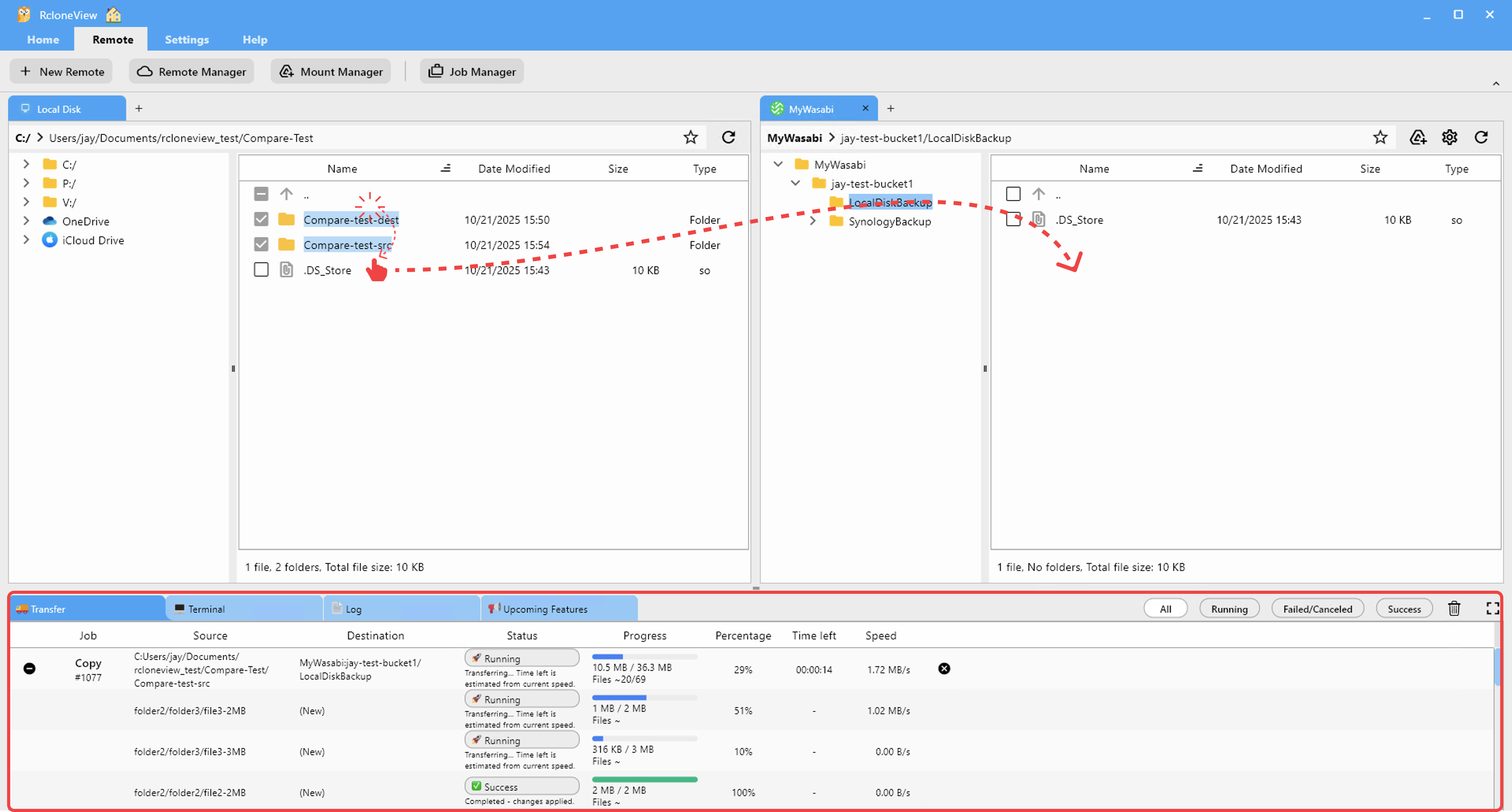
The drag-and-drop interface handles ad-hoc uploads when a photographer returns from a shoot with a full card. Within RcloneView's dual-panel explorer, you drag the folder from the local panel directly to the S3 bucket panel — the app confirms the operation before executing, preventing accidental overwrites of the production library.
Automated Sync for Distributed Teams
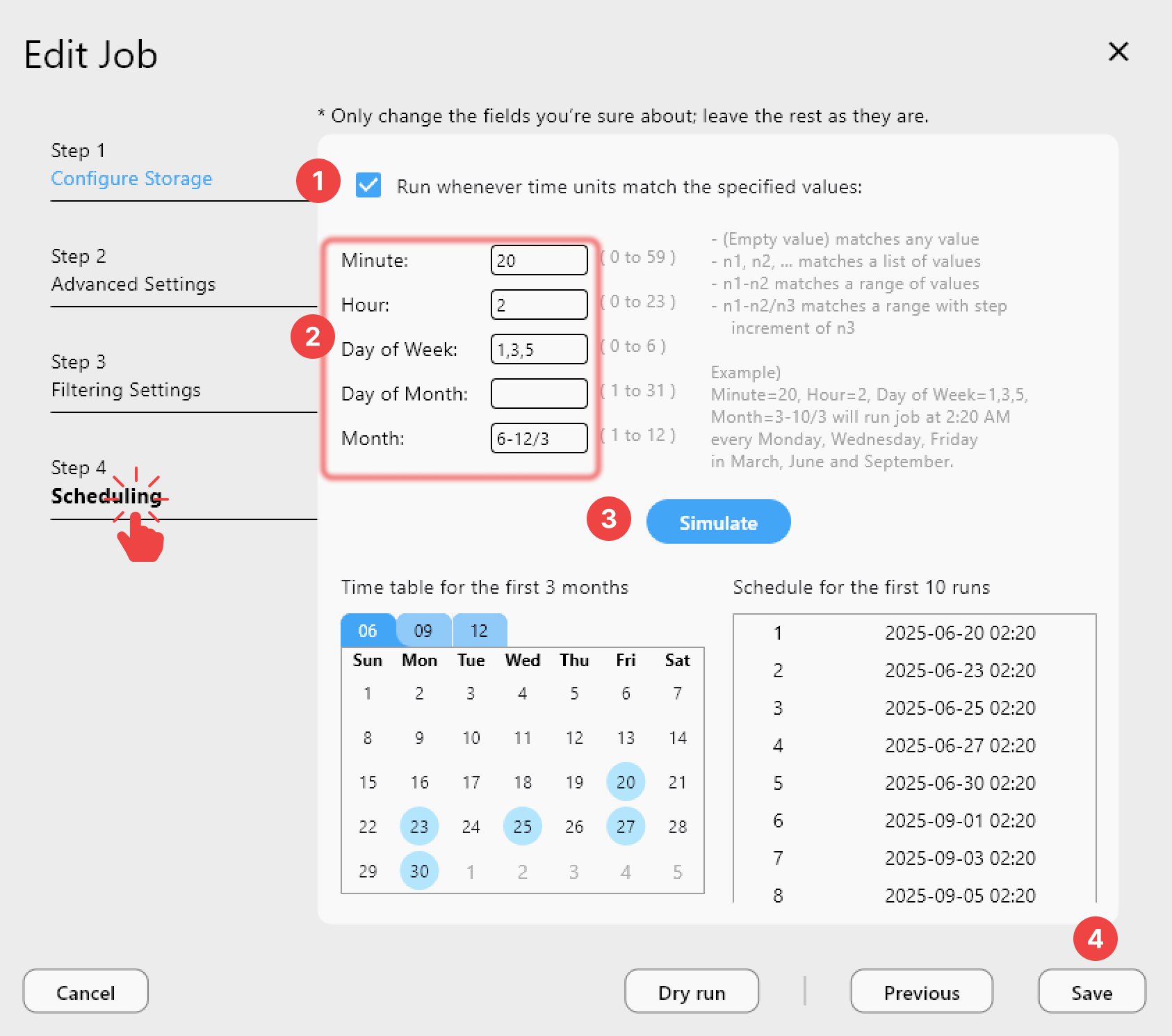
Tour operators, ground transport partners, and hotel booking coordinators often work across time zones. A guide in Thailand updates a client's itinerary at 2 AM local time while the agency's main office is offline. RcloneView's PLUS license enables crontab-style scheduled sync jobs that run at set intervals — for example, every six hours — ensuring that the master itinerary folder on the agency's shared OneDrive stays synchronized with the booking team's Google Drive without anyone having to remember to trigger a transfer.
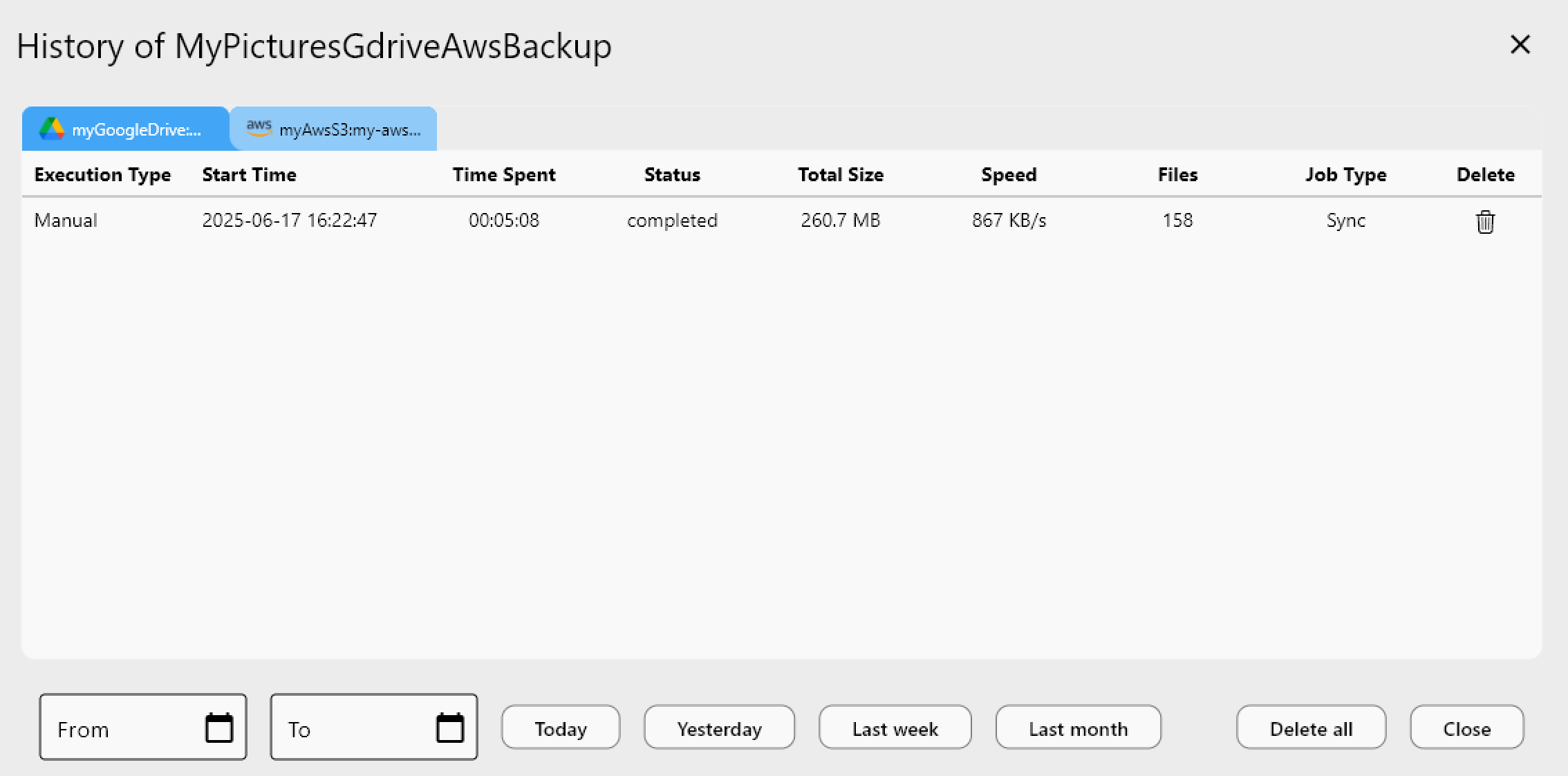
Job history logging gives operations managers a full audit trail: every sync run records start time, duration, file count, transfer size, and success status. When a compliance review requires proving that client documents were archived within 24 hours of booking, those timestamped logs provide the evidence without additional overhead.
Getting Started
- Download RcloneView from rcloneview.com.
- Connect your agency's cloud accounts — Google Drive, Dropbox, OneDrive, and Amazon S3 — via the Remote tab > New Remote wizard.
- Create a 1:N sync job in Job Manager with the active bookings folder as source and your archive destinations as targets.
- Configure a scheduled sync (PLUS license) to run every 6–12 hours, keeping all copies current without manual effort.
With RcloneView handling the file movement, your team focuses on clients — not on which folder the latest itinerary ended up in.
Related Guides:
- Cloud Storage for Hospitality and Hotels
- Automate Daily Cloud Backups with RcloneView
- Sync One Source to Multiple Cloud Destinations
Supported Cloud Providers





























