RcloneView on Void Linux — Cloud Storage Sync and Backup

Run a full graphical multi-cloud manager on Void Linux without waiting for an XBPS package to appear.
Void Linux's rolling-release, independent package base (XBPS, runit) means many GUI apps arrive late or never get packaged at all. RcloneView isn't in the XBPS repositories, but since it ships as a Linux .AppImage, .deb, and .rpm from its own download page, Void users can run it directly without needing a distro-specific build. A desktop environment with X11 or Wayland is required, since RcloneView is a native GUI application, not a headless service.

Manage & Sync All Clouds in One Place
RcloneView is a cross-platform GUI for rclone. Compare folders, transfer or sync files, and automate multi-cloud workflows with a clean, visual interface.
- One-click jobs: Copy · Sync · Compare
- Schedulers & history for reliable automation
- Works with Google Drive, OneDrive, Dropbox, S3, WebDAV, SFTP and more
Free core features. Plus automations available.
Installing RcloneView on Void
The most reliable path on Void is the .AppImage, since it bundles its own runtime and sidesteps XBPS package naming or dependency mismatches entirely. Download the RcloneView-{version}-{arch}.AppImage file for x86_64 or aarch64, mark it executable, and run it directly from your file manager or terminal. Void does not maintain an APT or RPM repository, so if you prefer the .deb or .rpm build instead, you'll need to extract it manually rather than installing through xbps-install. RcloneView is only distributed from rcloneview.com — there is no AUR, Flatpak, or Snap package to fall back on.

Before launching, confirm GTK+3 and either libayatana-appindicator3-1 or libappindicator3-1 are present for system tray support — Void's minimal base doesn't install these by default the way some desktop-focused distros do.
Setting Up Remotes and Mounts
Once RcloneView is running, add your cloud remotes the same way you would on any platform: OAuth login for services like Google Drive or Dropbox, credential entry for S3-compatible or SFTP endpoints. Mounting works through the embedded rclone's nfsmount method on Linux, which requires FUSE — install fuse3 through XBPS if it isn't already present, since Void's minimal installs frequently omit it.
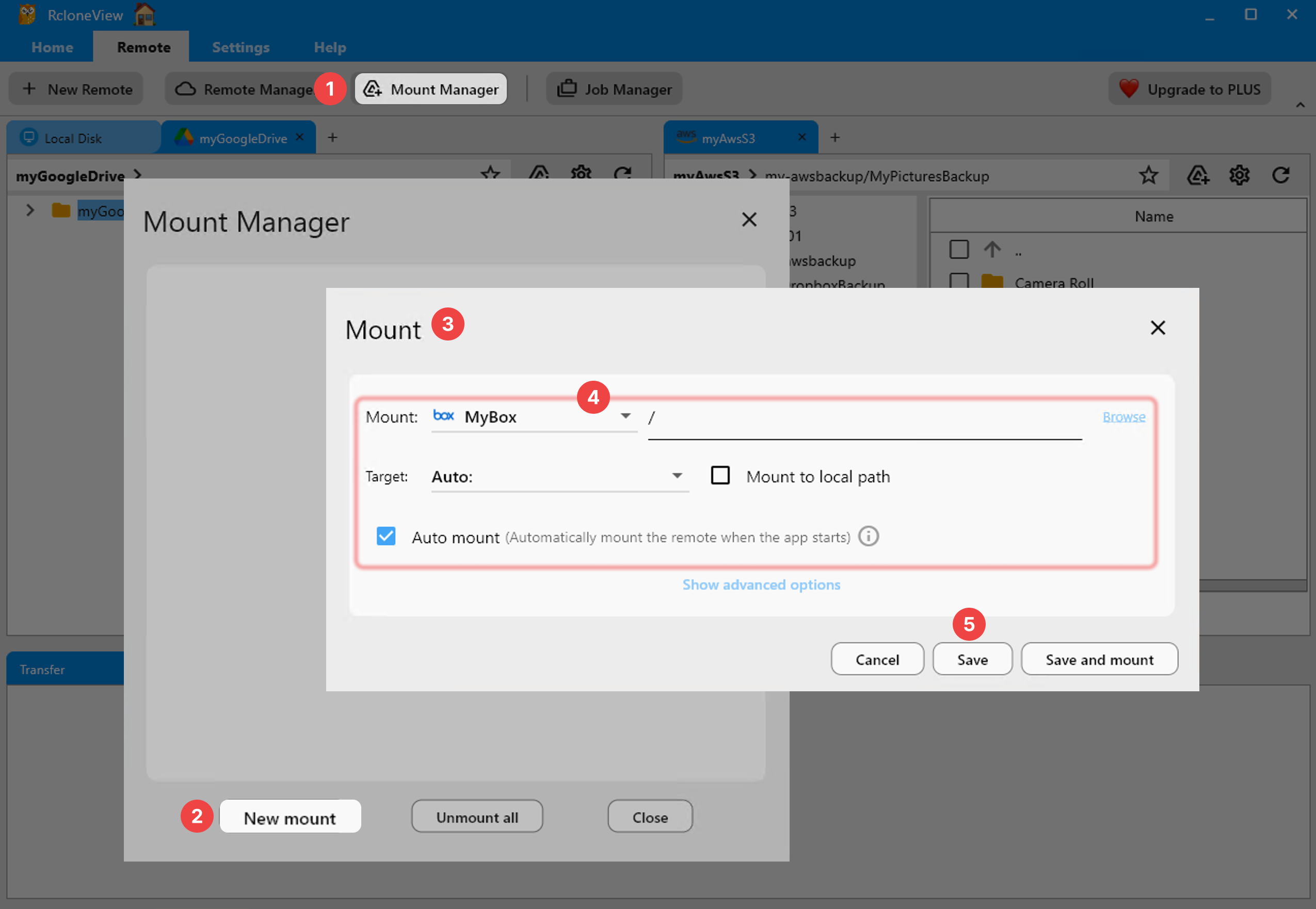
RcloneView connects to 90+ providers and mounts and syncs all of them from the same window, on Windows, macOS, and Linux alike — useful if you split your work between a Void Linux workstation and other machines.
Scheduling Backups with runit in Mind
RcloneView cannot run as a systemd service, and Void doesn't use systemd at all — it runs runit. That distinction doesn't matter here, because RcloneView's own Job Manager handles scheduling internally rather than depending on the init system. Set up a scheduled sync job through the crontab-style scheduler (a PLUS feature) so backups run on a timer while the app stays open in the system tray.
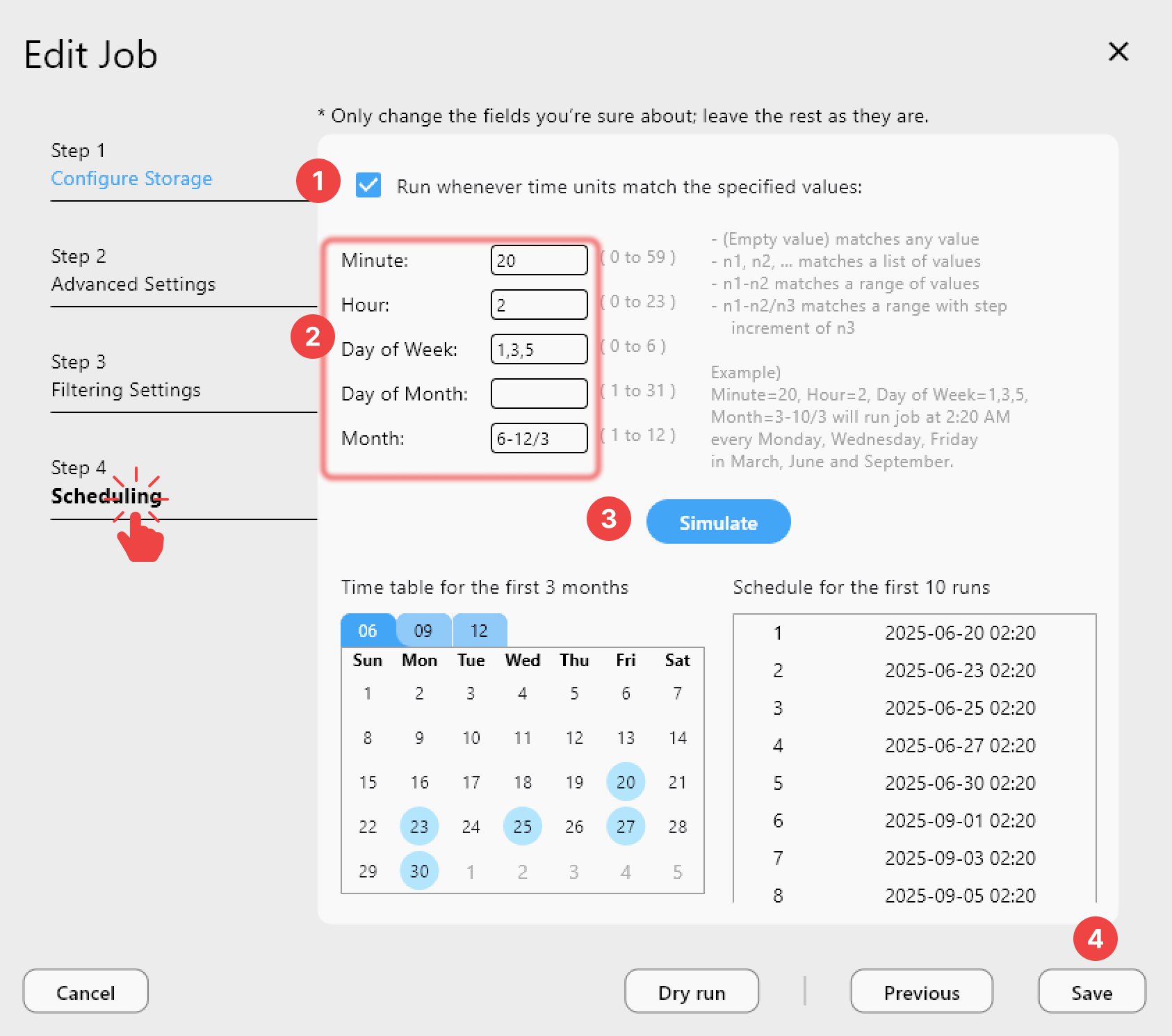
If you do want a true background daemon on Void with no GUI at all, that's a job for rclone rcd directly rather than RcloneView — the app itself always needs a display server to run.
Getting Started
- Download the AppImage from rcloneview.com and mark it executable.
- Install
fuse3and the AppIndicator library through XBPS if mount or tray features don't work out of the box. - Add your cloud remotes and confirm access in the Explorer panel.
- Create a sync or backup job and, if desired, schedule it to run automatically.
Void's minimalism doesn't have to mean managing cloud storage by hand — RcloneView brings the same GUI workflow here that it does everywhere else.
Related Guides:
- RcloneView on Gentoo Linux — Cloud Storage Sync and Backup
- RcloneView on Arch Linux — Cloud Storage Sync and Backup
- Install RcloneView on Ubuntu and Debian Linux
Supported Cloud Providers





























