RcloneView vs NetDrive: Which Cloud Storage Manager Is Right for You?
Both RcloneView and NetDrive let you mount cloud storage as a local drive, but they take very different approaches to pricing, provider support, and overall file management.
If you work with cloud storage daily, mounting it as a native drive letter or folder is a game-changer. NetDrive has been a popular Windows-centric tool for mapping cloud storage as network drives since the early 2010s. RcloneView takes a broader approach: it wraps rclone's engine in a visual interface that handles mounting, syncing, transferring, and scheduling across 70+ cloud providers. This guide breaks down the key differences so you can choose the right tool.

Manage & Sync All Clouds in One Place
RcloneView is a cross-platform GUI for rclone. Compare folders, transfer or sync files, and automate multi-cloud workflows with a clean, visual interface.
- One-click jobs: Copy · Sync · Compare
- Schedulers & history for reliable automation
- Works with Google Drive, OneDrive, Dropbox, S3, WebDAV, SFTP and more
Free core features. Plus automations available.
Side-by-Side Comparison
| Feature | RcloneView | NetDrive |
|---|---|---|
| Cloud providers supported | 70+ (Google Drive, S3, OneDrive, Dropbox, B2, Azure, SFTP, etc.) | ~10 (Google Drive, OneDrive, Dropbox, S3, Azure, SFTP, FTP, WebDAV) |
| Mount cloud as local drive | Yes | Yes (primary feature) |
| Cloud-to-cloud transfers | Yes | No |
| File sync/copy/move | Yes (with comparison) | No (mount-only) |
| Folder comparison | Yes | No |
| Job scheduling | Yes | No |
| Bandwidth throttling | Yes | No |
| Encryption (Crypt remote) | Yes (rclone crypt) | No |
| Real-time transfer monitoring | Yes | Limited |
| Filter/exclude rules | Yes | No |
| Platforms | Windows, macOS, Linux | Windows, macOS |
| Pricing | Free | Subscription ($21.90/year personal, $54.90/year team) |
| Backend | rclone (open source) | Proprietary |
Cloud Mounting Capabilities
Both tools allow you to mount cloud storage as a local drive, but the implementation differs significantly.
NetDrive focuses almost exclusively on mounting. It maps cloud storage to a Windows drive letter or macOS mount point. The experience is polished for this single use case — drives appear in File Explorer immediately and reconnect on boot. However, NetDrive does not offer file sync, copy, or transfer features beyond what the mounted drive exposes.
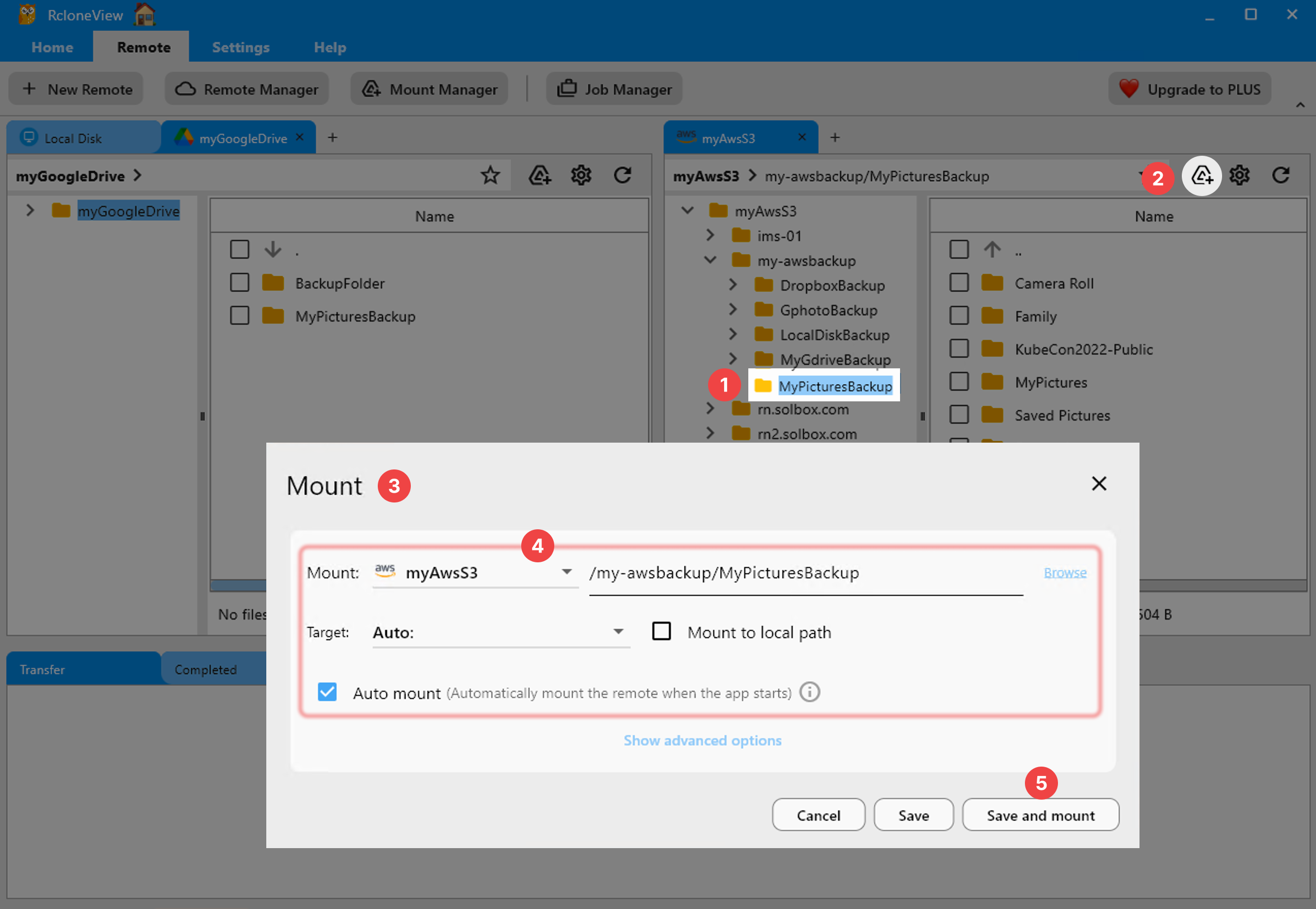
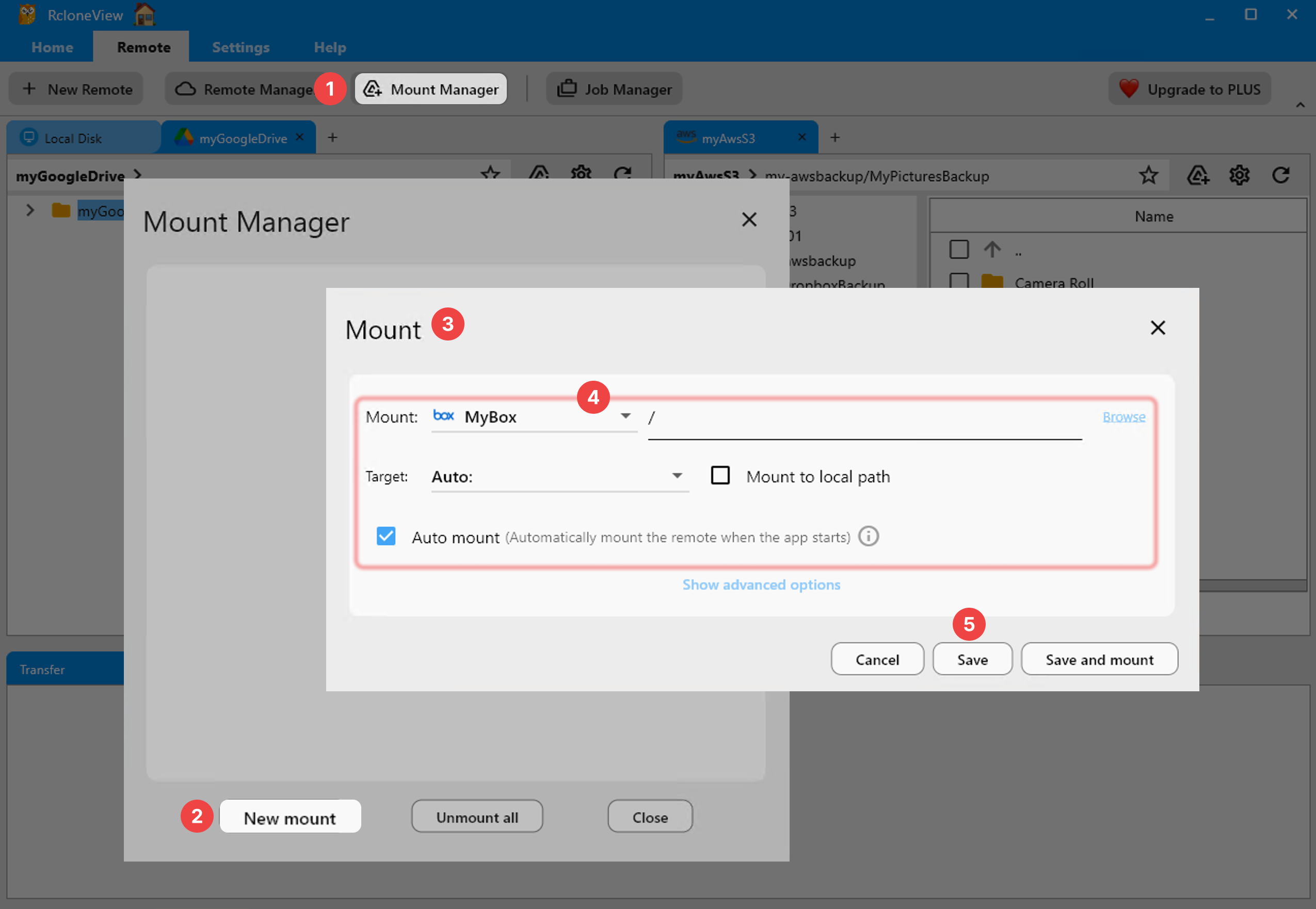
RcloneView provides mounting through rclone's VFS (Virtual File System) layer, which supports advanced caching options, read-only or read-write modes, and fine-grained control over cache size and polling intervals. You can mount from the remote explorer or use the dedicated Mount Manager.
Multi-Cloud Provider Support
This is where the gap widens considerably. NetDrive supports roughly 10 cloud services — enough for the most popular consumer clouds. RcloneView, powered by rclone, connects to over 70 providers including S3-compatible storage (Wasabi, Backblaze B2, Cloudflare R2, MinIO), enterprise platforms (Azure Blob, Google Cloud Storage), and niche services (pCloud, Jottacloud, Mega, Internet Archive).
If your workflow involves only Google Drive or OneDrive, both tools work. If you manage data across Wasabi, Backblaze B2, and Google Drive simultaneously, RcloneView is the clear choice.

Sync, Copy, and Transfer Features
NetDrive is a mount-only tool. Once your cloud storage is mounted, you use your OS file manager to copy files manually. There is no built-in sync engine, no job scheduling, and no folder comparison.
RcloneView offers a full dual-pane file manager with sync, copy, and move operations. You can compare folders before syncing, set up filter rules to include or exclude file patterns, and schedule recurring jobs. Transfer progress is monitored in real time with detailed logs.

Pricing and Licensing
NetDrive operates on an annual subscription model. The personal plan costs $21.90/year for 1 PC, while the team plan is $54.90/year per license. There is no free tier beyond a trial period. Subscriptions must be renewed to continue using the software.
RcloneView is free. It builds on rclone, which is open-source software licensed under MIT. There are no subscription fees, no device limits, and no feature gating behind paid tiers. This makes RcloneView especially attractive for teams managing multiple machines or for users who need cloud management across several workstations.
Encryption and Security
NetDrive does not offer built-in encryption for cloud data. Your files are stored however the cloud provider stores them, with no additional client-side encryption layer.
RcloneView supports rclone's crypt remote, which encrypts file names and contents before they leave your machine using XSalsa20 and Poly1305. This zero-knowledge encryption works with any provider — you can layer it on top of Google Drive, S3, or even SFTP. Because crypt is an rclone standard, encrypted files can be decrypted with the rclone CLI on any machine, avoiding vendor lock-in.
Job Scheduling and Automation
NetDrive has no scheduling or automation features. If you need recurring transfers or backups, you must use external tools like Windows Task Scheduler to script file copies to a mounted drive.
RcloneView includes built-in job scheduling. You can create recurring sync, copy, or move jobs that run on a defined schedule. Combined with filter rules and bandwidth throttling, this makes RcloneView suitable for automated backup workflows without any external scripting.

When to Choose NetDrive
- You only need to mount cloud storage as drive letters and nothing else.
- You prefer a minimal, single-purpose tool with a simple setup wizard.
- Your cloud usage is limited to Google Drive, OneDrive, or Dropbox.
- You are comfortable with annual subscription costs.
When to Choose RcloneView
- You need multi-cloud management across more than 10 providers.
- You want sync, copy, move, and folder comparison features built in.
- You need job scheduling and automated recurring backups.
- You want encrypted remotes (rclone crypt) for zero-knowledge encryption.
- You prefer a free tool with no subscription fees.
- You need Linux support alongside Windows and macOS.
- You want cloud-to-cloud transfers without downloading files locally.
Getting Started with RcloneView
- Download RcloneView from rcloneview.com.
- Add your cloud remotes — Google Drive, OneDrive, S3, SFTP, or any of 70+ providers.
- Mount a remote as a local drive from the explorer or Mount Manager.
- Run sync jobs with real-time progress monitoring and scheduling.
If your needs go beyond simple drive mounting — especially if you manage multiple cloud providers or need automated sync workflows — RcloneView delivers significantly more capability at zero cost.
Related Guides:
Supported Cloud Providers





























