Cloud Storage for Data Scientists — Manage Training Data and Models with RcloneView

Data scientists move gigabytes daily — RcloneView provides a multi-cloud GUI to manage training datasets, model checkpoints, and experiment outputs across S3, Google Drive, and more.
Machine learning workflows generate enormous volumes of files: raw datasets that can span hundreds of gigabytes, preprocessed feature stores, trained model checkpoints, and experiment logs that need long-term archival. Moving these between local machines, cloud object storage, and shared team drives is time-consuming and risky when transfers fail silently. RcloneView gives data science teams a visual file manager that spans 90+ cloud providers from a single window on Windows, macOS, and Linux.

Manage & Sync All Clouds in One Place
RcloneView is a cross-platform GUI for rclone. Compare folders, transfer or sync files, and automate multi-cloud workflows with a clean, visual interface.
- One-click jobs: Copy · Sync · Compare
- Schedulers & history for reliable automation
- Works with Google Drive, OneDrive, Dropbox, S3, WebDAV, SFTP and more
Free core features. Plus automations available.
Connect All Your Storage in One View
ML pipelines often span several storage systems simultaneously: an Amazon S3 bucket for training runs and model artifacts, a shared Google Drive for team datasets, a local NAS for raw data collection, and perhaps a Backblaze B2 bucket for cost-effective long-term archival. RcloneView lets you add each as a named remote and open them in side-by-side explorer panels — drag files between providers and monitor transfers without switching between browser tabs or CLI sessions.
RcloneView manages 90+ cloud providers — S3, Google Drive, Backblaze B2, and more — from a single window, free to sync and compare on the FREE license.
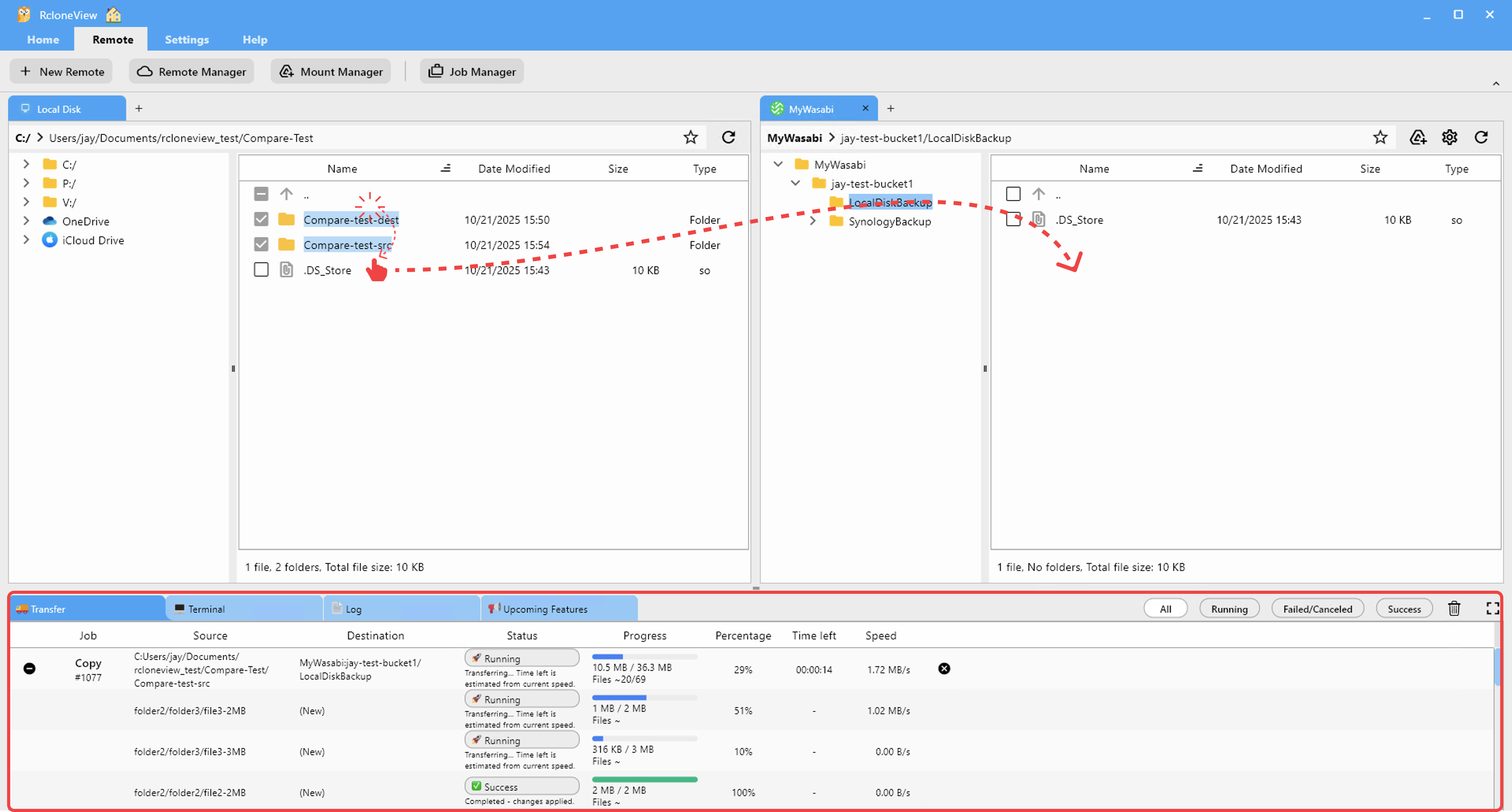
A computer vision team processing 200 GB of annotated images can connect their annotation shared drive and their S3 training bucket simultaneously, then copy only new batches by browsing both panels and selecting changed directories. Public datasets shared via institutional WebDAV or Google Drive work as remotes too, sitting alongside private S3 buckets in the same session.
Transfer Large Model Files with Live Transfer Monitoring
Uploading a 15 GB checkpoint file or syncing a multi-part dataset to S3 demands reliable feedback. RcloneView's Transferring tab shows per-transfer speed, bytes completed, and file count for every active job. The configurable multi-thread transfer setting splits large file uploads into parallel streams, which can meaningfully accelerate uploads to S3-compatible providers like Wasabi or Cloudflare R2 where per-file overhead adds up quickly.

If a transfer is interrupted by a network blip or a VPN timeout, rerunning the sync job picks up where it stopped: RcloneView skips files already transferred and resumes from the remainder. For terabyte-scale datasets, this avoids wasting hours on redundant retries.
Verify Dataset Integrity with Folder Compare
After a preprocessing pipeline modifies or augments a local dataset, confirming the cloud backup reflects the current state before launching training runs can save expensive GPU time. RcloneView's Folder Compare view displays side-by-side differences between any two folders — local or cloud — identifying files that are left-only, right-only, or have different sizes.

For data scientists, this serves as a pre-training sanity check: verify the cloud training directory matches the expected local baseline before committing GPU budget. Files marked as different can be individually copied to resolve discrepancies. Enable checksum verification in sync jobs to catch corruption that size comparison alone would miss.
Automate Dataset Backups with Scheduled Sync
Data collection pipelines that run continuously benefit from automatic cloud backup that doesn't require a manual trigger. With a PLUS license, RcloneView's crontab-style scheduler triggers sync jobs at defined intervals — nightly after a pipeline completes, or hourly during active collection windows. The 1:N sync feature mirrors one source directory to multiple destinations simultaneously, so a single raw-data folder can back up to both S3 and Google Drive in a single job run.

Filter rules in Step 3 of the sync wizard let you exclude temporary files, checkpoint intermediates, and cache directories that don't belong in a clean backup — keeping storage costs down without writing custom scripts.
Getting Started
- Download RcloneView from rcloneview.com.
- Add your S3 bucket (Amazon S3, Wasabi, Cloudflare R2) as a remote via Remote tab > New Remote.
- Add Google Drive or any other collaboration storage as a second remote in the same session.
- Create sync jobs from local data directories to cloud destinations — use filter rules in Step 3 to exclude temporary files and pipeline cache directories.
Your team's datasets, checkpoints, and experiment outputs become navigable and reliably backed up without requiring command-line expertise from every team member.
Related Guides:
- AI Training Dataset Pipeline with RcloneView
- Manage Amazon S3 Cloud Sync and Backup with RcloneView
- Cloud Storage for DevOps and Software Teams with RcloneView
Supported Cloud Providers





























