Build an AI Training Dataset Pipeline: Efficiently Transfer Local Data to Cloud Storage with RcloneView
Move terabytes of training data from local workstations or NAS into cloud buckets (S3, R2, HuggingFace Datasets, GCS) with GUI-based jobs, checksum validation, and scheduled deltas.
AI teams need fast, reliable ingestion into object storage. RcloneView wraps rclone’s performance flags, checksums, and retries in a visual workflow so you can ship data to your bucket once, keep it consistent with deltas, and avoid command-line fragility.

Manage & Sync All Clouds in One Place
RcloneView is a cross-platform GUI for rclone. Compare folders, transfer or sync files, and automate multi-cloud workflows with a clean, visual interface.
- One-click jobs: Copy · Sync · Compare
- Schedulers & history for reliable automation
- Works with Google Drive, OneDrive, Dropbox, S3, WebDAV, SFTP and more
Free core features. Plus automations available.
Why RcloneView for AI dataset uploads
- No CLI surprises: configure S3/R2/GCS/HuggingFace endpoints with guided dialogs and save them as reusable remotes.
- Integrity first: checksum-aware transfers, retry logic, and post-run compares to prove your dataset arrived intact.
- High throughput, throttled safely: tune transfers, chunk sizes, and bandwidth caps per job to match lab or colocation links.
- Repeatable jobs: schedule nightly deltas from local SSD/NAS, monitor progress, and export logs for compliance.
Prerequisites
- RcloneView installed where the data resides (workstation, NAS gateway, or a jump box with access to local storage).
- Cloud bucket credentials (AWS S3 keys, R2 tokens, HuggingFace CLI token, or GCS service account).
- Enough outbound bandwidth or a staging disk to batch uploads.
Step 1 — Add remotes for your target buckets
- Open Settings → Remote Storage and click Add.

- Choose your target:
- S3 / S3-compatible for AWS, MinIO, or R2.
- WebDAV / HTTP if pushing to HuggingFace Spaces that expose WebDAV (or use S3-compatible if enabled).
- GCS for Google Cloud buckets.
- Paste keys/tokens, select the bucket, and test the connection.
Step 2 — Stage your local dataset for transfer
- Point RcloneView to the local root directory (e.g.,
/datasets/imagenet/or a mounted NAS share). - Clean obvious issues: zero-byte placeholders, temp files, or paths that exceed 255 chars on the destination.
- If you keep annotations or manifests, place them alongside the data so they are versioned together.
Step 3 — Validate structure with side-by-side Explorer
- Open the local folder on the left pane and the target bucket path on the right.

- Use Compare to preview what will be created in the bucket.

- Copy a small shard (e.g., a single class folder) first to verify ACLs and naming before the big push.
Step 4 — Build a checksum-verified upload job
- Create a Sync or Copy job from the local root to the bucket prefix (e.g.,
s3:ai-training/imagenet/). - Enable checksum use (ETag/MD5/SHA1 as supported) and keep retries on.
- Set Transfers and Bandwidth Limit to saturate your link without triggering provider throttling.
Step 5 — Run and monitor at scale
- Start the job and watch throughput, ETA, and any retries in real time.

- If targeting R2 or S3 with small files, bump chunk size and parallelism; for huge binaries, increase chunk size but keep concurrency modest to avoid 429s.
- Use Job History to export logs as proof-of-ingest for your MLOps ticket or compliance runbook.
Step 6 — Schedule nightly deltas
- Create a second job that syncs only changes (new data, fixed labels) and schedule it during low-traffic hours.

- Keep the original full-upload job disabled; rerun it only for major re-ingests.
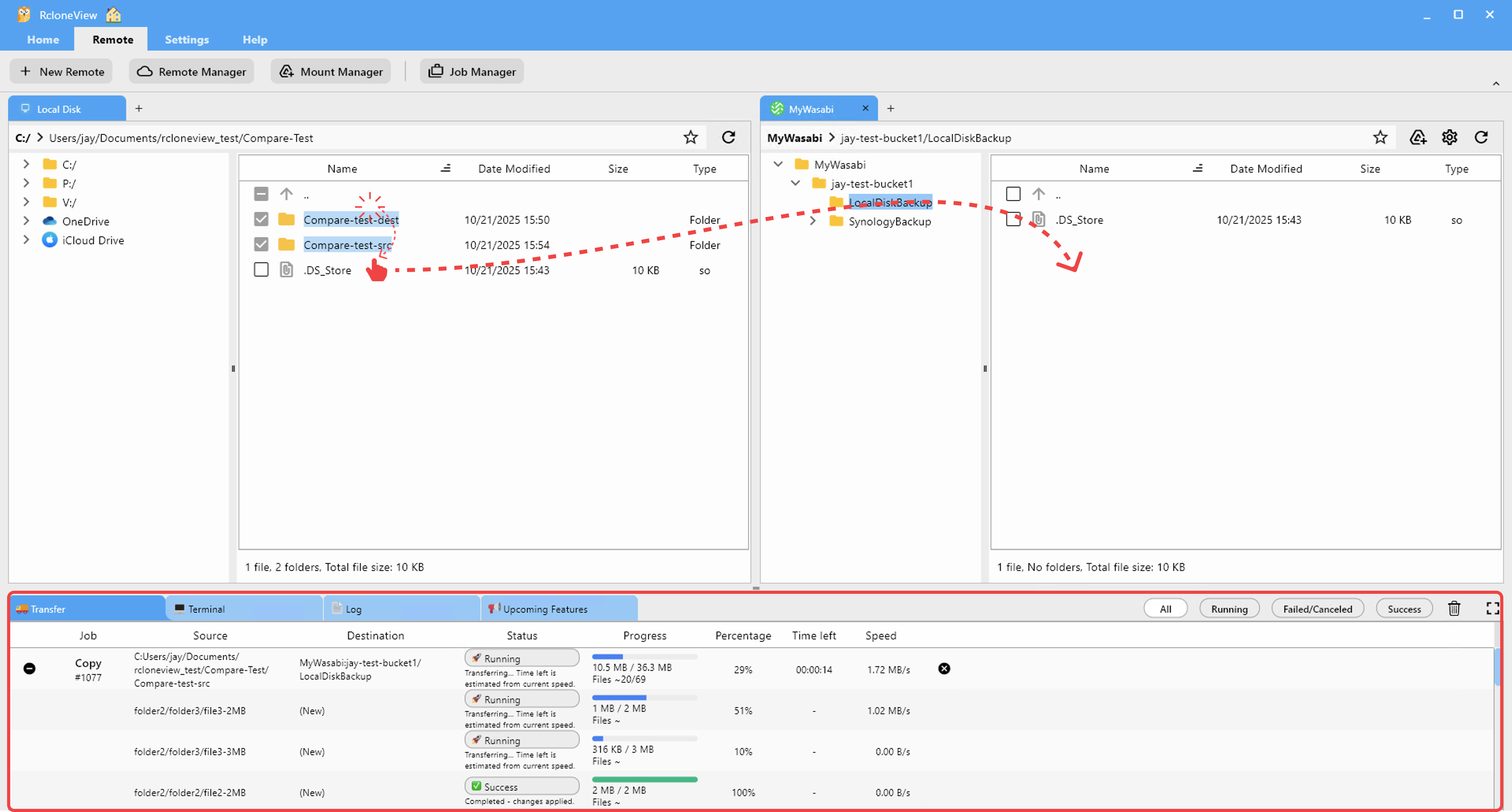
Step 7 — Fast fixes with drag-and-drop
- For quick patch uploads (hotfix annotations, a few shards), drag files from local to the bucket pane; RcloneView will handle checksums and retries automatically.
Step 8 — Optional: Mount buckets for spot checks
- Mount the bucket as a drive to verify samples directly from training nodes without redownloading.
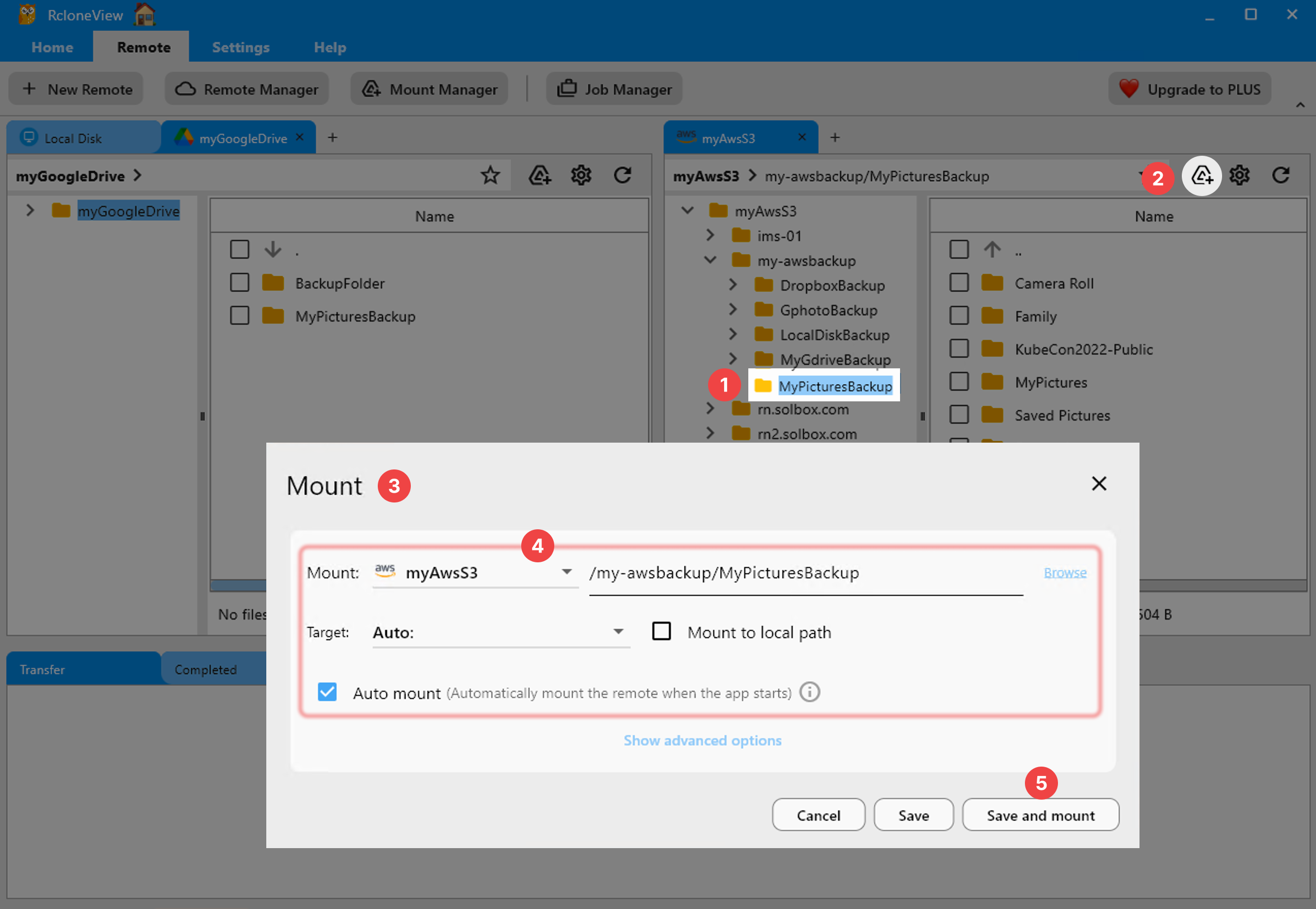
- Use it to confirm file integrity in-place or to stream small validation sets.
Troubleshooting for AI pipelines
- Checksum mismatches: rerun compare, then retry only failed objects from history; check for antivirus or filesystem locks on the local side.
- Throughput stalls: lower concurrency for R2, raise chunk size for GCS/S3, or cap bandwidth to avoid ISP shaping.
- Token/credential expiry: rotate keys in the remote config once; all dependent jobs inherit the new credentials.
Related resources
- Add AWS S3 and S3-Compatible
- Add WebDAV
- Browse & Manage Remotes
- Drag & Drop files
- Compare folder contents
- Synchronize Remote Storages Instantly
- Create Sync Jobs
- Execute & Manage Jobs
- Job Scheduling
- Real-time Transfer Monitoring
- Mount Cloud Storage as a Local Drive
Wrap-up
With RcloneView, data scientists and AI engineers can push massive local datasets to cloud buckets with integrity checks, throttled performance, and repeatable schedules—without wrestling with CLI flags. Keep your uploads auditable, automate deltas, and get back to training faster.
Supported Cloud Providers





























