Cloud Storage for Fitness and Wellness Businesses with RcloneView
From class recordings and workout libraries to client health data and marketing content, fitness businesses juggle a surprising amount of digital files. RcloneView provides a single interface to organize, back up, and sync all of it across multiple cloud providers.
The fitness and wellness industry has gone digital in a major way. Online classes, on-demand workout libraries, wearable device integrations, and digital membership platforms generate a steady stream of files that need to be stored, protected, and accessible. A single yoga studio might maintain hundreds of class recordings, thousands of client profiles, and a growing library of social media content.
Managing these files across Google Drive, Dropbox, OneDrive, and potentially an S3 bucket for video archives quickly becomes overwhelming. RcloneView simplifies this by connecting to over 70 storage backends through a visual two-pane file manager, letting you move files between providers with drag-and-drop ease.
This guide walks through how fitness studios, personal trainers, gyms, and wellness practitioners can build a practical cloud storage workflow using RcloneView.

Manage & Sync All Clouds in One Place
RcloneView is a cross-platform GUI for rclone. Compare folders, transfer or sync files, and automate multi-cloud workflows with a clean, visual interface.
- One-click jobs: Copy · Sync · Compare
- Schedulers & history for reliable automation
- Works with Google Drive, OneDrive, Dropbox, S3, WebDAV, SFTP and more
Free core features. Plus automations available.
Managing Workout Video Libraries
Video is the backbone of modern fitness content. Whether you record live classes for on-demand replay or produce structured workout programs, video files consume significant storage space. A single hour of 1080p footage can exceed 5 GB.
RcloneView's two-pane explorer lets you connect a local editing workstation on one side and a cloud archive on the other. After editing, drag finished videos to cost-effective storage like Wasabi or Backblaze B2 for long-term archiving, while keeping the most popular content on Google Drive or Dropbox for quick sharing with members.
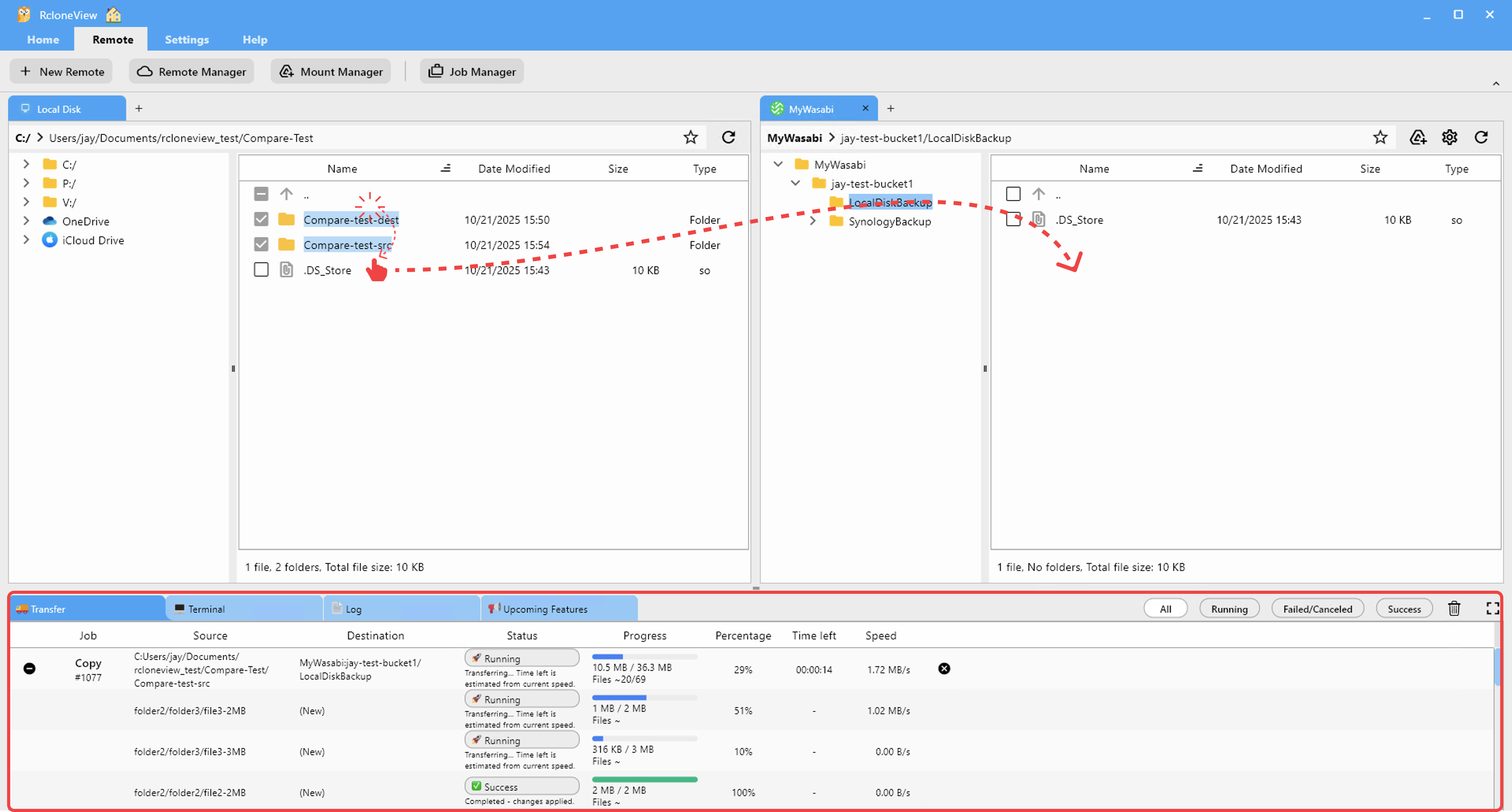
Organize your library by program, instructor, and date to make retrieval fast when you need to reuse or reshare content.
Protecting Client Records and Health Data
Fitness and wellness businesses collect sensitive information: health questionnaires, injury histories, body composition data, nutrition logs, and payment details. While most fitness businesses are not directly subject to HIPAA, those offering health coaching, physical therapy partnerships, or integrated wellness services may handle data that falls into a gray area.
Regardless of regulatory requirements, protecting client data is a trust issue. Use RcloneView to set up automated backups of your client database exports to an encrypted cloud destination. Rclone's crypt remote encrypts files before upload, ensuring that even if a cloud account is breached, client information remains unreadable.

Schedule these backups to run nightly so you always have a recent, secure copy of your most important business data.
Syncing Marketing Assets Across Platforms
Fitness businesses rely heavily on visual content: Instagram reels, YouTube thumbnails, email banners, promotional photos, and branded templates. Marketing teams or freelance designers may work from different cloud accounts than the business owner.
RcloneView makes it easy to sync a marketing assets folder between providers. Keep the working files in Dropbox where your designer collaborates, then sync finished assets to Google Drive where your social media manager picks them up. One sync job keeps everyone working from the latest versions.

Backing Up Membership and Scheduling Databases
Your membership management system and class scheduling platform are the operational heart of your business. Whether you use MindBody, Glofox, Zen Planner, or another platform, most allow you to export data as CSV or database backups.
Create a RcloneView sync job that picks up these exports from a local folder and pushes them to two separate cloud destinations. This redundancy ensures that if one provider has an outage or your account is locked, you can still recover your member data and class schedules.

Distributing Class Recordings to Members
Many studios offer recorded classes as a membership perk. After recording and light editing, you need to get the files where members can access them. RcloneView can transfer finished recordings from your editing machine to a cloud storage bucket that feeds your website or app.
For studios using S3-compatible storage behind a CDN, RcloneView connects directly to your bucket, letting you upload, organize, and manage files without learning AWS console or CLI commands.
Handling Multi-Location File Consistency
Fitness chains and franchise operations need consistent branding, class schedules, and operational documents across all locations. RcloneView's compare feature lets you check that each location's cloud folder contains the same set of files.

Set up a sync job from a central headquarters folder to each location's shared drive. When headquarters updates a pricing sheet or class schedule template, all locations receive the update automatically.
Monitoring Transfers and Reviewing History
Uploading a week's worth of class recordings can take time, especially with large 4K files. RcloneView's real-time monitoring panel shows upload progress, speed, and any errors that occur during transfer.

The job history feature provides a log of past transfers, so you can verify that last night's scheduled backup completed successfully before the studio opens.

Cost-Effective Storage for Growing Content Libraries
As your video library and client base grow, storage costs can escalate. Instead of paying premium rates on consumer cloud platforms, offload archival content to providers with lower per-GB pricing. Wasabi, Backblaze B2, and Cloudflare R2 all offer significant savings for bulk storage.
RcloneView manages these providers alongside Google Drive and Dropbox in the same interface, so you can tier your storage by access frequency without juggling separate tools.
Getting Started
- Download RcloneView from rcloneview.com.
- Add your cloud accounts: Google Drive for daily collaboration, plus an S3-compatible provider for video archiving.
- Create sync jobs to back up client databases, class recordings, and marketing assets on a regular schedule.
- Use the compare feature to verify file consistency across locations or team members.
With RcloneView handling your cloud storage, you can spend less time managing files and more time helping clients reach their wellness goals.
Related Guides:
Supported Cloud Providers





























