Cloud Storage for HVAC and Plumbing Contractors — Organize Job Files with RcloneView

Job-site photos, permits, and invoices end up scattered across phones, laptops, and whatever cloud app a technician happened to install — RcloneView pulls them into one place.
A residential HVAC or plumbing outfit generates a steady stream of files that have nothing to do with each other technically but everything to do with each other for billing: before-and-after photos of a furnace install, a scanned permit, a supplier invoice, a warranty document. Techs in the field often save these to whatever app is already on their phone, and the office ends up piecing together a job record from three different cloud accounts. RcloneView gives the office a single explorer window over every one of those accounts, so pulling a complete job file together doesn't mean logging in and out of separate apps.

Manage & Sync All Clouds in One Place
RcloneView is a cross-platform GUI for rclone. Compare folders, transfer or sync files, and automate multi-cloud workflows with a clean, visual interface.
- One-click jobs: Copy · Sync · Compare
- Schedulers & history for reliable automation
- Works with Google Drive, OneDrive, Dropbox, S3, WebDAV, SFTP and more
Free core features. Plus automations available.
Centralizing Photos and Documents from the Field
Connect the Google Drive or Dropbox accounts techs already use for job photos alongside the office's main cloud storage, and browse all of them from the same set of Explorer panels. Because RcloneView supports 1 to 4 panels at once, the office can keep one panel open on a technician's upload folder and another on the job's permanent folder, moving files across with drag-and-drop — dragging between two different remotes always copies, so nothing is lost from the original account while the office builds out its own organized copy.

Folder Compare is useful here too: point it at a technician's raw upload folder and the office's sorted job folder to see at a glance which photos and documents haven't been filed yet.
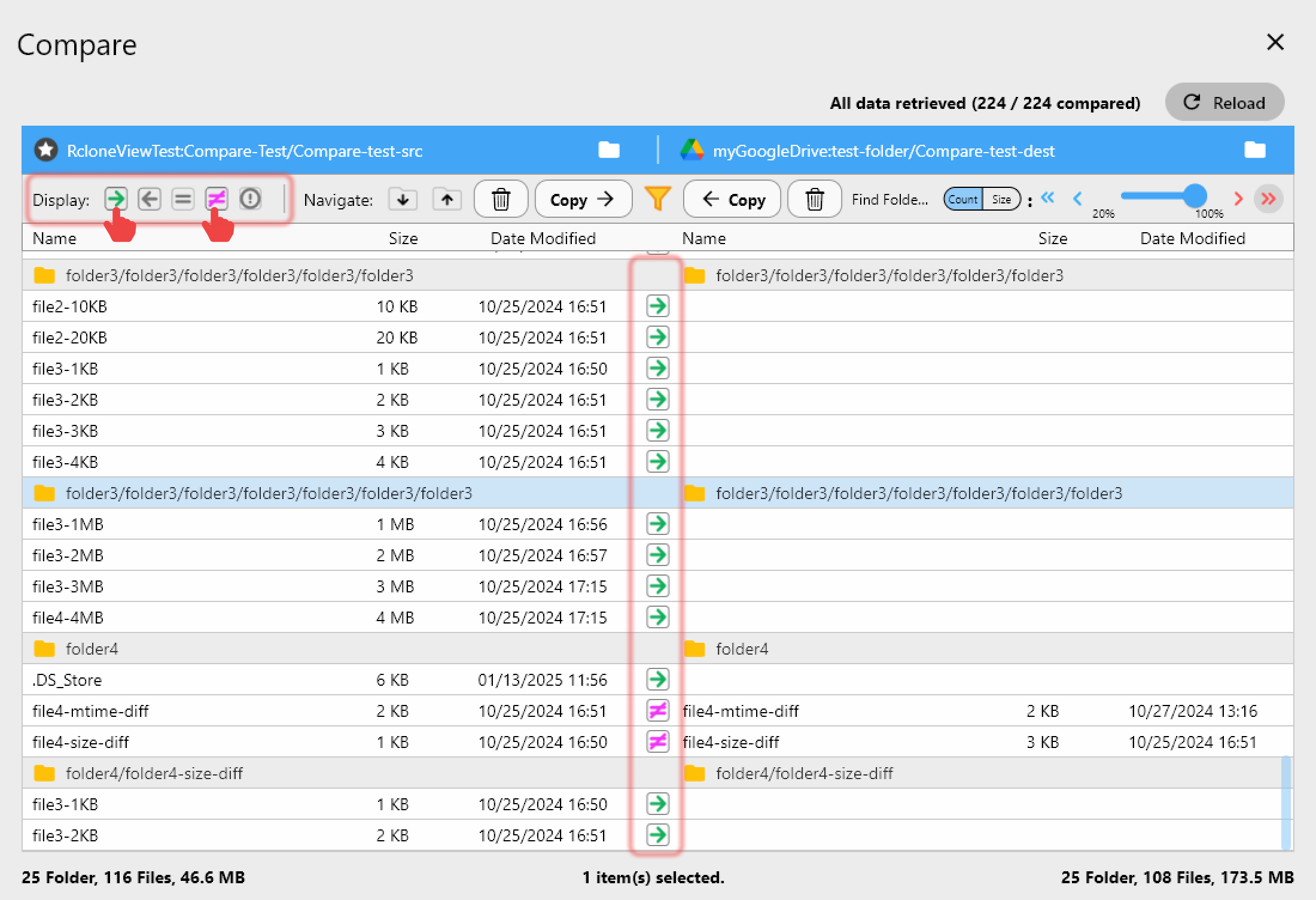
Automating the Backup Between Office and Cloud
Once job files are consolidated, they still need a backup that doesn't depend on one laptop's hard drive. Set up a sync job from the office's local job folders to a cloud remote, and use 1:N synchronization to mirror that same content to a second cloud provider — a free-license feature that gives even a small shop two independent copies of every invoice and permit. Connect S3, Azure, or Backblaze B2 with full read/write on the FREE license, which makes a low-cost archive tier practical even for a two-truck operation.
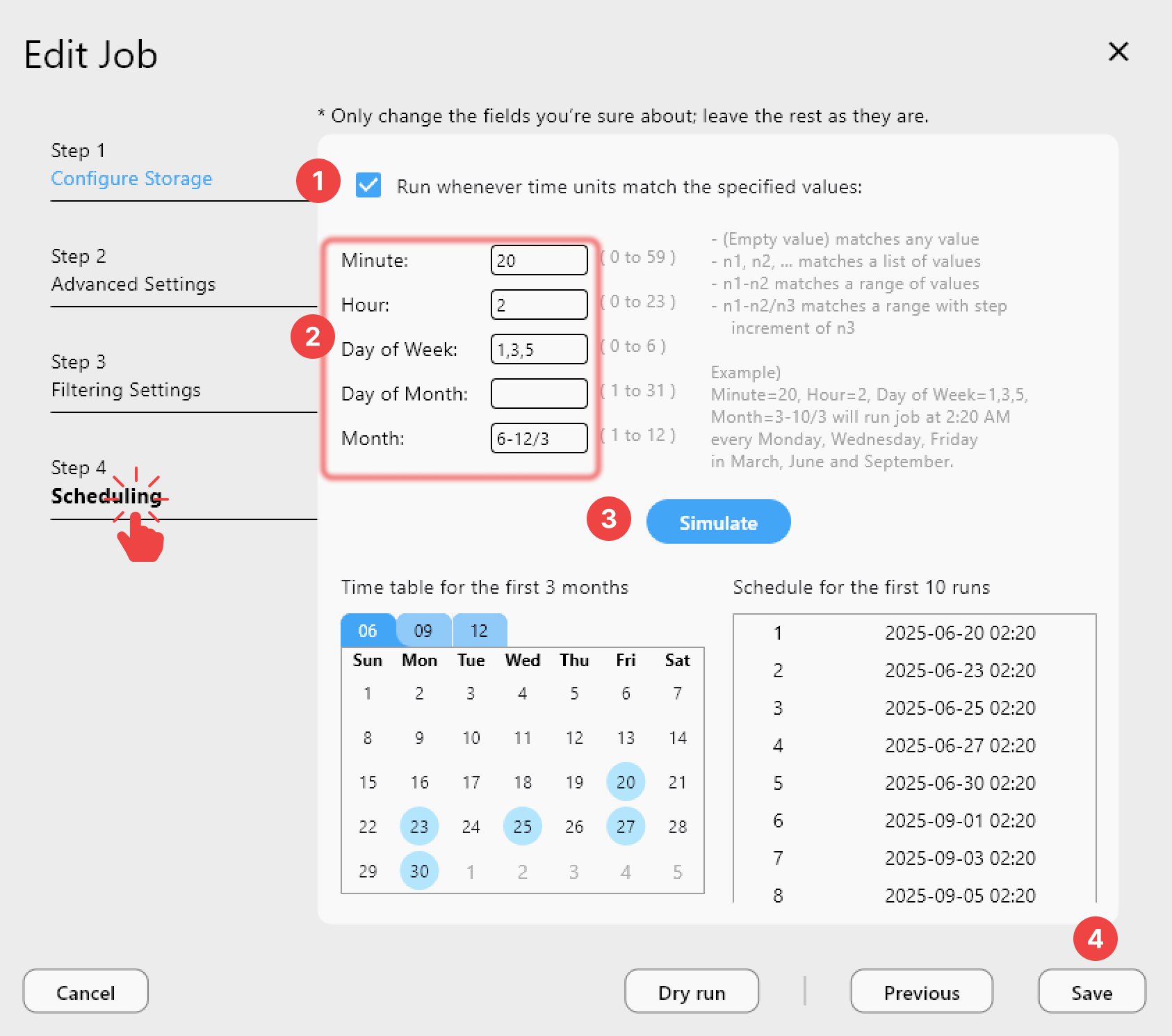
PLUS license accounts can attach a crontab schedule so this backup runs overnight automatically, which matters more than it sounds like for a business where the person managing files is also swinging a wrench during the day.
Getting Started
- Download RcloneView from rcloneview.com.
- Connect each cloud account technicians use for job photos and documents.
- Use Folder Compare to find and file anything not yet moved into the job archive.
- Set up a sync job (with 1:N mirroring, if useful) to back up the archive automatically.
A little structure around job files means fewer scrambles for a missing invoice or permit when a customer calls back six months later.
Related Guides:
- Cloud Storage for Construction Project Management with RcloneView
- Folder Comparison Guide — Detect Differences with RcloneView
- One-to-Many Sync to Multiple Destinations with RcloneView
Supported Cloud Providers





























