RcloneView on AlmaLinux — Cloud Storage Sync and Backup

Run RcloneView on AlmaLinux to browse, sync, mount, and back up 90+ cloud providers from a native GUI instead of stitching together CLI scripts.
AlmaLinux has become a common choice for teams migrating off CentOS, and many of those servers or workstations end up needing reliable cloud storage access. RcloneView installs as a native .rpm package on AlmaLinux and gives you a full file-manager-style interface for every remote rclone supports, from Amazon S3 to Google Drive to SFTP servers. RcloneView mounts AND syncs 90+ providers from one window, on Windows, macOS, and Linux — the same app and workflow across your whole environment.

Manage & Sync All Clouds in One Place
RcloneView is a cross-platform GUI for rclone. Compare folders, transfer or sync files, and automate multi-cloud workflows with a clean, visual interface.
- One-click jobs: Copy · Sync · Compare
- Schedulers & history for reliable automation
- Works with Google Drive, OneDrive, Dropbox, S3, WebDAV, SFTP and more
Free core features. Plus automations available.
Installing RcloneView on AlmaLinux
RcloneView ships an .rpm package built for RHEL-family distributions like AlmaLinux. Download the .rpm file from the official download page, then install it with your system's package tool (dnf install ./rclone_view-{version}-linux-x86_64.rpm or the aarch64 build on ARM64 hardware). There is no AlmaLinux repository or PPA to add — the .rpm is a direct download, and that's the only supported path on this distro.
Because RcloneView is a Flutter-based GUI application, AlmaLinux needs a desktop environment with an X11 or Wayland display server running, plus GTK+ 3.0 and either libayatana-appindicator3-1 or libappindicator3-1 for the system tray icon. On a minimal server install of AlmaLinux without a desktop environment, install a desktop stack first, or use RcloneView from a workstation and connect to an external rclone instance running headless on the server instead — RcloneView itself cannot run without a display, and it is not a systemd service.

Connecting Cloud Remotes
Once installed, adding a remote works the same way it does on every other platform: Remote tab > New Remote, pick your provider, and either authenticate through a browser popup (Google Drive, Dropbox, OneDrive, Box) or enter credentials directly (Amazon S3, Backblaze B2, SFTP). The embedded rclone binary handles the connection over http://127.0.0.1:5582, so there's no separate rclone install to manage on AlmaLinux unless you specifically want to point RcloneView at an external rclone instance.
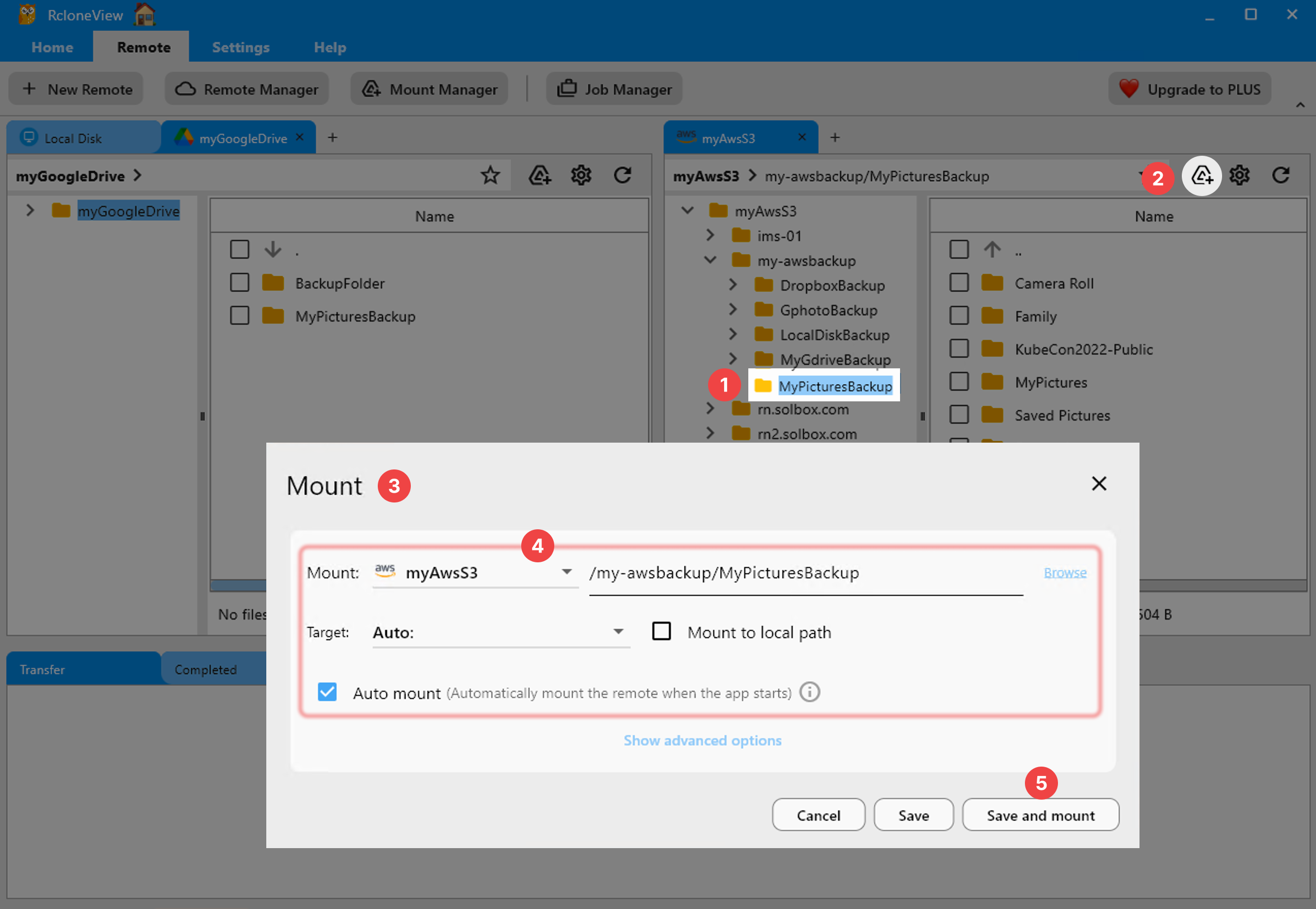
Mounting is available through nfsmount, RcloneView's default mount method on Linux — select a remote folder, click the mount icon in the panel toolbar, and it appears as a local path other applications can read from directly. FUSE (fuse3 recommended) needs to be present for mounting to work.
Scheduling Sync Jobs
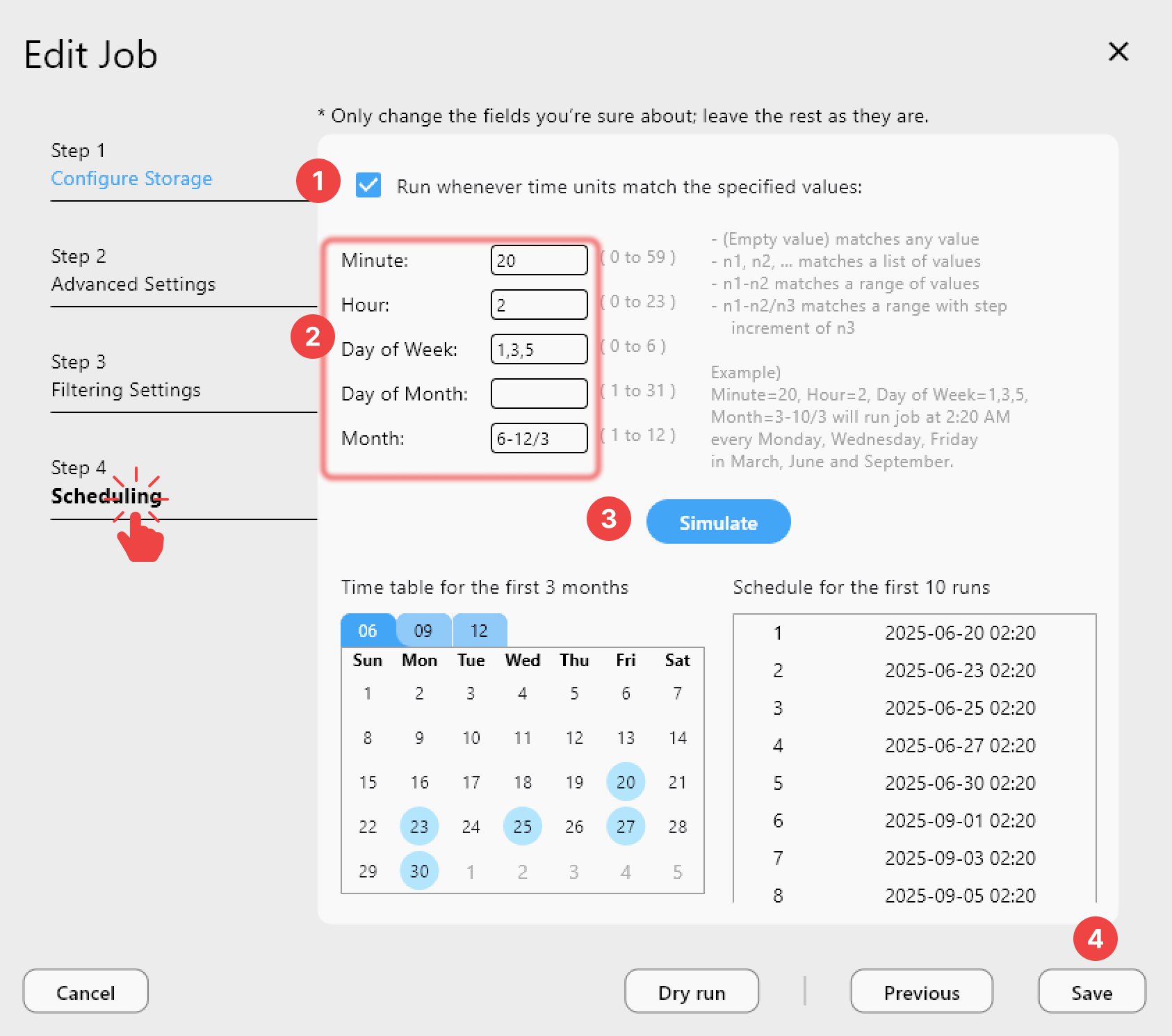
For AlmaLinux workstations that stay on most of the day, scheduled sync jobs turn RcloneView into a background backup tool. Configure a job through the 4-step Sync wizard, set filters to skip temp or oversized files, and — on a PLUS license — attach a crontab-style schedule so it runs automatically without you triggering it manually each time.
Job History logs every run with status, duration, and transfer speed, which is useful for confirming a scheduled backup actually completed overnight rather than silently failing.
Getting Started
- Download RcloneView from rcloneview.com — grab the x86_64 or aarch64 .rpm for AlmaLinux.
- Install with
dnf install ./rclone_view-{version}-linux-{arch}.rpm, confirming GTK+3 and a display server are present. - Add your first cloud remote through Remote tab > New Remote.
- Set up a sync or mount to start managing cloud storage directly from AlmaLinux.
With the .rpm installed, AlmaLinux gets the same drag-and-drop cloud management experience as Windows and macOS users, without needing a package repository or extra dependencies beyond GTK and a display server.
Related Guides:
- RcloneView on Fedora, RHEL, and CentOS — Cloud Storage Sync and Backup
- Install RcloneView on Ubuntu and Debian Linux
- RcloneView on CentOS/Rocky Linux — Cloud Storage Sync and Backup
Supported Cloud Providers





























