RcloneView vs Duplicati — Cloud Backup Tool Comparison
Duplicati and RcloneView both protect your data in the cloud, but they approach the problem differently. Duplicati creates compressed, encrypted backup archives. RcloneView syncs and manages files in their native format. Here's when to use each.
Duplicati is an open-source backup tool that creates encrypted, deduplicated backups of your local files to cloud storage. RcloneView is a multi-cloud file manager that syncs, transfers, and browses files across 70+ providers. They overlap in cloud backup but diverge in philosophy and capabilities.

Manage & Sync All Clouds in One Place
RcloneView is a cross-platform GUI for rclone. Compare folders, transfer or sync files, and automate multi-cloud workflows with a clean, visual interface.
- One-click jobs: Copy · Sync · Compare
- Schedulers & history for reliable automation
- Works with Google Drive, OneDrive, Dropbox, S3, WebDAV, SFTP and more
Free core features. Plus automations available.
Quick Comparison
| Feature | RcloneView | Duplicati |
|---|---|---|
| Primary purpose | Multi-cloud file management | Encrypted backup |
| Cloud-to-cloud transfer | Yes | No |
| File browsing | Two-pane visual explorer | No file browser |
| Backup format | Native files (as-is) | Proprietary encrypted archives |
| Deduplication | No | Yes (block-level) |
| Encryption | Crypt remotes (zero-knowledge) | AES-256 built-in |
| Version history | Via provider (if supported) | Built-in versioning |
| Cloud providers | 70+ | ~30 |
| Mount as drive | Yes | No |
| File restore | Direct file access | Restore from archive |
| Scheduling | Built-in | Built-in |
| Price | Free | Free |
Where Duplicati Excels
Block-level deduplication
Duplicati splits files into blocks and deduplicates them. If you change one page of a 100 MB document, only the changed blocks are uploaded. This saves significant bandwidth and storage for incremental backups.
Built-in versioning
Duplicati maintains a version history of all backed-up files. Restore any file to any previous version without relying on the cloud provider's versioning.
Compressed archives
Backup archives are compressed, reducing storage costs. A 100 GB dataset might only use 60 GB of cloud storage.
Where RcloneView Excels
Native file access
Files synced with RcloneView remain in their native format on the cloud. You can open a Google Drive file, edit an OneDrive document, or serve S3 objects directly — no restore process needed.

Cloud-to-cloud operations
RcloneView transfers between cloud providers directly. Duplicati only backs up from local storage to cloud — it can't manage or transfer between cloud accounts.
Multi-cloud management
Browse and manage files across 70+ providers in a single interface. Duplicati stores archives but doesn't help you manage cloud storage day-to-day.
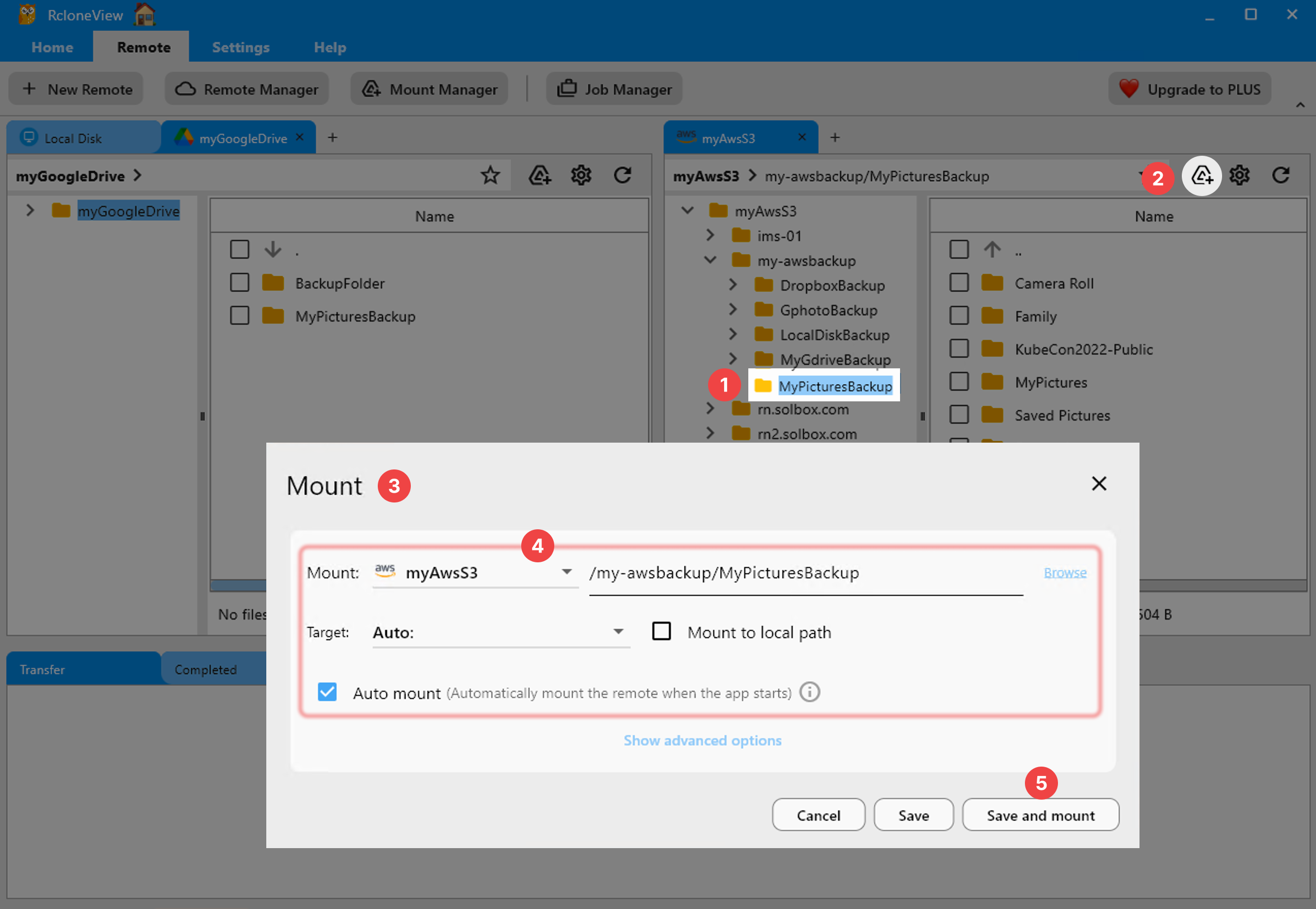
Mount as local drive
Mount any cloud storage as a local drive:
When to Use Each
| Scenario | Best Tool |
|---|---|
| Encrypted incremental backup of local files | Duplicati |
| Sync files between two cloud accounts | RcloneView |
| Browse and manage cloud files | RcloneView |
| Version history of all backed-up files | Duplicati |
| Cloud-to-cloud migration | RcloneView |
| Minimize storage costs for backups | Duplicati |
| Mount cloud as local drive | RcloneView |
| Multi-cloud file management | RcloneView |
Can You Use Both?
Absolutely. Use Duplicati for encrypted, versioned local backups. Use RcloneView for cloud-to-cloud sync, file management, and migration. They complement each other well.
Getting Started with RcloneView
- Download RcloneView from rcloneview.com.
- Add your cloud accounts — 70+ providers supported.
- Browse, sync, and manage with the two-pane explorer.
- Schedule automated syncs for ongoing protection.
Different tools for different jobs. Know when to use each.
Related Guides:
Supported Cloud Providers





























