Sync IDrive e2 Object Storage to AWS S3 or Google Drive with RcloneView
IDrive e2 offers incredibly affordable S3-compatible storage at $0.004/GB/month. But without a desktop sync client, managing files means API calls or web UI. RcloneView gives you a full visual interface.
IDrive e2 is one of the most cost-effective S3-compatible object storage services available — cheaper than Backblaze B2, Wasabi, and AWS S3. It's ideal for backups, archives, and cold storage. But like most object storage providers, IDrive e2 lacks a native desktop client. RcloneView connects via the S3 API, giving you visual file management, cloud-to-cloud sync, and scheduled automation.

Manage & Sync All Clouds in One Place
RcloneView is a cross-platform GUI for rclone. Compare folders, transfer or sync files, and automate multi-cloud workflows with a clean, visual interface.
- One-click jobs: Copy · Sync · Compare
- Schedulers & history for reliable automation
- Works with Google Drive, OneDrive, Dropbox, S3, WebDAV, SFTP and more
Free core features. Plus automations available.
Why IDrive e2?
| Provider | Cost per TB/month | Egress |
|---|---|---|
| IDrive e2 | $4.00 | Free (3x storage) |
| Backblaze B2 | $6.00 | $0.01/GB |
| Wasabi | $6.99 | Free |
| AWS S3 Standard | $23.00 | $0.09/GB |
IDrive e2's pricing makes it a compelling choice for anyone needing affordable, reliable object storage.
Connecting IDrive e2
Since IDrive e2 is S3-compatible:
- Click Add Remote → select Amazon S3.
- Choose IDrive e2 or Other from the S3 provider dropdown.
- Enter your credentials:
- Access Key and Secret Key from IDrive e2 dashboard.
- Endpoint: Your regional endpoint (e.g.,
https://s3.us-west-1.idrivecloud.io).
- Save — your e2 buckets are now browsable.

Browse and Manage
View IDrive e2 buckets alongside any other cloud:

Sync Scenarios
Google Drive → IDrive e2 (Affordable Backup)
Use e2 as a low-cost backup for your Google Drive:
- Create a Copy job: Google Drive → IDrive e2 bucket.
- Schedule nightly with Job Scheduling.
- Pay a fraction of what Google charges for the same data.
IDrive e2 → AWS S3 (Cross-Cloud Redundancy)
- Create a Sync job: IDrive e2 → S3 bucket.
- Maintain redundancy across two different S3-compatible providers.
Local/NAS → IDrive e2 (Offsite Archive)
- Create a Copy job: Local folder or NAS → IDrive e2.
- Perfect for offsite backup at minimal cost.

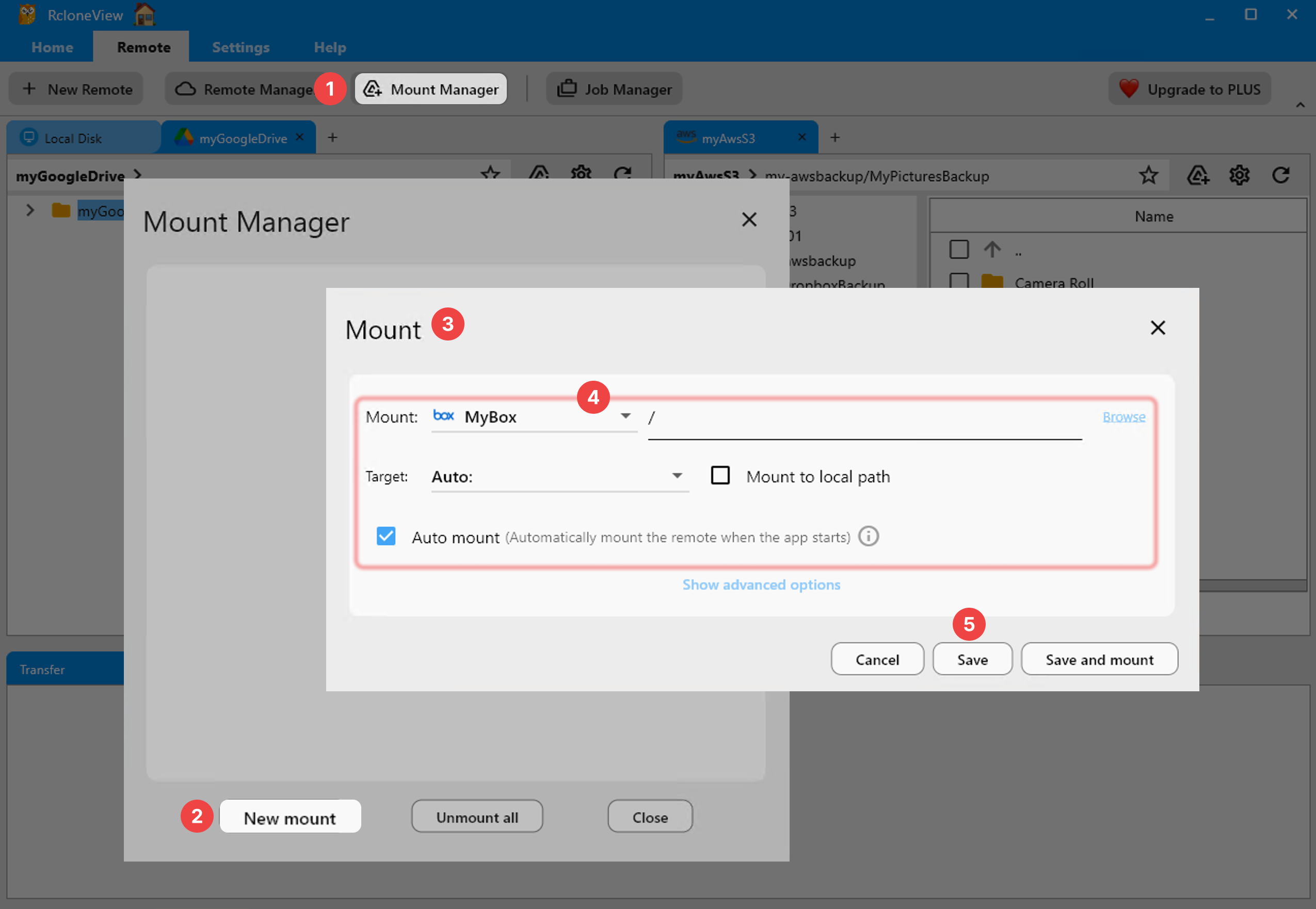
Mount as Local Drive
Access IDrive e2 as a regular folder:
Automate and Monitor


Getting Started
- Download RcloneView from rcloneview.com.
- Add IDrive e2 as an S3-compatible remote.
- Browse, mount, or sync to any destination.
- Schedule for automated low-cost cloud backup.
IDrive e2 is the budget king of object storage. RcloneView gives it the desktop experience it deserves.
Related Guides:
- Add AWS S3 and S3-Compatible
- Mount Cloud Storage as a Local Drive
- Compare Folder Contents
- Job Scheduling
Supported Cloud Providers





























