Sync Linode Object Storage to AWS S3 or Google Drive with RcloneView
Linode (now Akamai) Object Storage gives you affordable S3-compatible buckets, but there's no desktop client. RcloneView fills the gap — browse, sync, and automate backups visually.
Linode Object Storage (now part of Akamai Connected Cloud) is a popular S3-compatible storage service used by developers and small businesses for its simplicity and competitive pricing. But like most object storage services, the web dashboard isn't built for everyday file management, and there's no native desktop sync client. RcloneView connects to Linode via the S3 API, giving you a full GUI for browsing, syncing, and automating data transfers.

Manage & Sync All Clouds in One Place
RcloneView is a cross-platform GUI for rclone. Compare folders, transfer or sync files, and automate multi-cloud workflows with a clean, visual interface.
- One-click jobs: Copy · Sync · Compare
- Schedulers & history for reliable automation
- Works with Google Drive, OneDrive, Dropbox, S3, WebDAV, SFTP and more
Free core features. Plus automations available.
Why Use RcloneView with Linode Object Storage?
- No desktop client — Linode offers a web console and API, but no sync app.
- Visual bucket management — Browse, drag-and-drop, and organize files without CLI.
- Cross-cloud sync — Replicate Linode data to AWS S3, Google Drive, or any provider.
- Automated backups — Schedule nightly syncs to a second cloud for redundancy.
Connecting Linode Object Storage
Since Linode is S3-compatible, setup uses the S3 provider:
- Open RcloneView and click Add Remote.
- Select Amazon S3 as the provider type.
- Choose Other from the S3 provider dropdown.
- Enter your Linode credentials:
- Access Key and Secret Key from the Linode Cloud Manager.
- Endpoint:
https://{cluster-id}.linodeobjects.com(e.g.,https://us-east-1.linodeobjects.com). - Region: Your cluster region.
- Save — your Linode buckets are now browsable.

Browse Your Buckets
View Linode buckets alongside any other cloud or local drive:

Sync Scenarios
Linode → AWS S3 (Cross-Cloud Redundancy)
- Create a Sync job: Linode → S3 bucket.
- Schedule daily with Job Scheduling.
- Both are S3-compatible, so transfers are fast and efficient.
Linode → Google Drive (Team Access)
- Create a Copy job: Linode → Google Drive folder.
- Makes developer assets accessible to non-technical team members.
Local/NAS → Linode (Offsite Backup)
- Create a Sync job from local storage → Linode bucket.
- Linode's pricing makes it cost-effective for offsite backups.

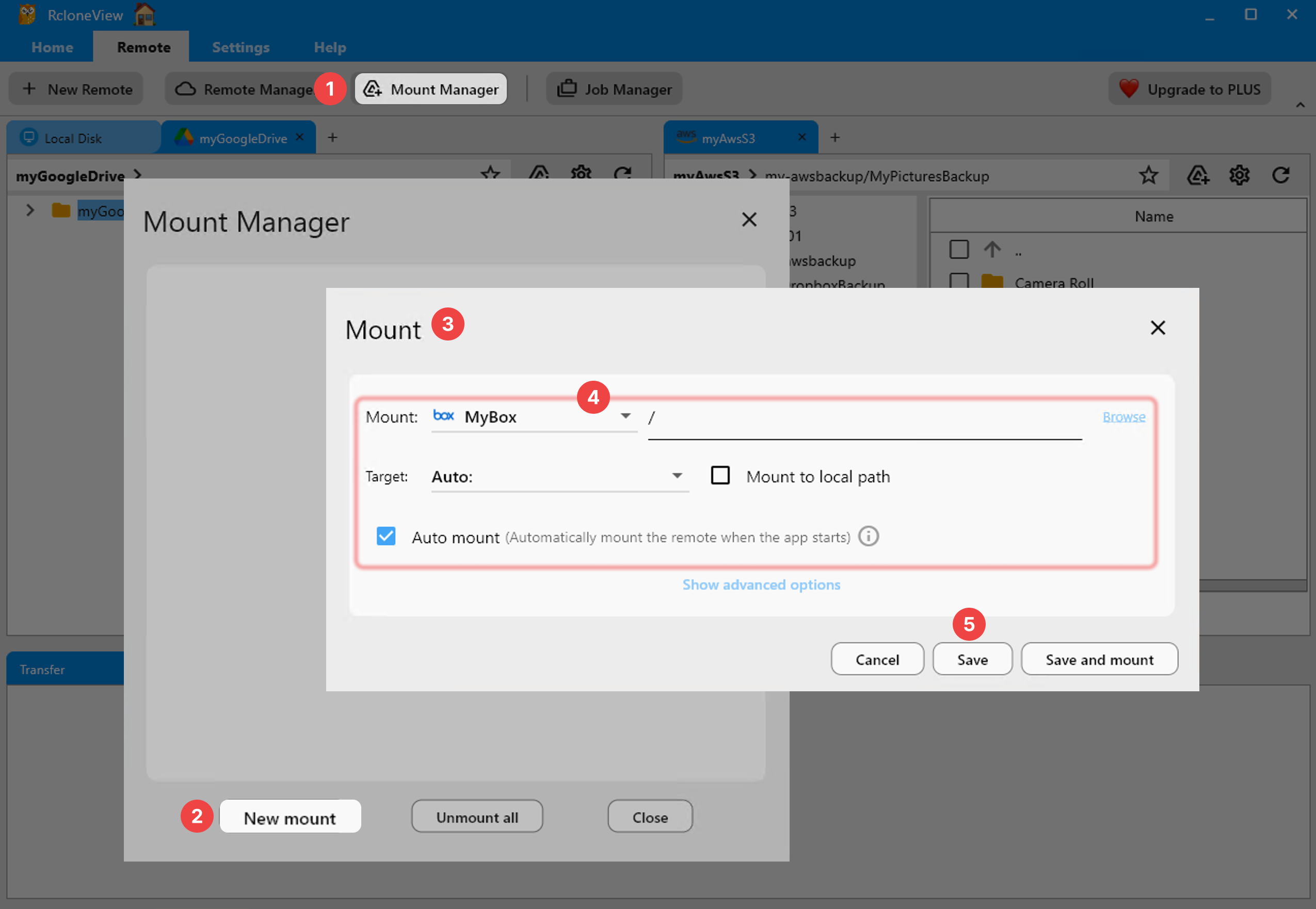
Mount as a Local Drive
Access Linode buckets like a regular folder:
Automate and Monitor


Getting Started
- Download RcloneView from rcloneview.com.
- Add Linode Object Storage as an S3-compatible remote.
- Browse, mount, or sync to any destination.
- Schedule for automated backups.
Linode Object Storage deserves better than a web console. RcloneView gives it a proper desktop experience with multi-cloud sync built in.
Related Guides:
- Add AWS S3 and S3-Compatible
- Mount Cloud Storage as a Local Drive
- Compare Folder Contents
- Job Scheduling
Supported Cloud Providers





























