Edit Cloud Video Projects with RcloneView: Mount Drives, Sync Media, and Protect Your Timeline
Stop shuttling drives or waiting on downloads. RcloneView lets you mount cloud storage as an edit drive, keep footage mirrored across locations, and automate protection for your timeline.
Modern shoots land footage on cameras, recorders, and remote offices at once. Moving it all by hand slows editors and risks broken links. RcloneView wraps the proven rclone engine in a clean UI so you can mount clouds like local disks, stage proxies, sync deliverables, and recover quickly when something goes wrong.

Manage & Sync All Clouds in One Place
RcloneView is a cross-platform GUI for rclone. Compare folders, transfer or sync files, and automate multi-cloud workflows with a clean, visual interface.
- One-click jobs: Copy · Sync · Compare
- Schedulers & history for reliable automation
- Works with Google Drive, OneDrive, Dropbox, S3, WebDAV, SFTP and more
Free core features. Plus automations available.
Why Cloud-First Editing Makes Sense
- Keep crews in sync without shipping spinning disks; everyone mounts the same source.
- Stay within tight windows by staging proxies near your editors while masters remain in cold storage.
- Reduce human error: scheduled syncs and checksum verification mean fewer broken relinks.
Set Up a Reliable Cloud Mount for NLEs
A stable mount is the backbone of cloud editing. RcloneView makes it few clicks.
- Connect remotes: add Google Drive, Dropbox, S3/Wasabi/R2, or your NAS via
+ New Remote. Guides: [Add Google Drive, Add AWS S3 and S3-Compatible.
 .
.
- Create the mount: Remote Explorer or Mount Manager keeps things simple: Mount Cloud Storage as a Local Drive.
- Pick an edit-friendly path: drive letter on Windows (
X:viacmount),/Volumes/Cloud/Editon macOS,/mnt/editon Linux.
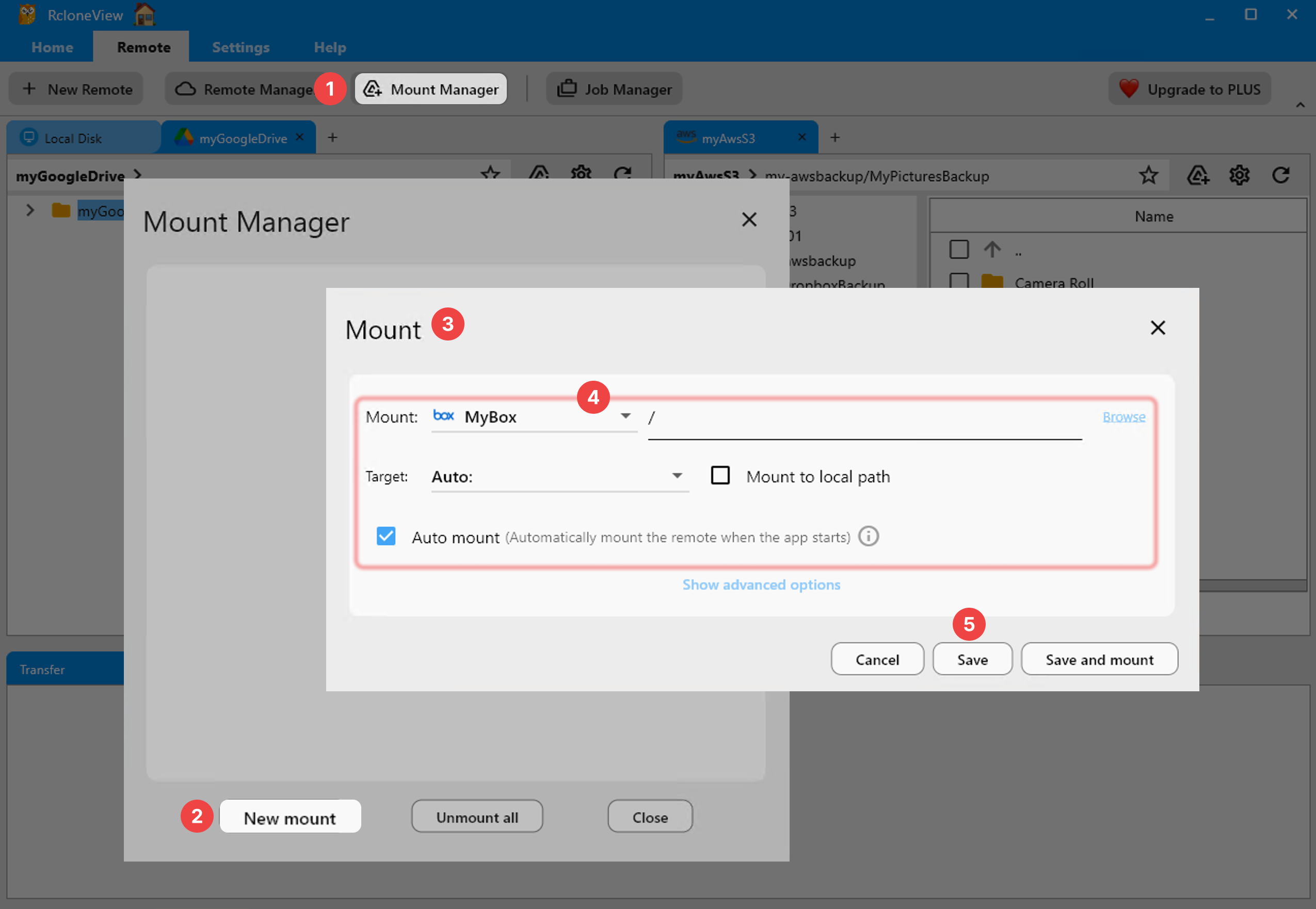 .
.
Keep Projects Safe with Compare, Sync, and Scheduler
Editing is messy; automation keeps it safe.
- Visual diffs before syncing: run Compare to spot missing footage or newer renders without CLI flags: Compare folder contents.
 .
.
- syncs: build repeatable jobs to push
Projects/to S3 while pulling fresh proxies from Drive: Synchronize Remote Storages Instantly, Create Sync Jobs, and Execute & Manage Jobs.
 .
.
- Schedule protection: run nightly syncs after editors log off. If a job fails, RcloneView retries and records the log so you can resume fast.

Share Proxies and Deliverables Across Clouds
Different stakeholders need different copies.
- Send lightweight proxies to Dropbox or Drive for reviewers while masters live in Wasabi or a NAS.
- Use separate sync jobs per destination so bandwidth-heavy masters run off-hours and proxies run hourly.
- Keep folder structures consistent with saved presets; the NLE relinks cleanly when paths match.
Monitor and Recover Quickly
You need to know when transfers slow down or fail.
- Watch throughput live in Transfer Monitor: Real-time Transfer Monitoring.
 .
.
- Review Job History to confirm checksums and skipped files: Job History.
Cloud Drives That Feel Local
RcloneView makes cloud storage behave like an edit-ready drive: mount once, automate syncs, and keep every version protected. Your team stops juggling copies and stays focused on the cut.
Supported Cloud Providers





























