Declutter Cloud Photo Libraries with RcloneView: Compare, Clean, and Protect Every Shot
Tired of the same RAWs and JPEGs scattered across Google Drive, Dropbox, and a NAS? RcloneView lets you see what's duplicated, clean it up, and lock in protected backups -- all without wrestling CLI flags.
If your photo and video history lives in three or more places, drift is inevitable: duplicates, missing edits, and folders that no one remembers. RcloneView wraps rclone's power in a visual workspace so you can compare sources, mount clouds like local drives, and run repeatable sync jobs that keep a single, protected master library.

Manage & Sync All Clouds in One Place
RcloneView is a cross-platform GUI for rclone. Compare folders, transfer or sync files, and automate multi-cloud workflows with a clean, visual interface.
- One-click jobs: Copy · Sync · Compare
- Schedulers & history for reliable automation
- Works with Google Drive, OneDrive, Dropbox, S3, WebDAV, SFTP and more
Free core features. Plus automations available.
Why a Unified Library Matters
- Stop paying to store the same album twice across providers.
- Keep a single source of truth for Lightroom, Capture One, or Photos.
- Prove backup integrity with logged, checksum-verified runs instead of guesswork.
Connect Clouds and Mount a Clean Workspace
- Add every location once: Google Drive, Dropbox, OneDrive, S3/Wasabi/R2, or NAS via
+ New Remote. Guides: add-oath-online-login and /support/howto/remote-storage-connection-settings/s3.
 .
.
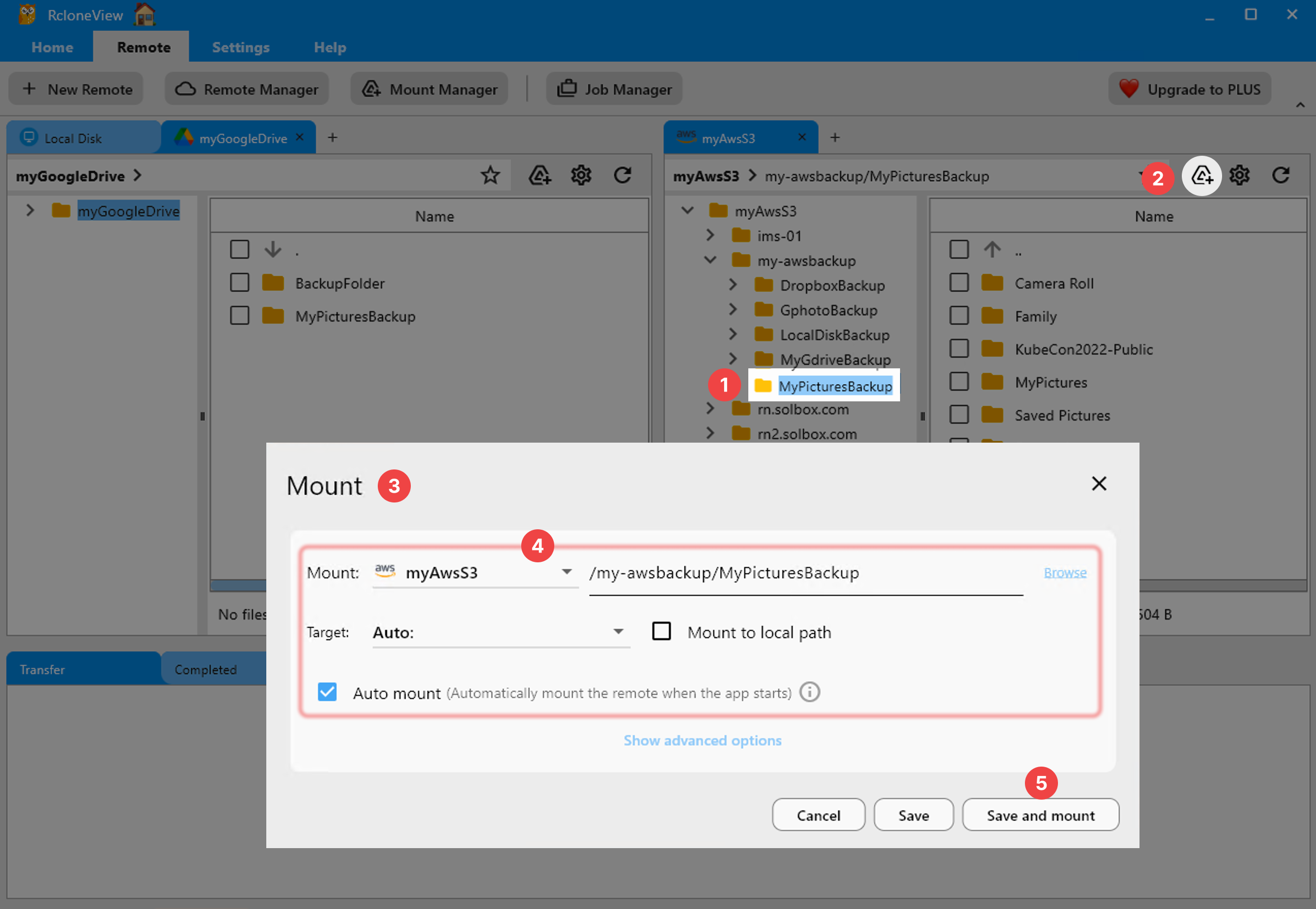
- Mount the key sources so they feel local to your tools: Mount Cloud Storage as a Local Drive.
- Use consistent paths (e.g.,
/Volumes/PhotosorX:\Photos) so editors and automations do not break when you switch machines.
 .
.
Spot Duplicates and Drift with Compare
- Run Compare between any two locations (e.g., Dropbox vs NAS) to see newer, missing, or mismatched files before syncing: Compare folder contents
- Filter by extensions to isolate RAWs, JPEGs, or sidecar files when reviewing differences.
 .
.
Build a Protected Master Library with Sync Jobs
- Choose your source of truth (often the NAS or the most complete cloud folder) and create a one-way sync to your backup target (e.g., S3/Wasabi with lifecycle policies). Guide: Create Sync Jobs, and Execute & Manage Jobs.
- Use job presets for albums or years (e.g.,
2020/,2021/) to keep runs small and predictable. - Prefer copy for safety when consolidating; switch to sync only after you trust the target and have a history of clean runs.
- Run a dry-run first with the embedded rclone flags to validate includes and excludes.
 .
.
Schedule, Monitor, and Verify
- Turn on scheduling so your master library is refreshed nightly instead of whenever someone remembers: Job Scheduling.
 .
.
- Use Job History logs as your audit trail; if a run fails, restart from the same job without reconfiguring.
Serve Editors and Family Fast
- Keep a fast copy of current projects mounted locally while colder archives stay in S3/Wasabi.
- Create a second job to push lightweight JPEG exports to a sharing cloud (Drive or Dropbox) while RAWs stay in your master vault.
- For travel shoots, mount the cloud on a laptop and let the scheduler backfill to the NAS when you reconnect.
Ready to clean up the sprawl and stop paying for duplicate pixels? Mount, compare, and schedule your way to a single, protected library with RcloneView.
Supported Cloud Providers





























