Reduce Multi-Cloud Costs: Identify and Clean Up Ghost Files with RcloneView’s Compare Tool
Stop paying for duplicate or forgotten data across Google Drive, S3, R2, and Dropbox. RcloneView’s Compare tool lets you visually spot and remove ghost files to shrink your monthly bill.
Cloud sprawl hits budgets first: overlapping backups, legacy project folders, and stale exports that nobody remembers. With RcloneView you can audit two remotes side by side, surface duplicates, and archive or delete safely—no CLI required and with logs you can keep for finance.

Manage & Sync All Clouds in One Place
RcloneView is a cross-platform GUI for rclone. Compare folders, transfer or sync files, and automate multi-cloud workflows with a clean, visual interface.
- One-click jobs: Copy · Sync · Compare
- Schedulers & history for reliable automation
- Works with Google Drive, OneDrive, Dropbox, S3, WebDAV, SFTP and more
Free core features. Plus automations available.
Why ghost files cost so much
- Redundant copies across premium tiers (Google Drive + S3 Standard) quietly double spend.
- Forgotten exports and media archives linger on expensive storage classes.
- Teams lose track of “final” versions, keeping every draft forever.
What you need
- RcloneView installed and signed in to the two remotes you want to audit (e.g.,
gdrive:ands3:orr2:). - Enough permissions to list and delete/move objects on the target remotes.
- Optional: a cheaper archive bucket (Wasabi, S3 Glacier, R2) for long-term retention.
Step 1 — Open both clouds side by side
- Connect your remotes in Settings → Remote Storage (Google Drive, S3/R2, Dropbox, etc.).

- Open the Explorer and load each remote in its own pane.

Step 2 — Run Compare to surface ghost files
- Click Compare to analyze names, sizes, and (when available) checksums.

- Results show:
- Identical files in both remotes (likely redundant).
- Left only / Right only items (orphaned data).
- Different items with the same name but different content.
Tip: Start with large folders (media, backups) for quick savings.
Step 3 — Clean up safely
- Delete duplicates on the expensive side, or move them into a cheaper archive bucket.
- Use Drag & Drop to relocate files before deleting so you keep one canonical copy.
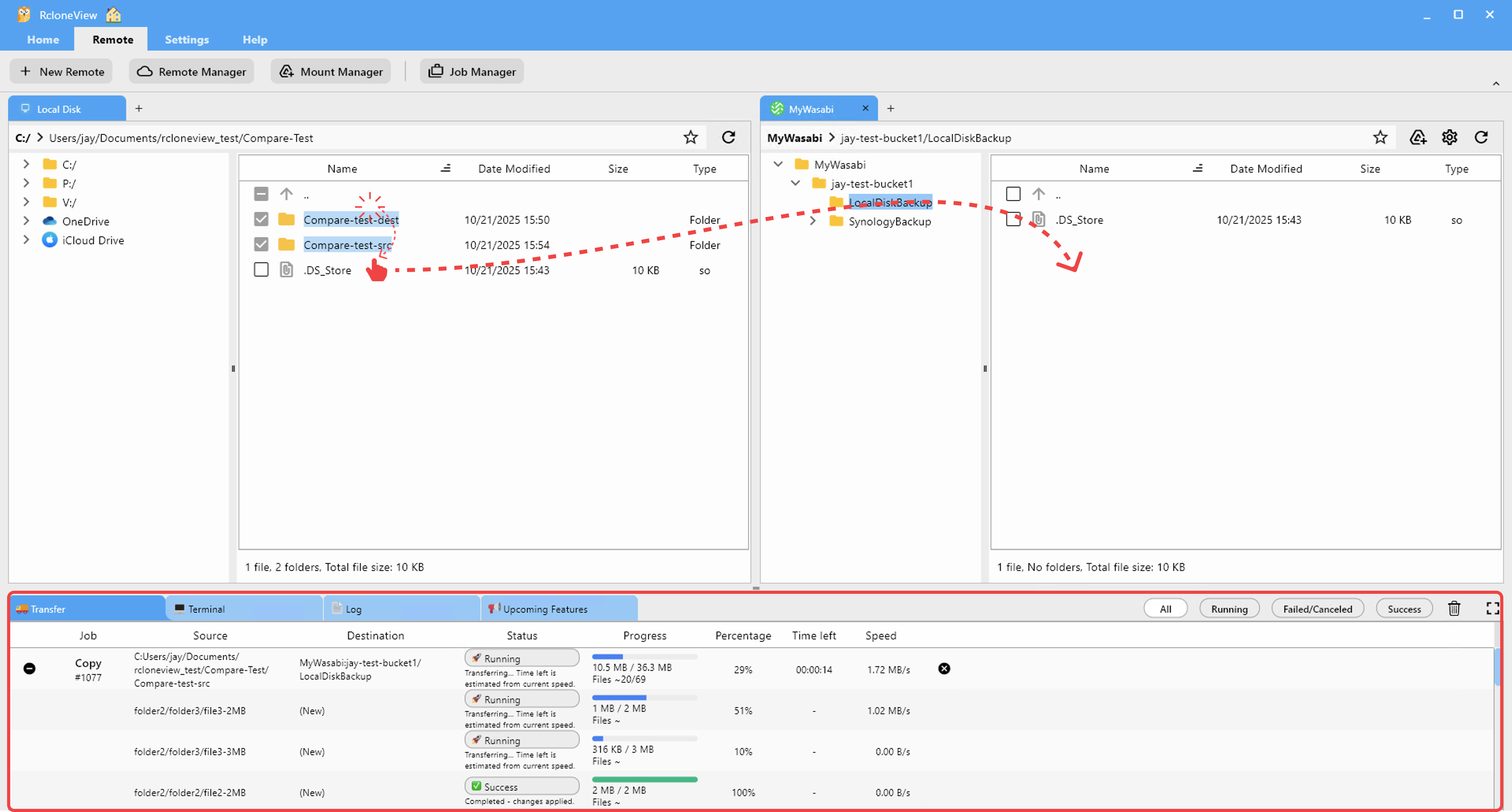
- For sensitive data, copy to archive first, verify, then delete the original to avoid accidental loss.
Step 4 — Prevent future bloat with scheduled syncs
- Create a Sync job from your primary storage to a backup or archive remote.
- Enable deletes (with care) so removed items don’t linger and keep accruing cost.
- Schedule the job during off-hours; keep bandwidth limits low for cheap egress.

Step 5 — Monitor and keep an audit trail
- Watch transfers live to catch rate limits or unexpected large moves.

- Use Job History to export logs for finance or compliance, proving what was deleted or archived.
Tier-and-save playbook
- Keep “hot” working sets on Google Drive/Dropbox.
- Push stale or infrequently accessed data to S3 Glacier, Wasabi, or R2.
- Re-run Compare monthly to catch new ghost files before they snowball into higher plan tiers.
Related resources
- Browse & Manage Remotes
- Compare folder contents
- Drag & Drop files
- Synchronize Remote Storages Instantly
- Create Sync Jobs
- Execute & Manage Jobs
- Job Scheduling
- Real-time Transfer Monitoring
- Mount Cloud Storage as a Local Drive
Wrap-up
Ghost files drain multi-cloud budgets. With RcloneView’s Compare, you can see duplicates instantly, archive smartly, and schedule cleanups that keep every provider lean—so you stay on the cheapest tier without losing the data you actually need.
Supported Cloud Providers





























