Transfer Files Between Wasabi and Google Drive with RcloneView
Move terabytes from Wasabi to Google Drive (or back) without juggling command lines. RcloneView layers rclone’s speed and S3 tuning into a guided GUI so you can compare, sync, and schedule migrations confidently.
RcloneView supports both S3-compatible storage like Wasabi and Google Drive’s OAuth flow. Open both remotes side-by-side, choose Explorer/Compare/Sync based on your workflow, and apply S3-friendly chunking to keep large uploads stable.

Manage & Sync All Clouds in One Place
RcloneView is a cross-platform GUI for rclone. Compare folders, transfer or sync files, and automate multi-cloud workflows with a clean, visual interface.
- One-click jobs: Copy · Sync · Compare
- Schedulers & history for reliable automation
- Works with Google Drive, OneDrive, Dropbox, S3, WebDAV, SFTP and more
Free core features. Plus automations available.
Wasabi vs Google Drive at a glance
- Wasabi: S3 API, fast ingest, low storage cost, per-bucket endpoints (e.g.,
s3.us-east-1.wasabisys.com). - Google Drive / Workspace: Familiar sharing, strong collaboration, API quotas to consider during bursts.
- RcloneView: One UI for both-compare before syncing, drag-and-drop, run dry runs, and schedule repeat jobs.
Add a Wasabi remote (S3-compatible)
- Click
+ New Remote-> choose S3. - Enter your Access Key / Secret Key, bucket region, and endpoint (e.g.,
s3.wasabisys.comor region-specific URL). - Save as
Wasabi_Archive(or similar) for clarity.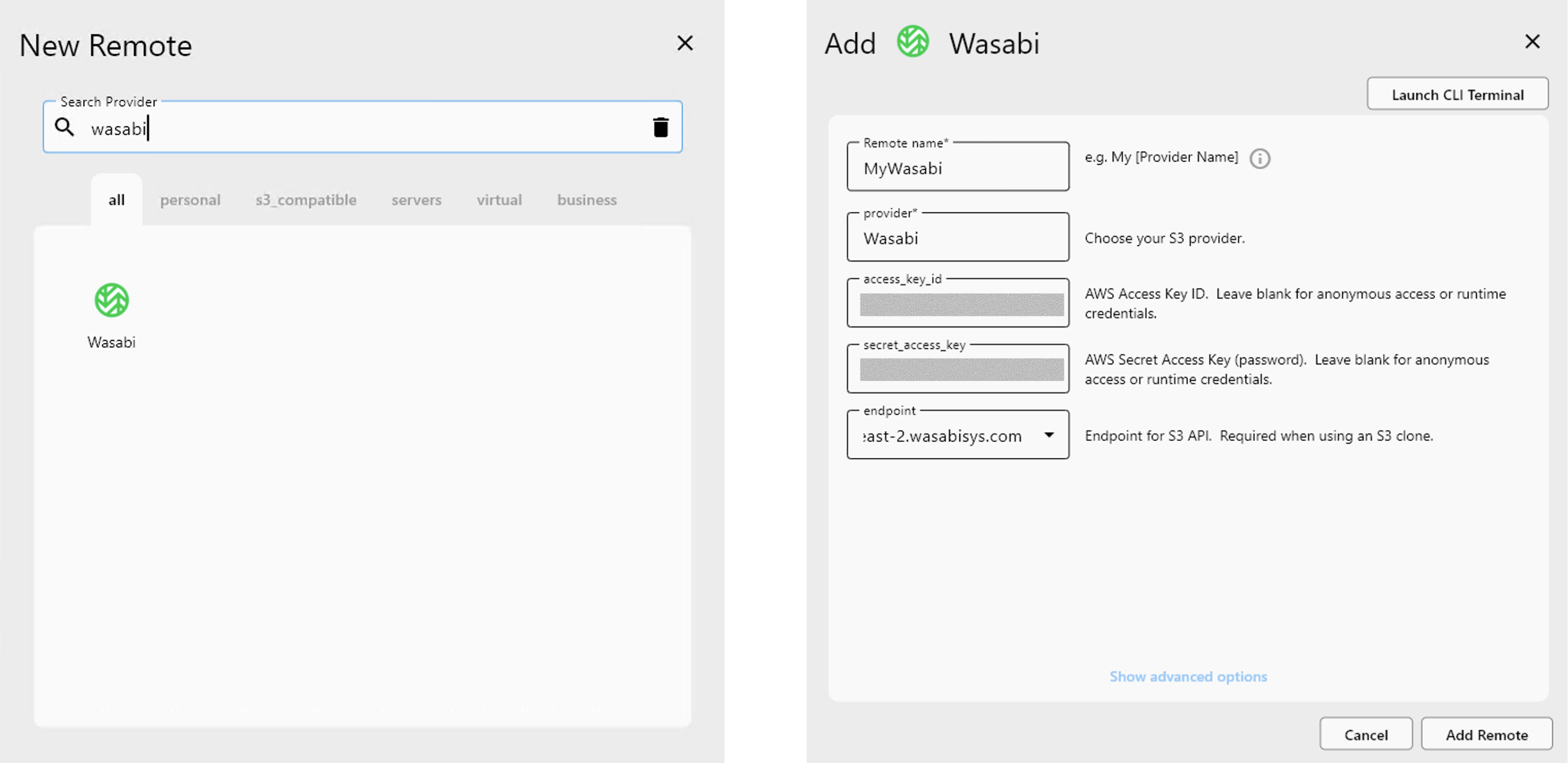
Reference setup: S3-compatible setup
Connect Google Drive with OAuth
- In
+ New Remote, pick Google Drive. - Sign in via the browser OAuth prompt and confirm the account or Workspace you’ll migrate to.
- Name it (e.g.,
GDrive_Workspace).
More detail: Add Google Drive via OAuth
Open both clouds side-by-side
- In Explorer -> Browse, open your Wasabi remote on one side and Google Drive on the other.
- Navigate to the source bucket/folder and the target Drive folder.
Choose the best transfer method
- Drag & Drop (Explorer): Quick copies for selected folders. Progress appears in Transfer logs.
- Compare -> Copy: Preview differences first; copy missing/newer files with confidence.
- Sync: One-way mirror for ongoing backups (Wasabi -> Drive or reverse). Add
--dry-runfirst to validate. - Need a walkthrough? See the multi-cloud tutorial flow: Transfer files between MEGA and Google Drive
Build a scheduled backup job
- After a successful Sync, click Save to Jobs.
- Open Job Manager -> Add Job (or edit the saved one) and set the schedule (e.g., nightly).
- Keep Backup Dir or versioned folders to preserve changed/deleted items on Drive.
- Monitor in Transfer tab and History for per-job outcomes.
Migration checklist (integrity + safety)
- Run a Compare first to see what will move; export results if needed.
- Start with
--dry-runon Sync to avoid surprises. - For critical data, validate with
rclone check source: dest:in the built-in Terminal and review API logs. - Use distinct destination folders (e.g.,
Wasabi_Archive_2025) until you verify integrity. - Document jobs with clear names (
Wasabi->GDrive_Nightly) and keep endpoints/keys scoped to the needed bucket.
Wrap-up
With RcloneView, Wasabi’s S3 performance and Google Drive’s collaboration live in one interface. Create both remotes, preview changes, tune S3 uploads, and schedule recurring jobs-all without editing configs or CLI flags. Start your Wasabi -> Google Drive migration today and keep every run verifiable.
Supported Cloud Providers





























