Cloud Storage for Publishing and Print Media Companies with RcloneView
Publishing and print media companies handle thousands of manuscripts, design files, and print-ready assets. RcloneView centralizes these files across cloud platforms and automates the backups that protect years of editorial work.
The publishing industry runs on files — manuscripts in Word and PDF, book covers and illustrations in PSD and AI, page layouts in InDesign, and print-ready output in high-resolution PDF/X. These files flow between authors, editors, designers, proofreaders, and print production teams, often using different cloud platforms at each stage. A manuscript might start in Google Docs, move to Dropbox for editorial review, then land on an internal server for layout and production.
RcloneView connects all these platforms into a single interface, enabling publishing teams to manage their complex file workflows without manual downloading and re-uploading at every stage.

Manage & Sync All Clouds in One Place
RcloneView is a cross-platform GUI for rclone. Compare folders, transfer or sync files, and automate multi-cloud workflows with a clean, visual interface.
- One-click jobs: Copy · Sync · Compare
- Schedulers & history for reliable automation
- Works with Google Drive, OneDrive, Dropbox, S3, WebDAV, SFTP and more
Free core features. Plus automations available.
Publishing Workflow Challenges
Publishing companies face several file management pain points:
- Large file sizes: A single book's design files (cover art, interior layout, illustrations) can total several gigabytes. Multi-volume series or art books can reach tens of gigabytes.
- Version control: Manuscripts go through dozens of revisions. Losing track of which version is current — or losing an earlier version that needs to be referenced — causes costly delays.
- Multi-platform teams: Authors use Google Docs, editors prefer Dropbox, designers work from local drives, and production sends files to print vendors via FTP. No single platform covers everyone.
- Long-term archival: Published works must be archived indefinitely. Backlist titles from decades ago may need reprinting, requiring access to original design files.
- Seasonal peaks: Publishing schedules create seasonal surges — fall catalog production, end-of-year releases — when file management demands spike.
Editorial Pipeline Management
The editorial pipeline moves manuscripts through distinct stages: submission, developmental editing, copyediting, proofreading, and production. At each stage, different team members need access, and files often change platforms.
RcloneView's two-pane explorer bridges these platforms. An editor can pull the latest manuscript from an author's Google Drive, compare it against the previous version in the company's Dropbox, and push the approved version to the production team's OneDrive — all from one interface. The compare feature highlights files that differ between locations, making it easy to spot which manuscripts have been updated.

Design Asset Synchronization
Design teams work with files that are too large for most cloud sync clients to handle gracefully. A single InDesign package for a 300-page book — including linked images, fonts, and the layout file — can exceed 10 GB. Syncing these packages between the designer's workstation, a review server, and cloud backup requires a tool that handles large files reliably.
RcloneView's multi-threaded transfers and resumable uploads ensure that large design packages transfer completely, even on imperfect connections. If a transfer is interrupted, RcloneView picks up where it left off rather than restarting from scratch.
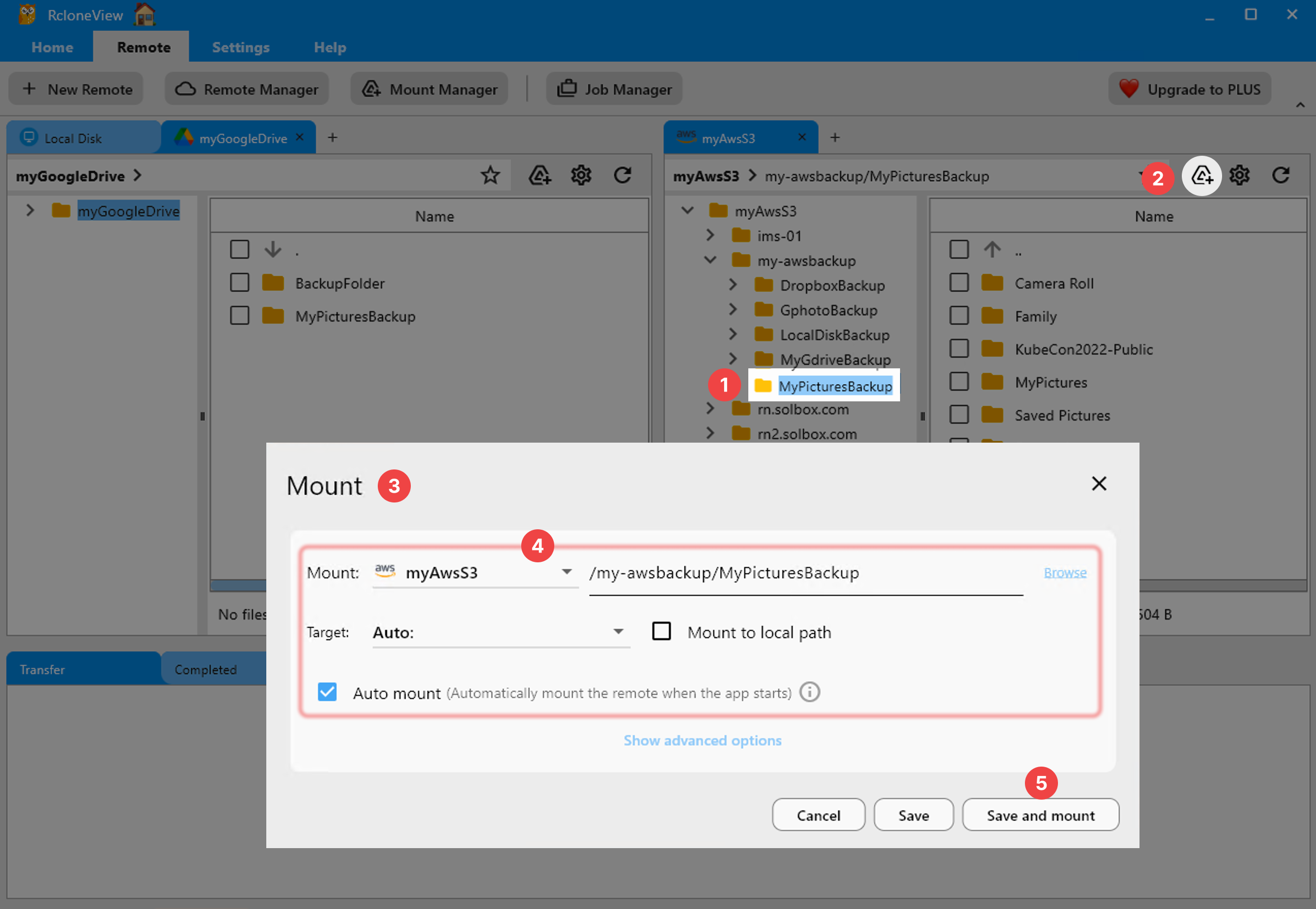
For designers who need to access files stored in the cloud without downloading entire packages, RcloneView's mount feature maps a cloud folder as a local drive. This lets InDesign, Photoshop, and Illustrator open cloud-hosted files directly — useful for reviewing layouts without a full download.
Print Production File Delivery
Print-ready files need to reach production vendors — printers, binderies, and distributors — reliably and on schedule. Many vendors still accept files via FTP or SFTP. Others use cloud storage drops on Google Drive or Dropbox.
RcloneView connects to FTP, SFTP, Google Drive, Dropbox, and S3 from the same interface. Drag print-ready PDFs from your internal storage to the vendor's FTP server, or copy them to a shared Dropbox folder. RcloneView's real-time monitoring confirms that files were delivered completely, and the job history provides a record of every delivery for production tracking.

Backlist and Long-Term Archival
Published titles remain in a publisher's catalog indefinitely. Reprint requests, new editions, translations, and rights sales all require access to original files — sometimes decades after initial publication. Storing these archives on expensive active storage is wasteful; losing them is unacceptable.
RcloneView enables cost-effective archival by syncing completed project folders to cold storage tiers. Transfer finished books to AWS S3 Glacier Deep Archive ($0.00099/GB/month) or Backblaze B2. Organize archives by title, series, or imprint for easy retrieval. When a reprint request comes in, pull the specific title's files back to active storage through RcloneView.

Automated Backups for Active Projects
Active projects need daily backups. A corrupted InDesign file or an accidentally overwritten manuscript can set production back by weeks. RcloneView's scheduler automates nightly backups of active project folders to a separate cloud provider.
Configure a sync job from the production team's primary storage (OneDrive, Google Drive, or a NAS) to a backup destination (Backblaze B2, Wasabi, or AWS S3). RcloneView's delta detection ensures only changed files are transferred each night, keeping backup windows short and costs low.
Getting Started
- Download RcloneView from rcloneview.com.
- Add remotes for each platform in your editorial pipeline (Google Drive, Dropbox, OneDrive, FTP, S3).
- Set up automated nightly backups for active production projects.
- Create an archival workflow for completed titles using cold storage tiers.
Publishing companies build their catalogs over decades. RcloneView ensures that every manuscript, design file, and print-ready asset is backed up, accessible, and organized across whatever cloud platforms your team uses.
Related Guides:
- Add Remote via Browse-based Log-in(OAuth)
- Browse and Manage Remote Storage
- Create Sync Jobs
- Mount Cloud Storage as a Local Drive
Supported Cloud Providers





























