Cloud Storage for Manufacturing and IoT Data with RcloneView
A single production line can generate gigabytes of sensor telemetry, machine vision images, and quality control records every shift. Getting that data from the factory floor to the cloud — reliably and affordably — is a problem that generic file sync tools were not designed to solve.
Modern manufacturing runs on data. CNC machines produce CAM files and toolpath logs. Machine vision systems capture thousands of inspection images per hour. IoT sensors on production equipment stream temperature, vibration, pressure, and throughput readings around the clock. Quality management systems generate inspection reports, deviation records, and certificates of compliance. All of this data needs to move from edge devices and factory servers to cloud storage for analytics, long-term archival, and cross-site access. RcloneView provides a GUI-based multi-cloud file manager that connects to AWS S3, Azure Blob Storage, Google Cloud Storage, and dozens of other providers, giving manufacturing IT teams a single tool for edge-to-cloud data movement, multi-site replication, and production data archival.

Manage & Sync All Clouds in One Place
RcloneView is a cross-platform GUI for rclone. Compare folders, transfer or sync files, and automate multi-cloud workflows with a clean, visual interface.
- One-click jobs: Copy · Sync · Compare
- Schedulers & history for reliable automation
- Works with Google Drive, OneDrive, Dropbox, S3, WebDAV, SFTP and more
Free core features. Plus automations available.
The Manufacturing Data Challenge
Manufacturing environments produce data at a scale and velocity that distinguish them from typical enterprise workloads:
- High volume, continuous generation — a single IoT gateway may collect readings from hundreds of sensors every second. Machine vision stations generate high-resolution images at line speed. Over a 24-hour production cycle, a mid-size factory can easily produce 50-200 GB of raw data.
- Multiple data types — sensor telemetry (CSV, JSON, Parquet), CAD/CAM files (STEP, IGES, G-code), quality images (TIFF, PNG, JPEG), production logs (text, XML), and ERP exports all coexist.
- Edge-first architecture — data is generated on the factory floor by PLCs, edge gateways, and local servers. Network connectivity to the cloud may be limited, intermittent, or metered.
- Regulatory retention — industries like aerospace (AS9100), automotive (IATF 16949), pharmaceutical (21 CFR Part 11), and food (FSMA) require production records to be retained for years or decades.
- Multi-site operations — manufacturers with multiple plants need to replicate data between sites for centralized analytics, disaster recovery, or supply chain visibility.
Generic cloud sync tools designed for office documents struggle with these requirements. They choke on millions of small sensor files, lack scheduling flexibility for off-peak transfers, and do not provide the transfer monitoring needed to verify that every production record reached its destination.
Edge-to-Cloud Sync for IoT Sensor Data
The typical IoT data pipeline in a manufacturing environment looks like this:
- Sensors and PLCs generate readings and push them to an edge gateway or local historian.
- Edge processing filters, aggregates, or compresses the raw data.
- Upload to cloud storage (S3, Azure Blob, GCS) for analytics, machine learning, or long-term retention.
RcloneView fits into step 3 as the reliable transport layer between the edge server and the cloud. On a factory-floor Linux server or Windows workstation, an administrator can configure RcloneView to sync a local data directory to an S3 bucket on a recurring schedule.

Key advantages for IoT data sync:
- Incremental sync — only new or changed files are transferred, which is critical when dealing with append-only sensor logs that grow continuously.
- Bandwidth throttling — limit upload speed to avoid saturating the factory's internet connection during production hours.
- Retry and resume — if a transfer fails mid-file (common on unreliable factory networks), RcloneView retries automatically.
- Multi-threaded transfers — large batches of small files transfer faster with concurrent upload streams.
For high-frequency sensor data stored as many small files (a common pattern with time-series data written as one file per minute or per batch), RcloneView's ability to handle millions of files in a directory without choking is essential. The underlying rclone engine uses efficient directory listing and parallel operations optimized for object storage.
CAM Files and Engineering Data Management
CNC machining programs (G-code), 3D models (STEP, STL), toolpath simulations, and setup sheets are critical manufacturing intellectual property. Losing a CAM file can halt a production line. Engineering teams need these files accessible across sites but also backed up to durable cloud storage.
RcloneView supports workflows that engineering and manufacturing IT teams commonly need:
- Sync CAM libraries to S3 or Azure — keep a cloud mirror of the master CAM file repository. When a machinist updates a program on the shop-floor server, the next scheduled sync pushes the change to the cloud.
- Cross-site replication — a company with plants in Ohio and Guadalajara can sync CAM files between both sites through a shared cloud bucket, ensuring both facilities have the latest toolpaths.
- Version tracking through folder structure — while RcloneView is not a version control system, manufacturers commonly organize CAM files by part number and revision in a folder hierarchy. Syncing this structure to cloud storage preserves the revision history.

Quality Control Images and Inspection Records
Machine vision systems, coordinate measuring machines (CMMs), and manual inspection stations generate images and reports that must be retained for traceability. In regulated industries, these records are often required to be available for audit for 7 to 15 years.
RcloneView helps quality teams manage this data:
- Automated archival — schedule nightly sync jobs that move the day's inspection images from the quality lab server to cloud archive storage (S3 Glacier, Azure Archive, Backblaze B2). This frees local disk space while meeting retention requirements.
- Compare source and destination — after a sync, use RcloneView's folder comparison to verify that every image on the local server has a matching copy in the cloud archive.
- Organize by production date and batch — sync jobs can be configured to preserve the folder structure, so images remain organized by production order, batch number, or inspection date.

For pharmaceutical and food manufacturers subject to 21 CFR Part 11 or FSMA, the ability to verify file integrity through hash comparison provides evidence that records have not been altered after initial storage.
Supply Chain Document Management
Manufacturing supply chains generate a constant flow of documents: purchase orders, packing slips, certificates of conformance, material test reports, and shipping notifications. These documents often arrive from dozens of suppliers in various formats and need to be organized, stored, and accessible to procurement, quality, and production teams.
RcloneView can serve as the bridge between document receipt and cloud archival:
- Sync incoming document folders to a centralized cloud location accessible to all relevant departments.
- Replicate supplier documentation to a backup cloud provider for disaster recovery.
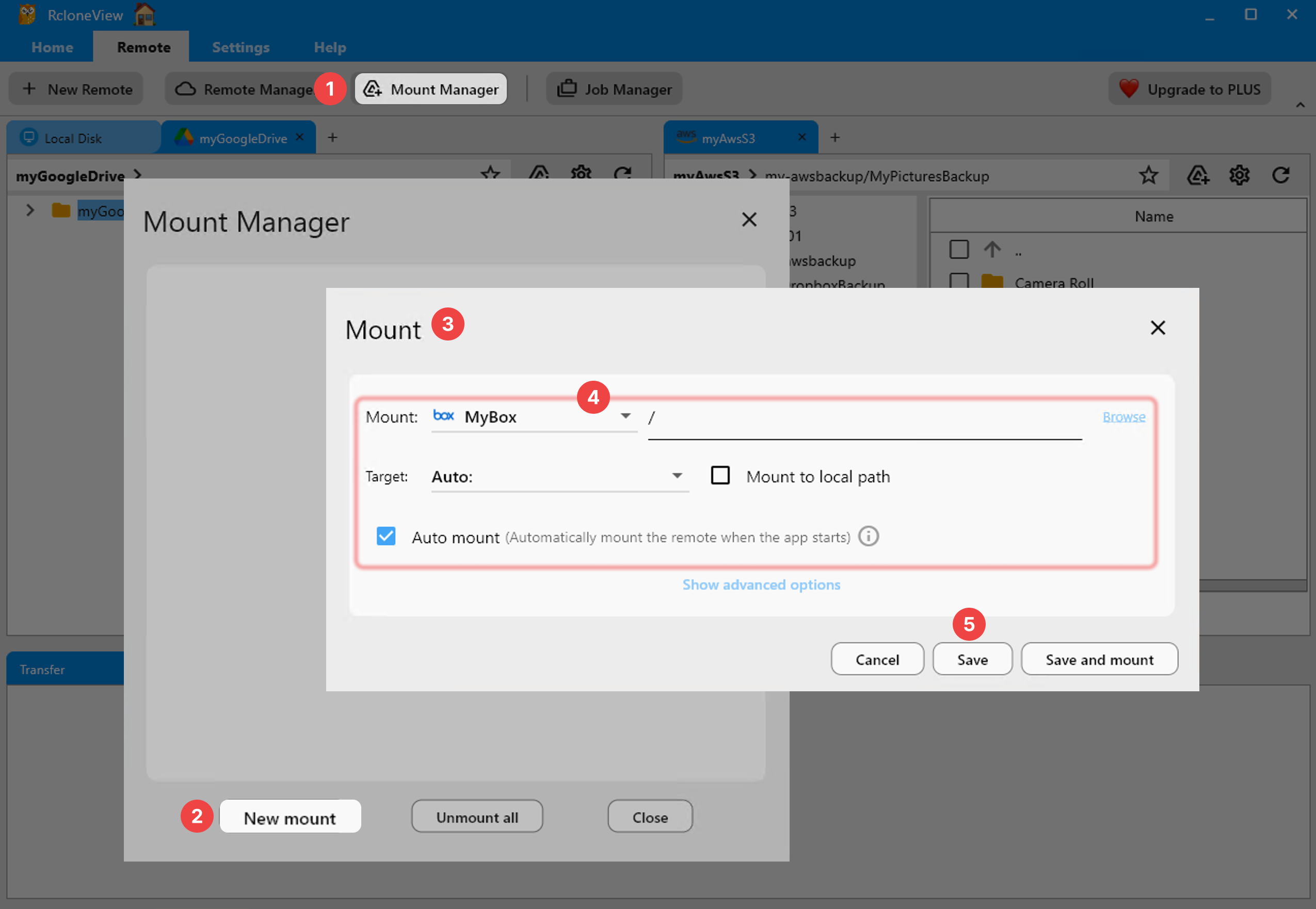
- Mount cloud storage as a local drive so ERP systems and document management applications can access cloud-stored supplier documents directly through the filesystem.
Multi-Site Replication and Disaster Recovery
Manufacturers with multiple facilities face a data availability challenge: if the ERP server or file server at one plant goes down, production may stop unless critical data (BOMs, work instructions, CAM files) is available elsewhere. Cloud storage provides the durable middle layer for multi-site replication.
A common RcloneView architecture for multi-site manufacturing:
- Each plant syncs critical data to a shared cloud bucket (AWS S3, Azure Blob, or an S3-compatible private cloud).
- Other plants pull from the same bucket on a scheduled or on-demand basis.
- Disaster recovery — if a plant loses its local file server, it can restore from the cloud copy using RcloneView's sync or copy operations.
RcloneView's real-time transfer monitoring lets IT staff track the progress of large replication jobs and verify completion before the next production shift begins.

Integration with Analytics Pipelines
The ultimate destination for much manufacturing IoT data is an analytics or machine learning pipeline. Data lands in S3 or Azure Blob and is then consumed by AWS Athena, Azure Data Lake Analytics, Databricks, or a custom pipeline. RcloneView's role in this architecture is ensuring that data arrives in the right bucket, in the right folder structure, on the right schedule.
Best practices for feeding analytics pipelines with RcloneView:
- Partition by date — configure sync jobs to write sensor data into date-partitioned folder structures (
s3://iot-data/2026/04/07/) that analytics engines can scan efficiently. - Separate raw and processed data — use different sync jobs to push raw sensor data to one bucket and processed/aggregated data to another.
- Lifecycle policies on the cloud side — configure S3 lifecycle rules or Azure Blob tiering to move older data to cheaper storage tiers automatically. RcloneView handles the initial upload; the cloud provider handles long-term cost optimization.
- Scheduled off-peak transfers — run large batch uploads during second or third shift when network bandwidth is available, using RcloneView's job scheduler.
Getting Started
- Identify your data sources — catalog the IoT gateways, machine vision servers, quality systems, and file servers that generate data needing cloud backup or sync.
- Choose your cloud storage targets — S3 for AWS analytics pipelines, Azure Blob for Microsoft-centric environments, or an S3-compatible provider like Wasabi or Backblaze B2 for cost-effective archival.
- Install RcloneView on the factory-floor server or edge gateway that has network access to both the data sources and the internet.
- Configure remotes for your cloud providers and set up sync jobs for each data source.
- Schedule automated transfers to run during off-peak hours or at defined intervals matching your data generation cadence.
- Monitor and verify — use RcloneView's transfer monitoring and folder comparison to ensure every file reaches its cloud destination.
Manufacturing data is too valuable and too regulated to manage with ad-hoc scripts and manual uploads. RcloneView gives factory IT teams a reliable, visual, and automatable tool for getting data from the production floor to the cloud — and keeping it there.
Related Guides:
Supported Cloud Providers





























