RcloneView vs rsync: Cloud Storage GUI vs Command-Line Sync
rsync is the gold standard for local and SSH file synchronization. RcloneView brings rsync-inspired concepts to 70+ cloud providers through a visual interface — built on rclone, which was designed as "rsync for cloud storage."
rsync has been a cornerstone of system administration since 1996. Its efficient delta-transfer algorithm, SSH transport, and Unix-philosophy design have made it the default tool for file synchronization across servers, backup systems, and deployment pipelines. But rsync was built for a world of local disks and SSH-accessible machines. It has no native concept of cloud storage APIs, OAuth tokens, or object storage.
rclone was created specifically to bring rsync's philosophy to the cloud, and RcloneView adds a graphical interface on top of rclone's engine. This comparison explores how these tools relate, where each excels, and when you might use one or both.

Manage & Sync All Clouds in One Place
RcloneView is a cross-platform GUI for rclone. Compare folders, transfer or sync files, and automate multi-cloud workflows with a clean, visual interface.
- One-click jobs: Copy · Sync · Compare
- Schedulers & history for reliable automation
- Works with Google Drive, OneDrive, Dropbox, S3, WebDAV, SFTP and more
Free core features. Plus automations available.
Feature Comparison
| Feature | RcloneView | rsync |
|---|---|---|
| Primary purpose | Multi-cloud file management (GUI) | Local/SSH file synchronization (CLI) |
| Cloud provider support | 70+ | None (SSH/local only) |
| Delta transfer (partial file updates) | No (full file transfers) | Yes (core feature) |
| Cloud-to-cloud transfers | Yes | No |
| GUI | Yes | No (CLI only; third-party GUIs exist) |
| Folder comparison | Yes (visual) | Yes (--dry-run with verbose output) |
| Mount cloud as local drive | Yes | No |
| File sync | Yes | Yes (primary feature) |
| Job scheduling | Yes (built-in) | Via cron/systemd |
| Bandwidth throttling | Yes | Yes (--bwlimit) |
| Checksum verification | Yes | Yes (--checksum) |
| Preserve permissions/ownership | No (cloud providers do not support Unix permissions) | Yes (-a archive mode) |
| SSH transport | Via SFTP remote | Native |
| Compression during transfer | Provider-dependent | Yes (-z flag) |
| Partial transfer resume | Yes | Yes (--partial) |
| Exclude/include filters | Yes | Yes (--exclude, --include, --filter) |
| Platforms | Windows, macOS, Linux | Linux, macOS, BSD (Windows via WSL/Cygwin) |
| Pricing | Free | Free (open source, GPL) |
The rsync Heritage
To understand RcloneView, it helps to understand the lineage. rsync introduced several concepts that shaped how we think about file synchronization:
- Delta transfers: rsync's rolling checksum algorithm identifies which parts of a file have changed and transfers only the differences. For large files with small modifications (log files, databases, virtual disk images), this dramatically reduces transfer time and bandwidth.
- Archive mode: The
-aflag preserves permissions, ownership, timestamps, symbolic links, and device files. This makes rsync suitable for system-level backups and migrations. - SSH transport: rsync natively tunnels over SSH, providing encrypted, authenticated transfers without additional configuration.
- Dry run: The
--dry-runflag shows what would happen without actually transferring anything — a pattern that rclone and RcloneView also adopt.
rclone was explicitly designed as "rsync for cloud storage." It adopted rsync's command-line conventions (sync, copy, move, check), filter syntax, and dry-run approach, then applied them to cloud storage APIs. RcloneView takes rclone's engine and wraps it in a GUI.
Where rsync Excels
rsync remains the superior tool for several specific scenarios:
Delta transfers: rsync's delta-transfer algorithm has no equivalent in the cloud world. When syncing a 10 GB database file where only 50 MB changed, rsync transfers just the deltas over SSH. rclone (and therefore RcloneView) must transfer the entire file because cloud storage APIs do not support partial uploads to existing objects. For large files with small changes, this difference is enormous.
Unix permission preservation: rsync faithfully copies Unix permissions, ownership, group information, symbolic links, hard links, device files, and extended attributes. This makes it essential for server migrations, system backups, and maintaining identical directory trees across machines. Cloud storage providers do not support Unix permission models, so neither rclone nor RcloneView can replicate this.
Mature SSH integration: rsync over SSH is seamless, well-understood, and battle-tested across millions of servers. Key-based authentication, jump hosts, non-standard ports, and SSH config file integration all work naturally.
Minimal dependencies: rsync is pre-installed on virtually every Linux distribution and macOS. It has no GUI dependencies, no runtime requirements, and runs on the smallest embedded systems. For scripted automation on servers, this minimalism is a feature.
Bandwidth optimization: Between rsync's delta transfers and its built-in compression (-z), it uses significantly less bandwidth than full-file transfer tools for many workloads.
Where RcloneView Excels
RcloneView addresses the areas where rsync cannot operate:
Cloud storage support: RcloneView connects to over 70 cloud providers through native APIs. Google Drive, OneDrive, Dropbox, Amazon S3, Azure Blob, Backblaze B2, Wasabi, Cloudflare R2, pCloud, Mega — all accessible through the same interface. rsync cannot interact with any cloud storage API.

Cloud-to-cloud transfers: Copy or sync files directly between two cloud providers. Migrate from Dropbox to Google Drive, replicate an S3 bucket to Backblaze B2, or sync OneDrive with pCloud — all without downloading files to your local machine. This server-side transfer capability has no rsync equivalent.

Visual interface: RcloneView provides a dual-pane file explorer, drag-and-drop operations, visual folder comparison, job management, and real-time transfer monitoring. rsync outputs text to a terminal. While third-party rsync GUIs exist (Grsync, LuckyBackup), they are wrappers with limited functionality compared to RcloneView's integrated approach.
Mounting: Mount any cloud storage as a local drive or mount point. This lets you access cloud files through your file manager, open them in applications, and interact with them as if they were local.
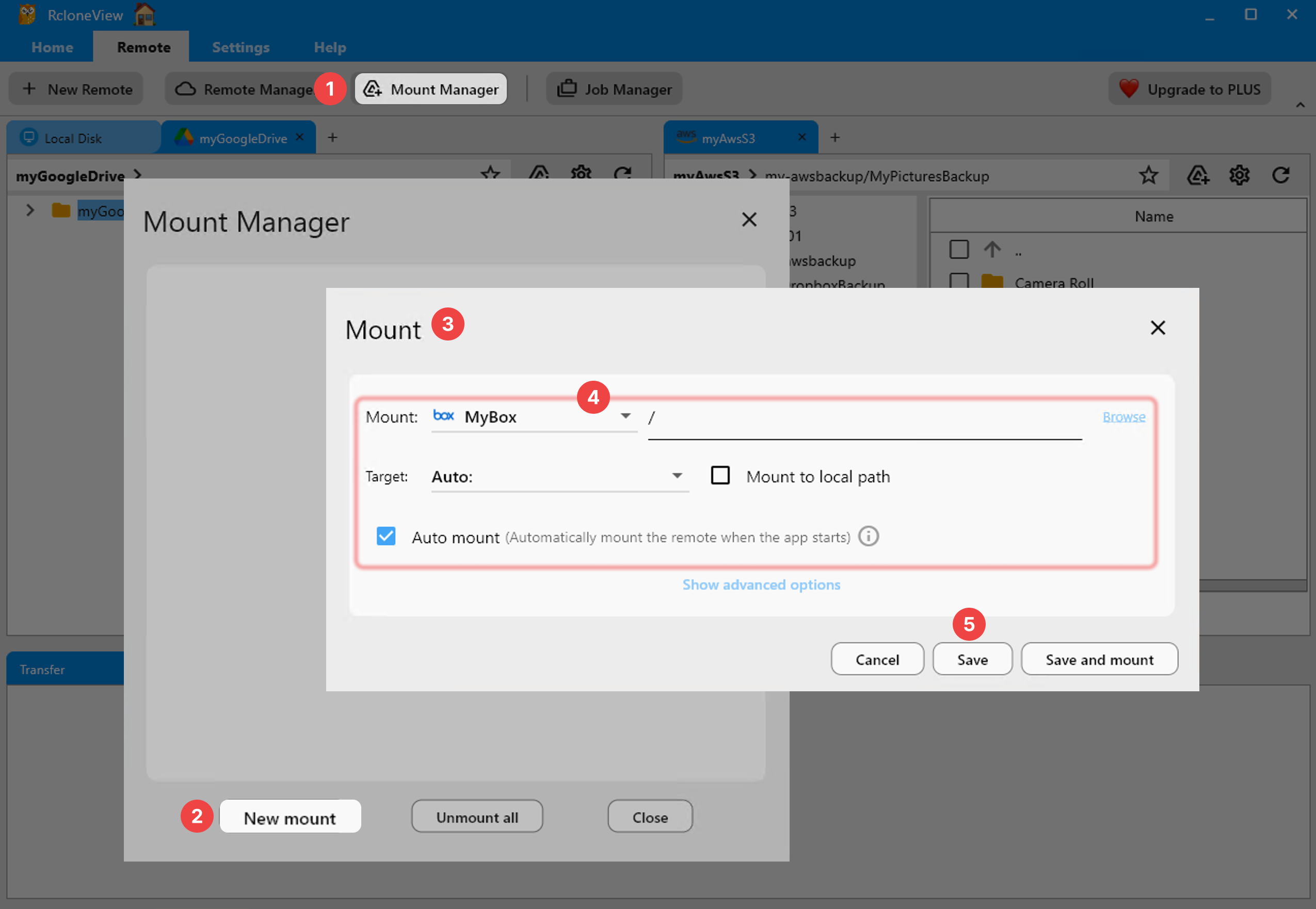
Built-in scheduling: Create and manage recurring jobs within the application. rsync relies on external scheduling through cron, systemd timers, or similar tools. RcloneView keeps everything in one place, with job history and execution tracking.

How rclone Extends rsync Concepts
rclone, the engine behind RcloneView, deliberately mirrors rsync's command structure:
| rsync command | rclone equivalent | Purpose |
|---|---|---|
rsync -av src/ dst/ | rclone sync src: dst: | Synchronize directories |
rsync -av --delete src/ dst/ | rclone sync src: dst: | Mirror with deletion |
rsync -av src/ dst/ (copy only) | rclone copy src: dst: | Copy without deleting extras |
rsync --dry-run | rclone --dry-run | Preview changes |
rsync --checksum | rclone check | Verify file integrity |
rsync --exclude '*.tmp' | rclone --exclude '*.tmp' | Filter patterns |
rsync --bwlimit=1000 | rclone --bwlimit 1M | Bandwidth limiting |
The naming and behavior are intentionally familiar. If you know rsync, rclone's concepts will feel natural. RcloneView surfaces all of these through its GUI.
The Delta Transfer Gap
The most significant technical difference between rsync and rclone/RcloneView is delta transfers. This deserves a closer look.
rsync computes rolling checksums of the destination file and sends them to the source. The source then identifies matching blocks and sends only the new or changed data. For a 1 GB file where 10 MB changed, rsync transfers approximately 10 MB.
Cloud storage APIs (S3, Google Drive, OneDrive, etc.) do not support this pattern. You cannot ask Google Drive to compute rolling checksums of an existing file or upload a binary patch. The entire file must be re-uploaded. rclone and RcloneView will detect that the file has changed (via checksum or timestamp comparison) and transfer the complete file.
For workloads dominated by large files with small changes (database files, virtual machines, log archives), rsync over SSH will always be more efficient. For workloads with many distinct files or files that change entirely between versions (documents, images, code releases), the difference is negligible.
Cross-Platform Considerations
rsync is native to Linux and macOS. On Windows, it is available through WSL (Windows Subsystem for Linux), Cygwin, or MSYS2 — but these are compatibility layers, not native ports. rsync on Windows often has issues with path formats, permissions, and symbolic links.
RcloneView runs natively on Windows, macOS, and Linux with the same interface and capabilities on each platform. If you work in a mixed environment, RcloneView provides a consistent experience everywhere.
When to Choose rsync
- You sync files between local disks or SSH-accessible servers.
- You need delta transfers for large files with small changes.
- You need to preserve Unix permissions, ownership, and special files.
- You work in scripted automation on Linux servers (cron jobs, deployment scripts, backup systems).
- You want a zero-dependency tool that is pre-installed on every Linux system.
- Your workflow does not involve cloud storage APIs.
When to Choose RcloneView
- You need to manage files in cloud storage — any of 70+ providers.
- You need cloud-to-cloud transfers without downloading files locally.
- You want a visual interface for file management, comparison, and monitoring.
- You need to mount cloud storage as a local drive.
- You want built-in job scheduling without configuring cron separately.
- You need consistent cross-platform support including native Windows operation.
- You manage a multi-cloud environment with data distributed across providers.
Using Both Together
rsync and RcloneView serve complementary roles in many environments. A practical setup might use:
- rsync for syncing local application data between servers over SSH, where delta transfers save significant bandwidth.
- RcloneView for managing cloud backups, performing cloud migrations, mounting cloud storage, and scheduling cloud sync jobs.
For example, rsync keeps your web server's content directory synchronized with a staging server, while RcloneView schedules nightly backups of that same content to Backblaze B2 and replicates it to Wasabi for redundancy.
Getting Started with RcloneView
- Download RcloneView from rcloneview.com.
- Add your cloud remotes — connect any of 70+ supported storage providers.
- Browse, transfer, sync, and mount cloud storage through an interface that will feel familiar to rsync users.
rsync remains indispensable for local and SSH file synchronization. When your workflow extends into the cloud, RcloneView — built on rclone, the spiritual successor to rsync — brings that same philosophy to 70+ cloud providers with a visual interface.
Related Guides:
Supported Cloud Providers





























