RcloneView vs Arq Backup: Multi-Cloud Management Compared
Arq Backup excels at versioned, deduplicated backups to cloud storage. RcloneView is a full multi-cloud file manager with sync, transfers, mounting, and scheduling across 70+ providers — for free.
Arq Backup and RcloneView both interact with cloud storage, but they solve different problems. Arq is a purpose-built backup application with versioning, deduplication, and retention policies. RcloneView is a multi-cloud file management platform built on rclone that handles sync, copy, move, mount, compare, and schedule operations across more than 70 cloud providers. Understanding where each tool excels helps you pick the right one — or decide to use both.

Manage & Sync All Clouds in One Place
RcloneView is a cross-platform GUI for rclone. Compare folders, transfer or sync files, and automate multi-cloud workflows with a clean, visual interface.
- One-click jobs: Copy · Sync · Compare
- Schedulers & history for reliable automation
- Works with Google Drive, OneDrive, Dropbox, S3, WebDAV, SFTP and more
Free core features. Plus automations available.
Feature Comparison
| Feature | RcloneView | Arq Backup |
|---|---|---|
| Primary purpose | Multi-cloud file management | Backup with versioning |
| Cloud providers supported | 70+ | ~10 (Amazon S3, Google Cloud, Dropbox, OneDrive, Google Drive, Backblaze B2, Wasabi, SFTP, MinIO, NAS) |
| Cloud-to-cloud transfers | Yes | No (local-to-cloud only) |
| File sync/copy/move | Yes | No (backup/restore only) |
| Mount cloud as local drive | Yes | No |
| Folder comparison | Yes | No |
| Job scheduling | Yes | Yes |
| Backup versioning | No (use rclone backup flag for basic versions) | Yes (full version history) |
| Deduplication | No | Yes (block-level) |
| Retention policies | No | Yes (configurable) |
| Encryption | Yes (rclone crypt) | Yes (AES-256) |
| Bandwidth throttling | Yes | Yes |
| Real-time transfer monitoring | Yes | Yes (progress display) |
| Platforms | Windows, macOS, Linux | Windows, macOS |
| Pricing | Free | $49.99 one-time (Arq 7) or Arq Premium $59.99/year (includes 1 TB storage) |
| Backend | rclone (open source) | Proprietary |
What Arq Backup Does Well
Arq is a mature backup application that has been available since 2009. Its core strengths are in the backup domain:
Versioning: Arq keeps multiple versions of every file. If you accidentally overwrite a document or need to restore a file from last week, Arq can retrieve any previous version within your retention window. This is true file-level versioning, not just a snapshot.
Deduplication: Arq breaks files into blocks and deduplicates them before upload. If you have multiple copies of the same file, or large files with only small changes between versions, Arq stores the unique blocks once. This significantly reduces storage consumption and upload time.
Retention policies: You can configure how long Arq keeps old versions — for example, hourly backups for 24 hours, daily for 30 days, weekly for a year. Arq automatically prunes old versions according to your rules.
Validation: Arq can verify the integrity of your backups by reading them back and checking against stored checksums. This catches silent corruption before you need to restore.
These are genuine backup-specific features that RcloneView does not replicate. If your primary need is versioned, deduplicated backup with retention management, Arq is purpose-built for that job.
What RcloneView Does Well
RcloneView is a fundamentally different tool. Rather than focusing on backup alone, it provides a complete cloud file management interface:
Multi-cloud file management: Browse, copy, move, and delete files across 70+ cloud providers through a visual two-pane explorer. Open Google Drive on one side and Wasabi on the other, then drag files between them.

Cloud-to-cloud transfers: Move data directly between cloud providers without downloading to your local machine first. This is critical for migrations, consolidation, and multi-cloud architectures.
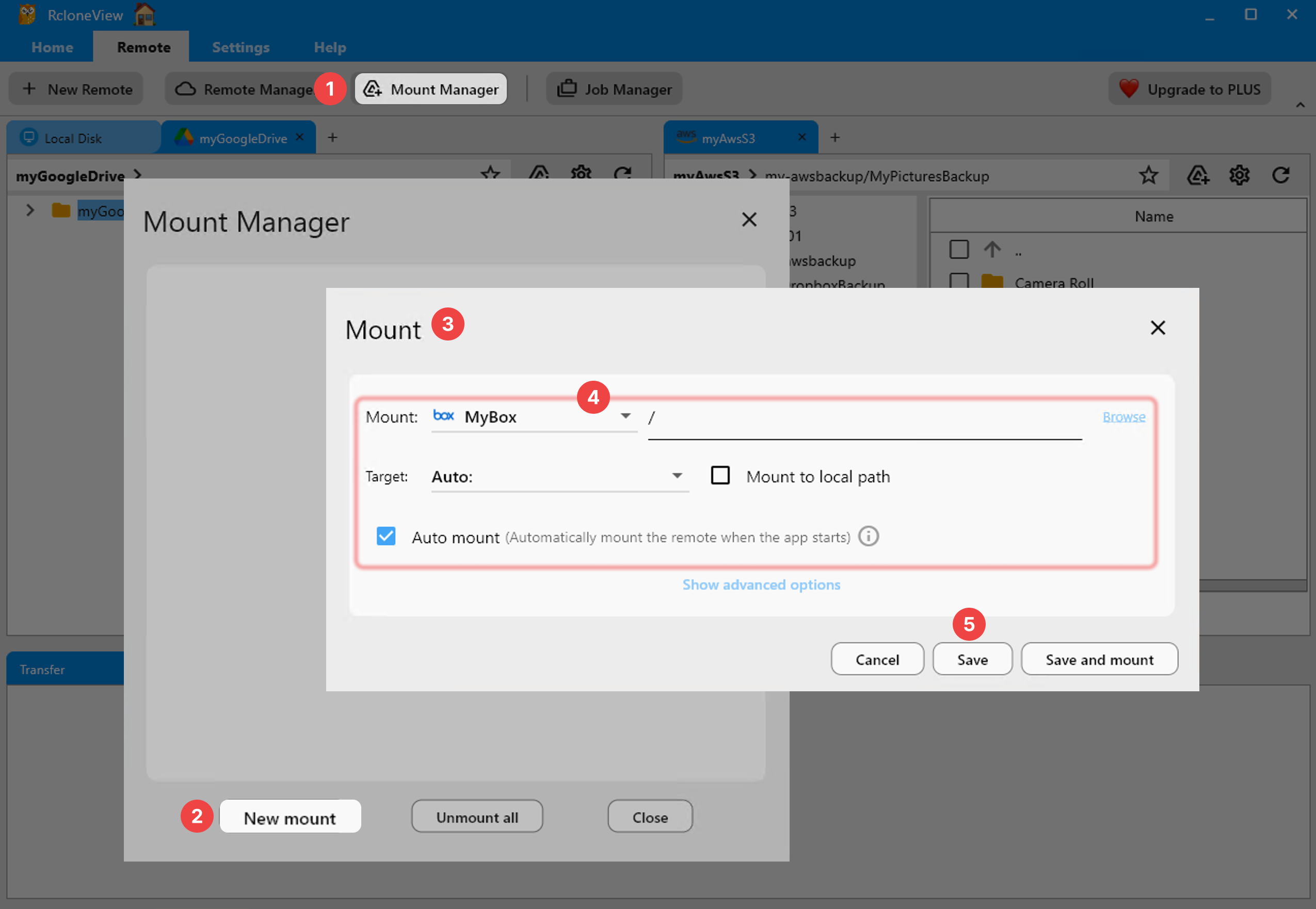
Mounting: Mount any supported cloud storage as a local drive. Access your S3 bucket, pCloud account, or Azure Blob container through your operating system's file manager.
Folder comparison: Compare the contents of two cloud locations to identify differences — new files, changed files, missing files. This is essential for verifying migrations and auditing sync jobs.
Job scheduling: Create recurring sync, copy, or move jobs with configurable schedules. RcloneView handles execution and maintains a history of past runs.

Supported Cloud Providers
Arq supports approximately 10 storage destinations: Amazon S3, Google Cloud Storage, Dropbox, OneDrive, Google Drive, Backblaze B2, Wasabi, SFTP, MinIO, and local/NAS storage. This covers the most popular options for personal and small-business backups.
RcloneView, through rclone, supports over 70 providers. In addition to everything Arq supports, RcloneView connects to Azure Blob Storage, Cloudflare R2, pCloud, Mega, Proton Drive, Jottacloud, Internet Archive, Hetzner Storage Box, OVH, Scaleway, and dozens more. If you use specialized or regional cloud providers, RcloneView is far more likely to support them.

Encryption Approaches
Arq encrypts all backup data with AES-256 before upload. Your encryption password is never sent to Arq's servers. The backup format is documented and open, so even without Arq, you could theoretically decrypt your data using the published specification.
RcloneView uses rclone's crypt remote for encryption. This provides XSalsa20 encryption for file contents and optional EME encryption for file names. Like Arq, the encryption is zero-knowledge — your key never leaves your machine. The advantage is that crypt remotes work with any rclone-compatible tool, so you are not locked into RcloneView for decryption.
Both tools provide strong encryption. Arq's encryption is tightly integrated with its backup format, while rclone's crypt is a standalone encryption layer you can apply to any storage provider.
Pricing and Licensing
Arq 7 is available as a one-time purchase for $49.99, which covers one computer. Arq Premium is a subscription at $59.99/year that includes the software plus 1 TB of Arq-managed cloud storage. There is no free tier beyond a trial period.
RcloneView is completely free with no feature restrictions, no device limits, and no subscription. It is built on rclone, which is open-source software. For teams or users with multiple machines, the cost difference adds up quickly.
Cross-Platform Support
Arq runs on Windows and macOS. There is no Linux version. If you manage Linux servers or workstations, Arq cannot back them up directly (though you could share storage via SFTP and back that up from a Windows or Mac machine).
RcloneView runs on Windows, macOS, and Linux. The same interface and capabilities are available across all three platforms.
Use Case: When to Choose Arq
Arq is the better choice when:
- Your primary need is versioned backup with the ability to restore files from any point in time.
- You want block-level deduplication to minimize storage costs for large, frequently-changing files.
- You need retention policies that automatically manage how long old versions are kept.
- You back up from a single machine to one or two cloud destinations.
- You are on macOS or Windows only.
Use Case: When to Choose RcloneView
RcloneView is the better choice when:
- You need to manage files across multiple cloud providers — browsing, copying, moving, comparing.
- You perform cloud-to-cloud transfers or migrations between providers.
- You want to mount cloud storage as a local drive.
- You need support for more than 10 cloud providers.
- You need Linux support.
- You want a free tool with no license fees or device limits.
- You need job scheduling for automated sync and copy operations across clouds.
Using Both Together
Arq and RcloneView are not mutually exclusive. A practical setup might use Arq for versioned backups of critical local files (documents, code, databases) to a cloud destination, while using RcloneView for cloud-to-cloud file management, migrations, and mounting remote storage. The tools do not conflict and can target the same cloud providers.
For example, you might back up your local project folder to Backblaze B2 using Arq (with versioning and deduplication), while using RcloneView to sync a shared media library from Google Drive to pCloud, mount an S3 bucket for ad-hoc access, and schedule weekly copies from OneDrive to Wasabi for archival storage.
Getting Started
- Download RcloneView from rcloneview.com.
- Add your cloud remotes — connect any of 70+ supported providers.
- Browse, transfer, sync, and mount your cloud storage through a visual interface.
If you need dedicated backup with versioning and deduplication, Arq is a capable tool. If you need broad multi-cloud management with sync, mounting, scheduling, and cloud-to-cloud transfers, RcloneView covers far more ground — for free.
Related Guides:
Supported Cloud Providers





























