How to Migrate from Dropbox to Wasabi Hot Cloud Storage with RcloneView
Dropbox is convenient but expensive at scale. Wasabi Hot Cloud Storage offers S3-compatible object storage at a fraction of the cost — and RcloneView makes the migration painless.
Dropbox has long been a go-to for file sharing and collaboration. But as storage needs grow — especially for media companies, creative agencies, and data-heavy teams — the per-user pricing model becomes difficult to justify. Wasabi offers hot cloud storage with no egress fees, no API request fees, and predictable per-terabyte pricing that can cut storage costs by 80% or more compared to Dropbox Business.
The migration itself is the hard part. Moving hundreds of gigabytes (or terabytes) between clouds requires a reliable tool that can handle interruptions, verify integrity, and let you monitor progress. RcloneView provides exactly that — a visual, two-pane interface for cloud-to-cloud transfers powered by rclone's battle-tested engine.

Manage & Sync All Clouds in One Place
RcloneView is a cross-platform GUI for rclone. Compare folders, transfer or sync files, and automate multi-cloud workflows with a clean, visual interface.
- One-click jobs: Copy · Sync · Compare
- Schedulers & history for reliable automation
- Works with Google Drive, OneDrive, Dropbox, S3, WebDAV, SFTP and more
Free core features. Plus automations available.
Why Migrate from Dropbox to Wasabi
The motivations usually come down to cost and control:
- Cost savings: Wasabi charges roughly $6.99/TB per month with no egress or API fees. Dropbox Business plans charge per user regardless of actual storage used.
- S3 compatibility: Wasabi speaks the S3 API, so your data is accessible from any S3-compatible tool, SDK, or application — no vendor lock-in.
- No egress fees: Download your data any time without surprise bandwidth charges.
- Hot storage by default: Every object in Wasabi is immediately accessible. No retrieval delays, no storage class tiers to manage.
- Scalability: Wasabi handles petabytes without changing your workflow or pricing model.
Step 1: Set Up Both Remotes in RcloneView
Start by connecting both clouds:
- Open RcloneView and click + New Remote.
- Add Dropbox: Select Dropbox, complete the OAuth login, and name it (e.g.,
MyDropbox). - Add Wasabi: Select S3-compatible storage, choose Wasabi as the provider, enter your Access Key, Secret Key, and region endpoint (e.g.,
s3.wasabisys.com). Name it (e.g.,MyWasabi). - Verify both remotes appear in the Explorer.

Step 2: Plan Your Migration
Before moving anything, map out your folder structure:
- Decide what to migrate: Everything, or just specific folders? Use RcloneView's filters to exclude temporary files, shared shortcuts, or old project archives.
- Create your Wasabi bucket: If you have not already, create a bucket in the Wasabi console or through RcloneView's Explorer.
- Map folder paths: Dropbox uses a flat root; Wasabi uses buckets and prefixes. Decide if you want
MyWasabi:my-bucket/Dropbox/or a flatter structure.
Step 3: Run the Migration
Open Dropbox on one side of the Explorer and Wasabi on the other. You have several options:
Drag and Drop for Small Batches
Select folders in Dropbox and drag them to the Wasabi pane. This works well for testing with a small subset before committing to a full migration.
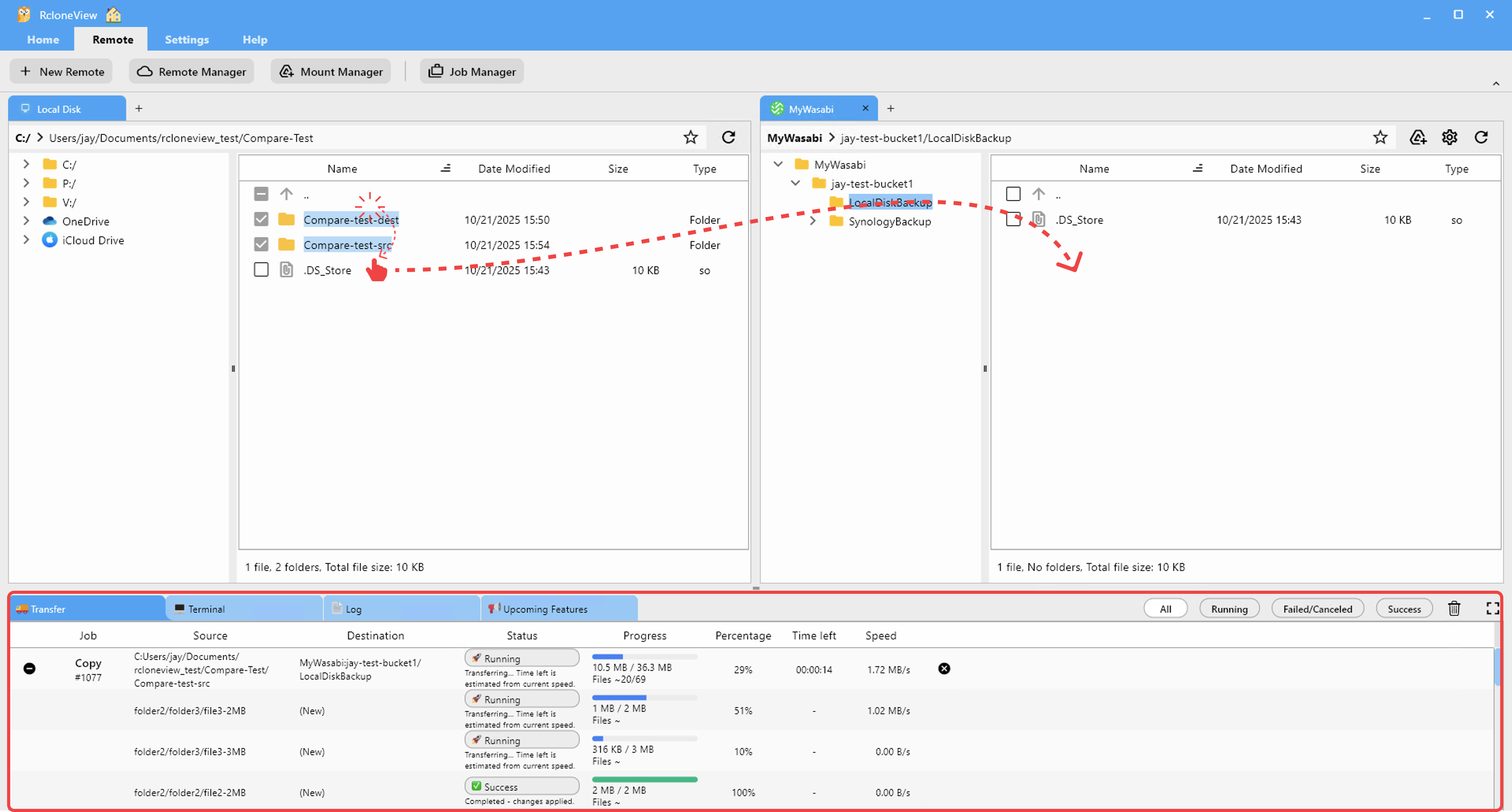
Copy Job for Full Migration
For large migrations, create a Copy job. This gives you Dry Run capability, progress monitoring, and the ability to resume if interrupted.
- Select the source folder in Dropbox and the destination in Wasabi.
- Choose Copy as the operation.
- Run a Dry Run first to see what will be transferred.
- Execute the job and monitor progress in real time.

Step 4: Verify with Compare
After the migration completes, use RcloneView's Compare feature to verify integrity:
- Open Dropbox and Wasabi side by side.
- Run a folder comparison on the migrated directories.
- Review the results — any files marked as different or missing need attention.
This step is critical for large migrations where network timeouts or API rate limits may have caused individual files to fail.

Step 5: Handle Large Datasets
If you are migrating terabytes of data, keep these tips in mind:
- Dropbox API rate limits: Dropbox throttles API requests. RcloneView and rclone handle retries automatically, but very large migrations may take days. Be patient.
- Run during off-hours: Start large transfers overnight or on weekends to minimize impact on your team's Dropbox usage.
- Use incremental runs: If the first run is interrupted, simply re-run the same Copy job. Rclone skips files that already exist and match on the destination.
- Check Wasabi minimum storage duration: Wasabi has a 90-day minimum storage duration policy. Plan accordingly if you are testing before committing.
Step 6: Schedule Ongoing Sync (Optional)
If you need a transition period where both Dropbox and Wasabi stay in sync:
- Create a Sync job from Dropbox to Wasabi.
- Schedule it to run daily or weekly in the Job Scheduling panel.
- Once your team has fully transitioned to Wasabi, disable the schedule and decommission Dropbox.

Getting Started
- Download RcloneView from rcloneview.com.
- Connect Dropbox and Wasabi in the New Remote wizard.
- Copy, verify, and schedule — migrate at your own pace with full visibility.
Moving off Dropbox does not have to be a weekend project. RcloneView makes it a managed, repeatable process.
Related Guides:
- Migrate Dropbox to Google Drive with RcloneView
- Wasabi vs Backblaze B2 vs IDrive e2 Comparison
- Migrate Dropbox to Azure Blob Storage with RcloneView
Supported Cloud Providers





























